175
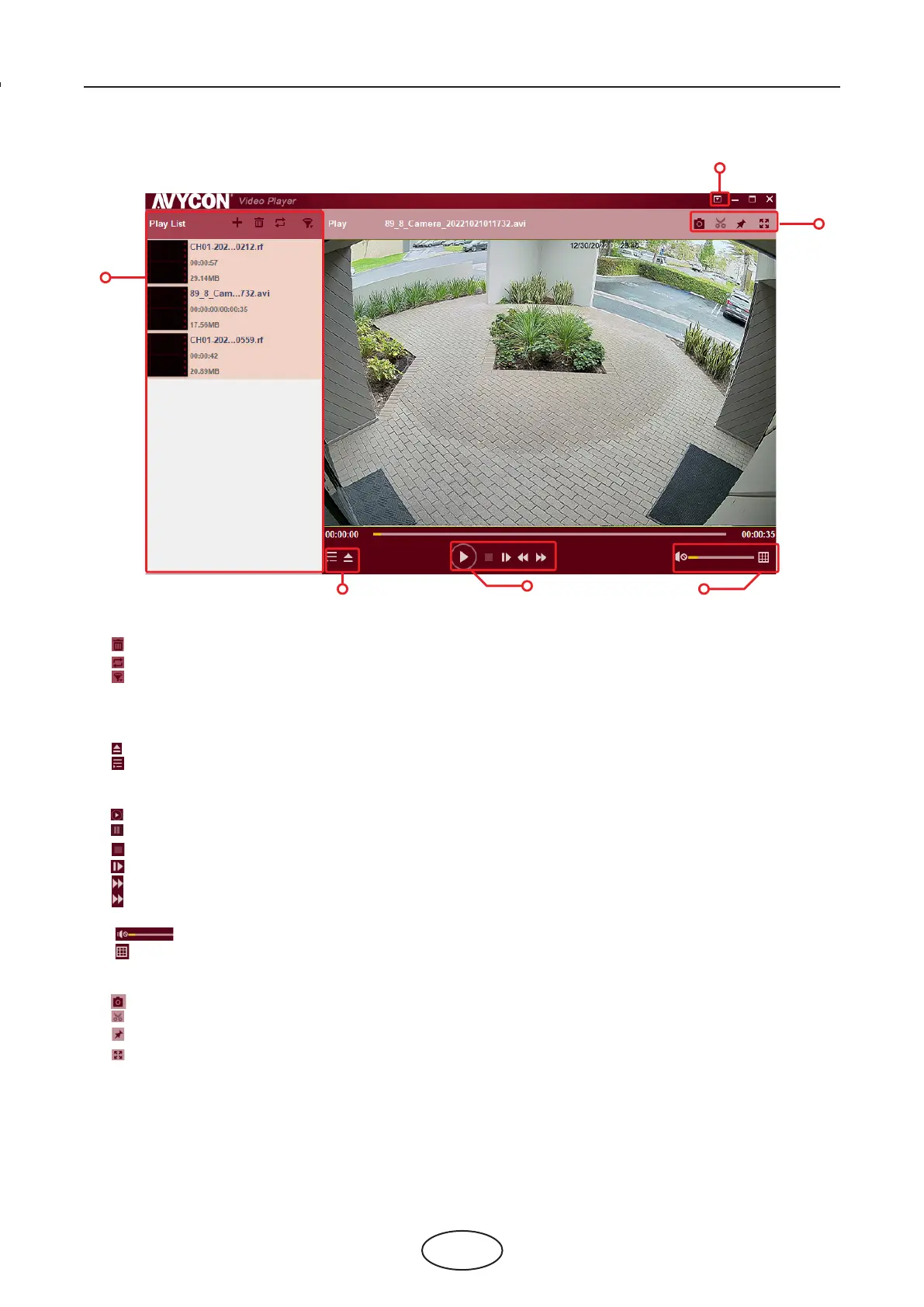
Video Player Control
8 Viewing Backed Up Video on PC/MAC
1. Play List
Add les
Remove les
To choose play mode: play a single le and stop; play all listed les by sequence; repeat one le;
repeat all les.
Filter by le name
2. Hide/Show Play List
Click to open les or load a folder.
3. Play Controls
Play
Pause
Stop
Play frame by frame. Click once to play a frame of the video.
Slow Play, 1/2, 1/4, 1/8, 1/16 speed
Fast Forward, x2, x4, x8, and x16
4. Volume control
Multi-screen play. It allows multiple videos to play at a time. When you choose multi-screen,
you can drag the video in Play List to the play screen.
5. Take snapshot
To save a video clip to your computer. Press once to start, press again to end the video clip.
Keep the video player on top.
Enlarge the video play screen to full screen.
1
2
3
4
5
6



 To Next Page