139
5 NVR System Setup5 NVR System Setup
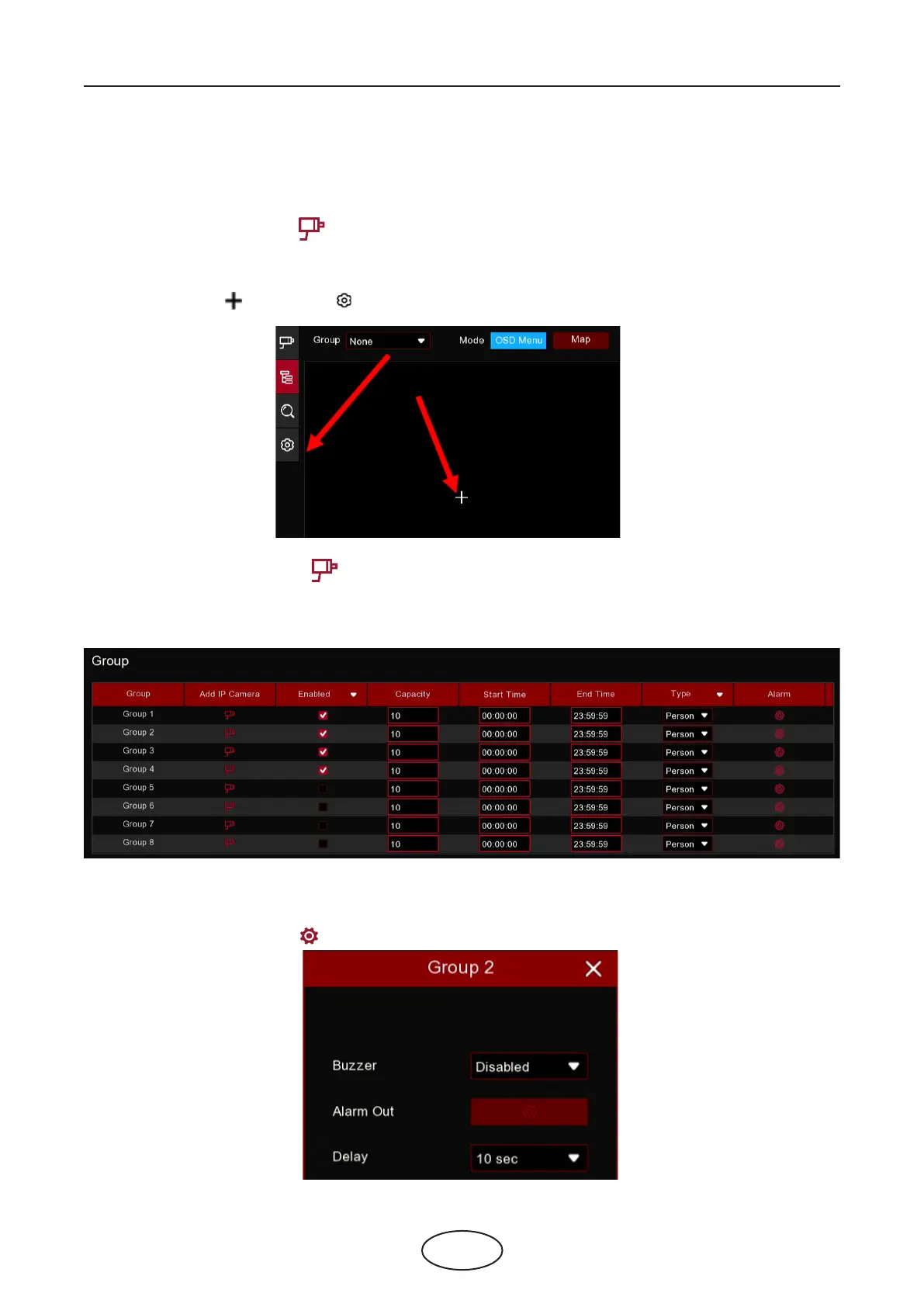
Buzzer: Set the buzzer duration in seconds when the Available number is 0.
Alarm Out: If your NVR support to connect to external alarm device, you can set to emit an alarm tone.
Delay: To congure the external alarm time when the Available number is 0.
Right click your mouse to exit the alarm setup page, and then click Save button to save the settings.
7. Click the Camera View icon to view the live images & counting data of all activated channels.
5.8.1.2 Group View Setup
1. Click the add icon or setup icon to get to the conguration page.
2. Click the Add IP Camera icon to add channel(s) to the group. Max. 8 groups can be set, but each
one channel can be added to 1 group only. If a channel is enabled in the Channel View mode, it will be not
allowed to add to any group.
3. Check the Enable box to activate the group.
4. Set the Capacity number, Start Time, End Time of each group.
5. Choose the detection target Type from Person, Vehicle and Motion.
6. Click one of the Alarm icons to congure the alarm actions when the Available number is 0.



 To Next Page