62
5.4.1.12 SD (Sound Detection)
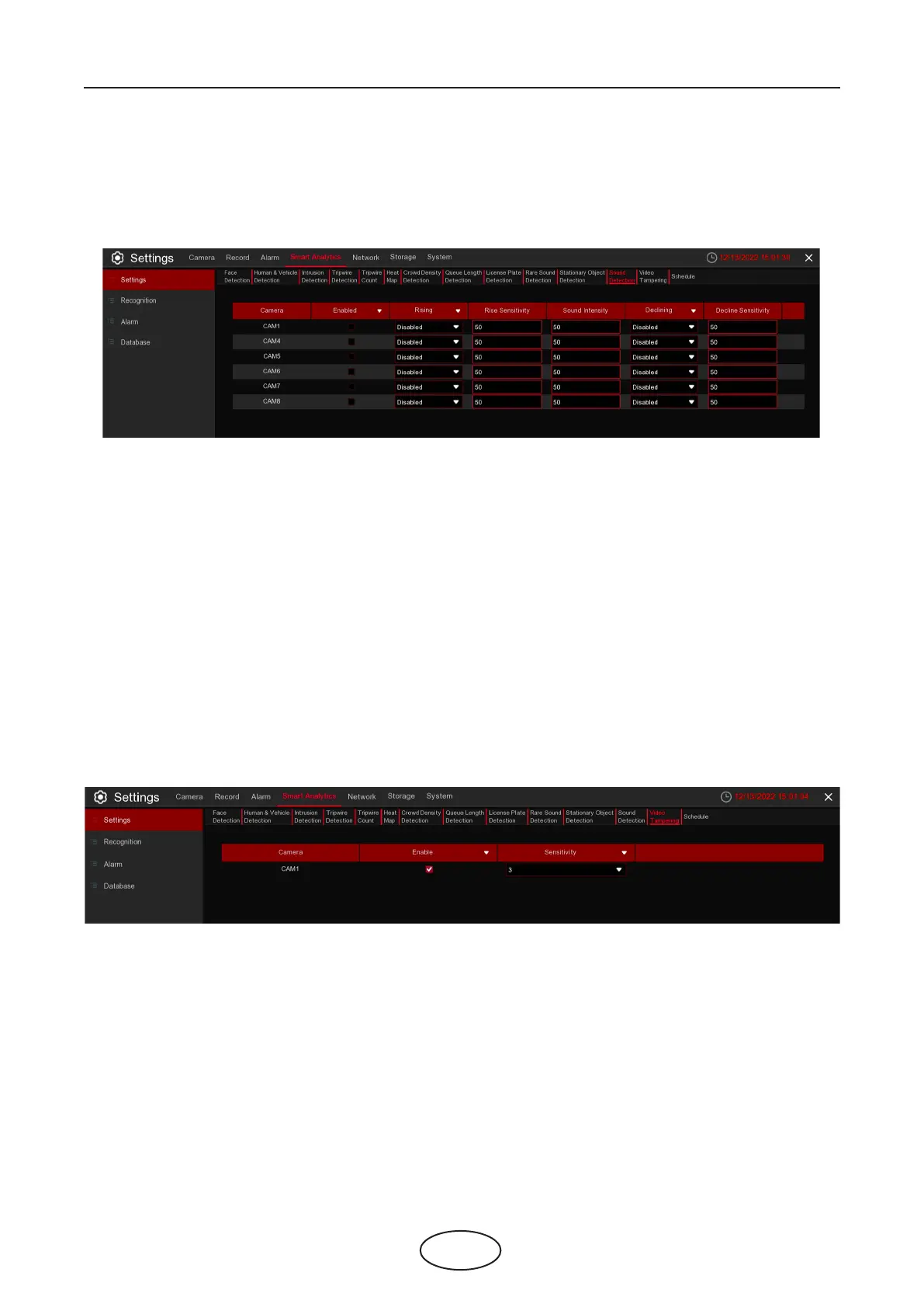
With the Sound Detection, it can trigger an alarm while detecting the sound rise or decline, and some cer-
tain actions can be taken when the alarm is triggered.
Enable: Enable or disable the SD function.
Rising: Enable or disable sound rise detection.
Rising Sensitivity: Set the sensitivity level. Level 1 is the lowest sensitivity level while level 100 is the highest
sensitivity level.
Sound Intensity: Set a threshold of sound intensity. Lowering this value will result in more sensitivity
Decline: Enable or disable sound decline detection
Decline Sensitivity: Set the sensitivity level. Level 1 is the lowest sensitivity level while level 100 is the highest
sensitivity level.
For Alarm setup, please refer to 5.1.9.1.1 Alarm Setup
5.4.1.13 VD (Video Tampering Detection)
Video Tampering detects the occlusion of the live view screen, and some certain actions can be taken
when the alarm is triggered.
Enable: Enable or disable the VD function.
Sensitivity: The sensitivity level is from 1 to 6, with a default value of 3. Higher sensitivity will be easier to
trigger the detection.
For Alarm setup, please refer to 5.1.9.1.1 Alarm Setup
5 NVR System Setup



 To Next Page