115
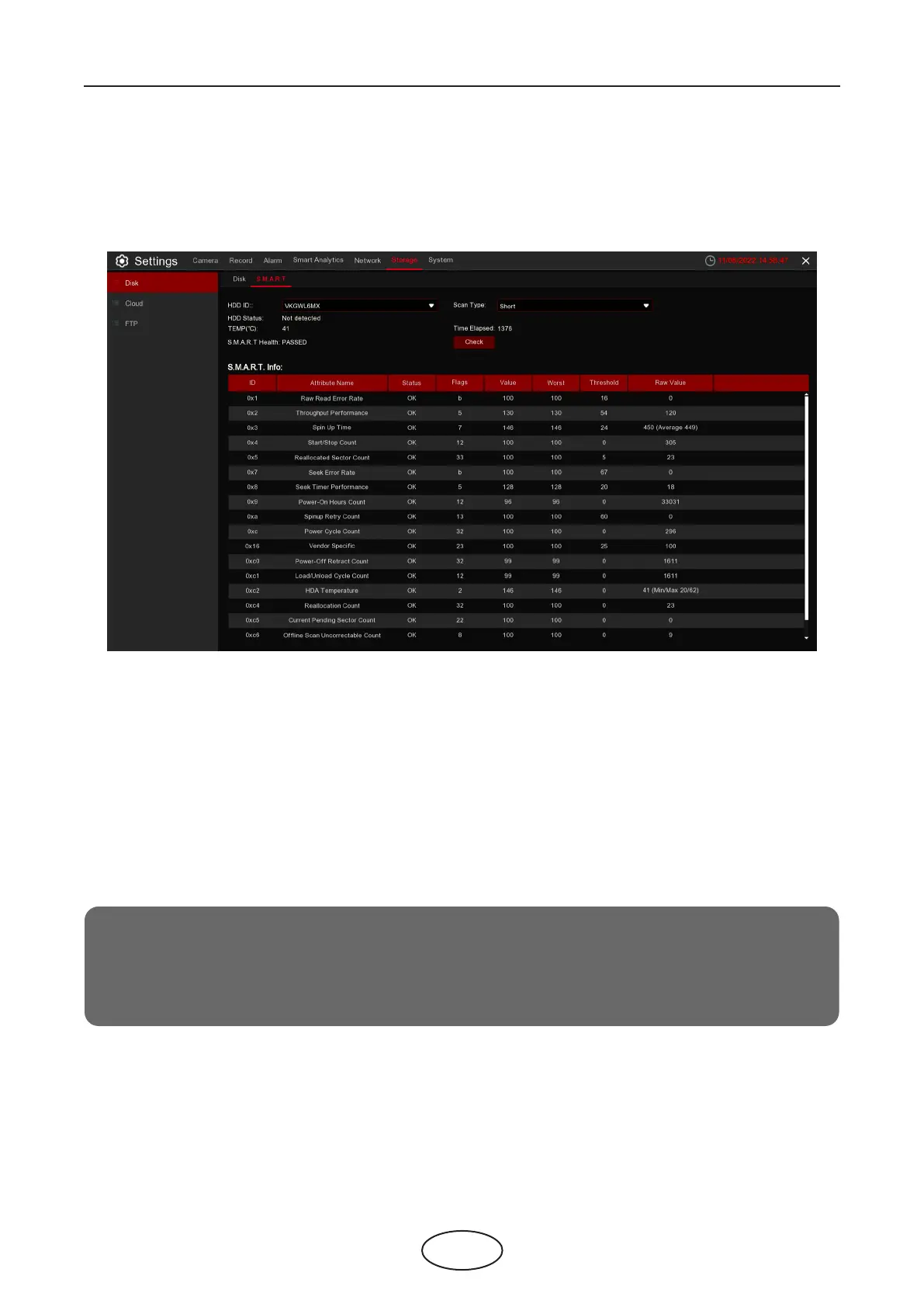
5.5.1.2 S.M.A.R.T
This function can be used to display technical information on the hard drive installed on your NVR. You can
also perform a test (there are three types available) to evaluate and detect potential drive errors.
5 NVR System Setup
Whole Evaluation not passed, continue to use the disk: If for some reason the hard drive has developed
a fault (such as one or more bad sectors), you can instruct your NVR to continue saving to the drive.
Self-check Type: There are three types available:
Short: This test veries major components of the hard drive such as read/write heads, electronics,
and internal memory.
Long: This is a longer test that veries the above as well as performing a surface scan to reveal
problematic areas (if any) and forces bad sector relocation.
Conveyance: This is a quick test that veries if the mechanical parts of the hard drive are working..
Note:
When peforming a test, your NVR will continue to work as normal. If an HDD S.M.A.R.T error is found,
the HDD can still be used, but there will be a risk of losing recording data. It is recommended to
replace it with a new HDD.
5.6.1.2 S.M.A.R.T
This function can be used to display technical information on the hard drive installed on your NVR. You can
also perform a test (there are three types available) to evaluate and detect potential drive errors.



 To Next Page