29
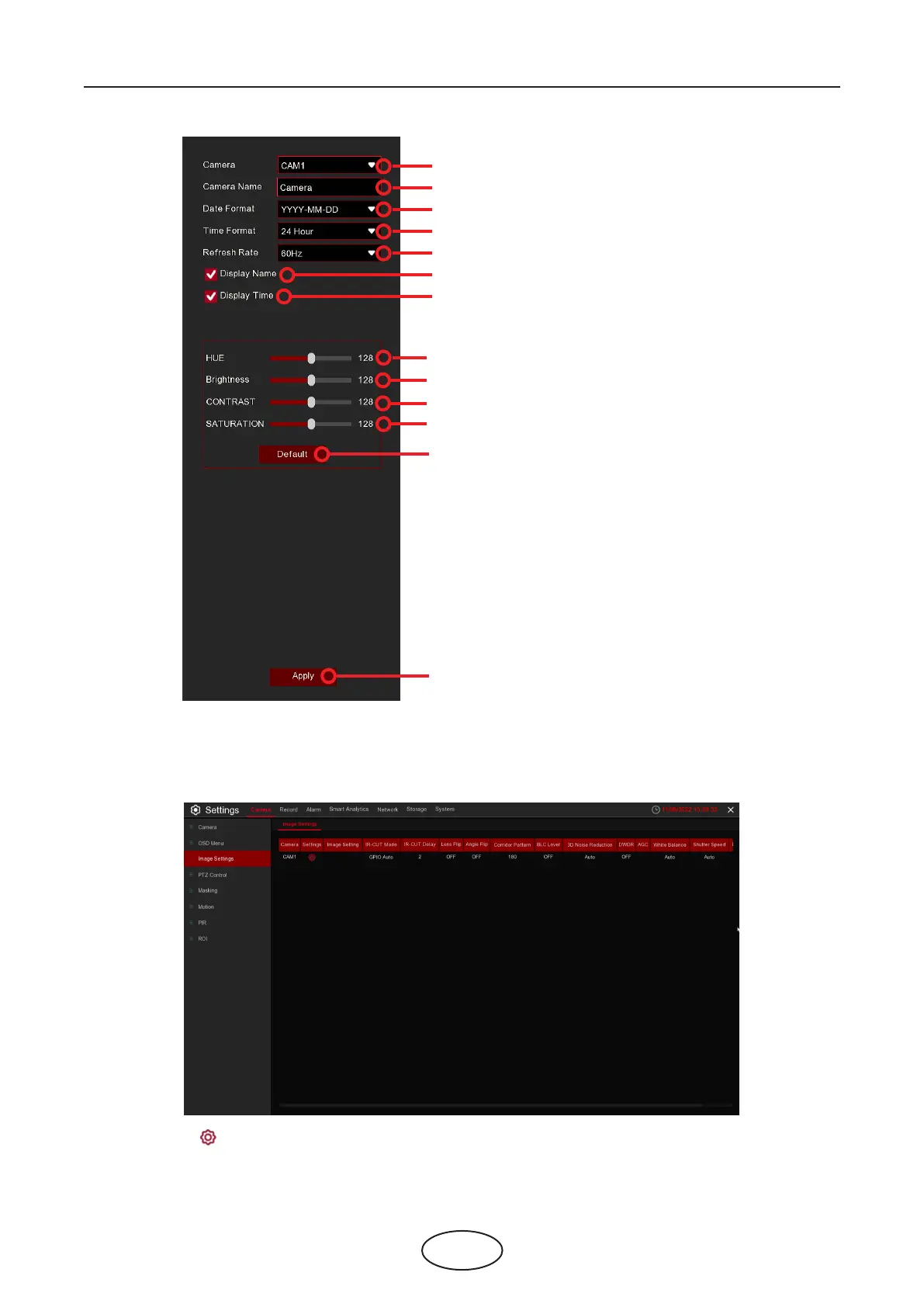
Choose a camera to congure.
Give a name to the camera.
Date format to display for the camera (for IP cameras only).
Time format to display for the camera (for IP cameras only).
Choose a refresh rate (XHz, XHz, XHz, 60Hz) for analog cameras.
To show the camera name in live view screen.
To show the system time in live view screen.
Adjust the Hue value for the image color.
Adjust the Brightness value for the image color.
Adjust the Contrast value for the image color.
Adjust the Saturation value for the image color.
Click Default to load the default color settings.
Click Apply to save these settings,
click the right button of your mouse to exit.
5.1.3 Image Control
This menu allows you to control image settings for supported IP cameras. It may not support IP cameras
connected with ONVIF protocol.
Setup: Click the icon into the setup page.
5 NVR System Setup



 To Next Page