61
5 NVR System Setup
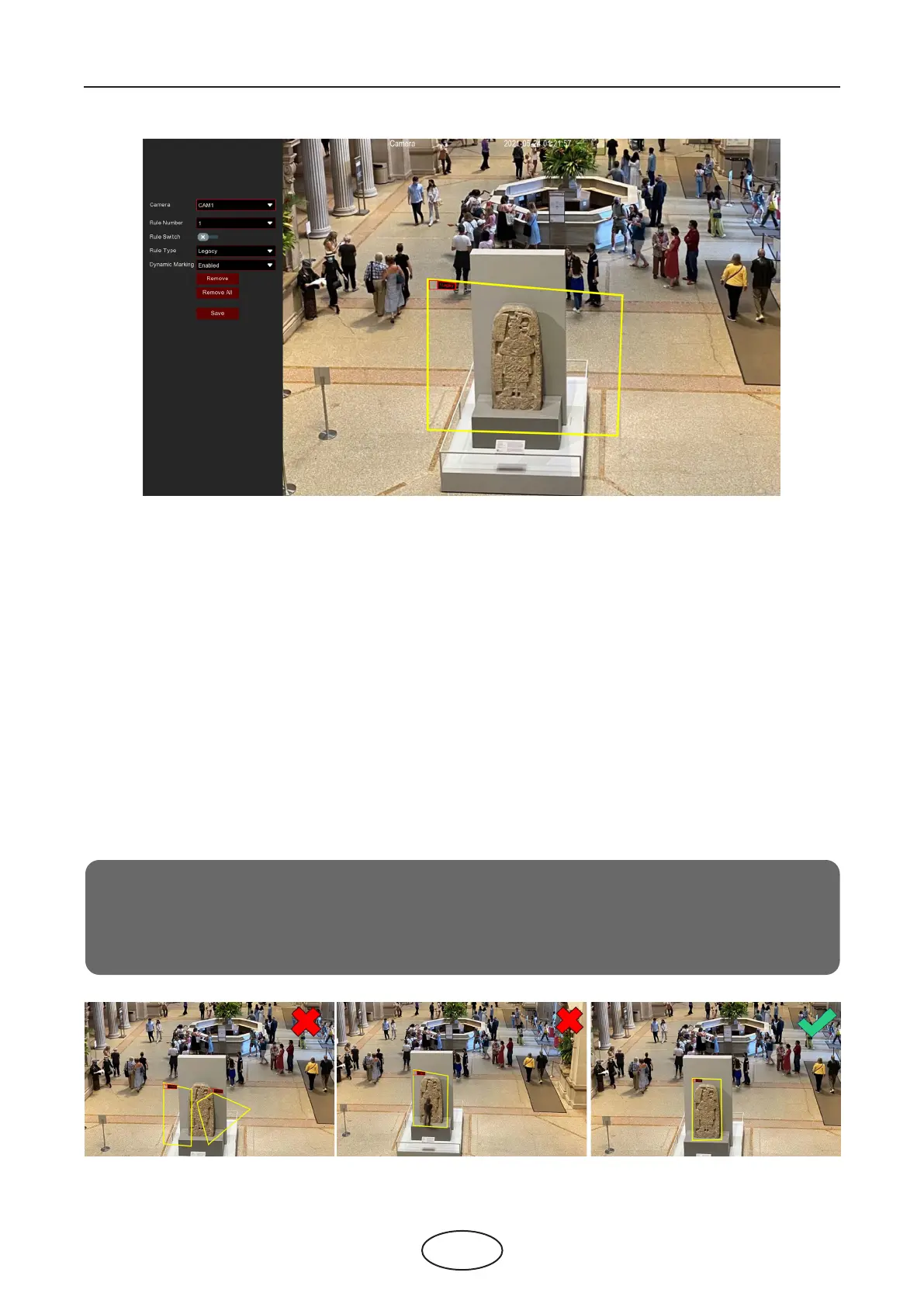
Notice:
1.
The area for detection must be greater than or equal to the size of the detected object, such
as the detection of the light stand.
2.
The detected object cannot be covered.
Camera: Select the camera you want to congure.
Rule Number: Max. 4 rules available.
Rule Switch: Activate or deactivate the rule.
1. Choose one of the Rule Numbers. It is the number of SOD areas. You can set a maximum of 4 areas for
the SOD function.
2. To enable the detection in Rule Switch.
3. Choose a Rule Type.
Legacy: NVR will only detect the left-over objects;
Lost: NVR will only detect the lost objects;
Legacy & Lost: NVR will detect both left-over & lost objects.
4. Use your mouse to click 4 points in the camera picture to draw a virtual region. The sharp of the region
should be a convex polygon. Concave polygons will not save.
5. Click Save to save your settings.
6. If you want to adjust the size of the region, click the red box in the region, the borders of the region will
be change to a red color. Long press the left button of your mouse to move the whole region, or drag
the corners to resize the region.
7. If you want to remove one of the regions from the camera picture, click the red box in the region and
then click the Remove button. Clicking Remove All will delete all regions.



 To Next Page