APOLLO 3 INTELLIGENT CONTROL SYSTEM USER MANUAL
1
Quick Start Guide
This section will guide your drive configuration for a basic Baker Hughes ESP installation. Please see Section 4:
Basic Setup Sequence, page 85.
1.1
Log on to Access Drive Configuration
If another screen is displayed, press “Home” to display the Home Screen.
1.
Starting at the home screen press “Settings”.
2.
From the Settings screen press “Login”.
3.
Login as Level 2, the default password is 9. Advanced users may want to log in at Level 3, the default
password is 8.
4.
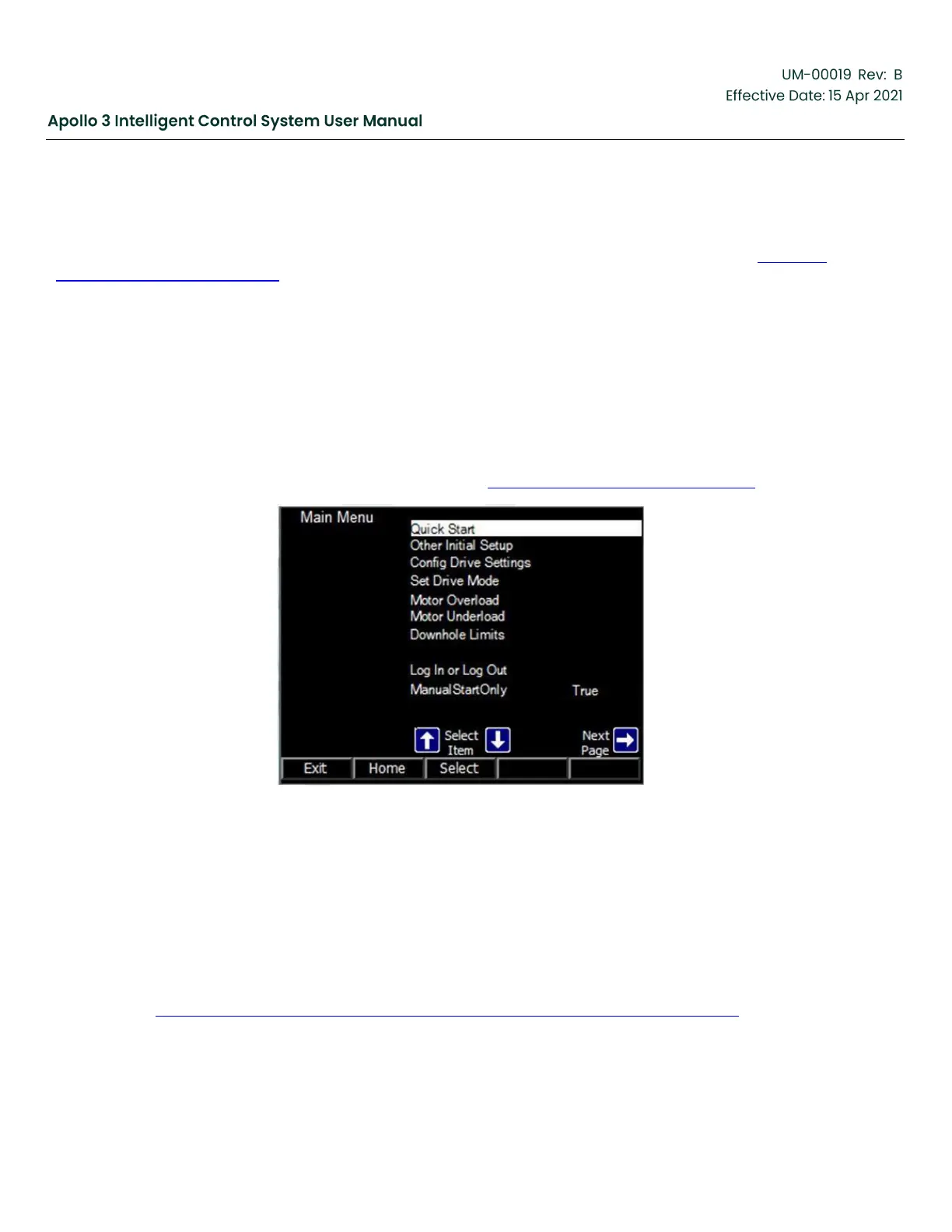
Press “OK” and the Main Menu is displayed (see Figure 1: Main Menu Display , page 14.)
Figure 1: Main Menu Display
1.2
Quick Start
Highlight Quick Start on the Main Menu and press the “Select” function button, the first Quick Start setting is
displayed.
Use the Settings button (F3) to navigate through the list of Quick Start settings.
Change the settings as appropriate for the pumping application.
Use Table 1: Quick Start Parameters for Vector Plus and Vector VII Applications, page 15 to navigate the
quick start parameters.


 To Next Page