EasyManua.ls Logo

Baker Hughes Apollo 3 - 3.6 User Interface Conventions; 3.6.1 LEDs

Default Icon
277 pages
Print Icon
To Next Page IconTo Next Page
To Previous Page IconTo Previous Page
Loading...
Copyright 2020 Baker Hughes Company. All rights reserved.
Page 61 of 277
3.6
User Interface Conventions
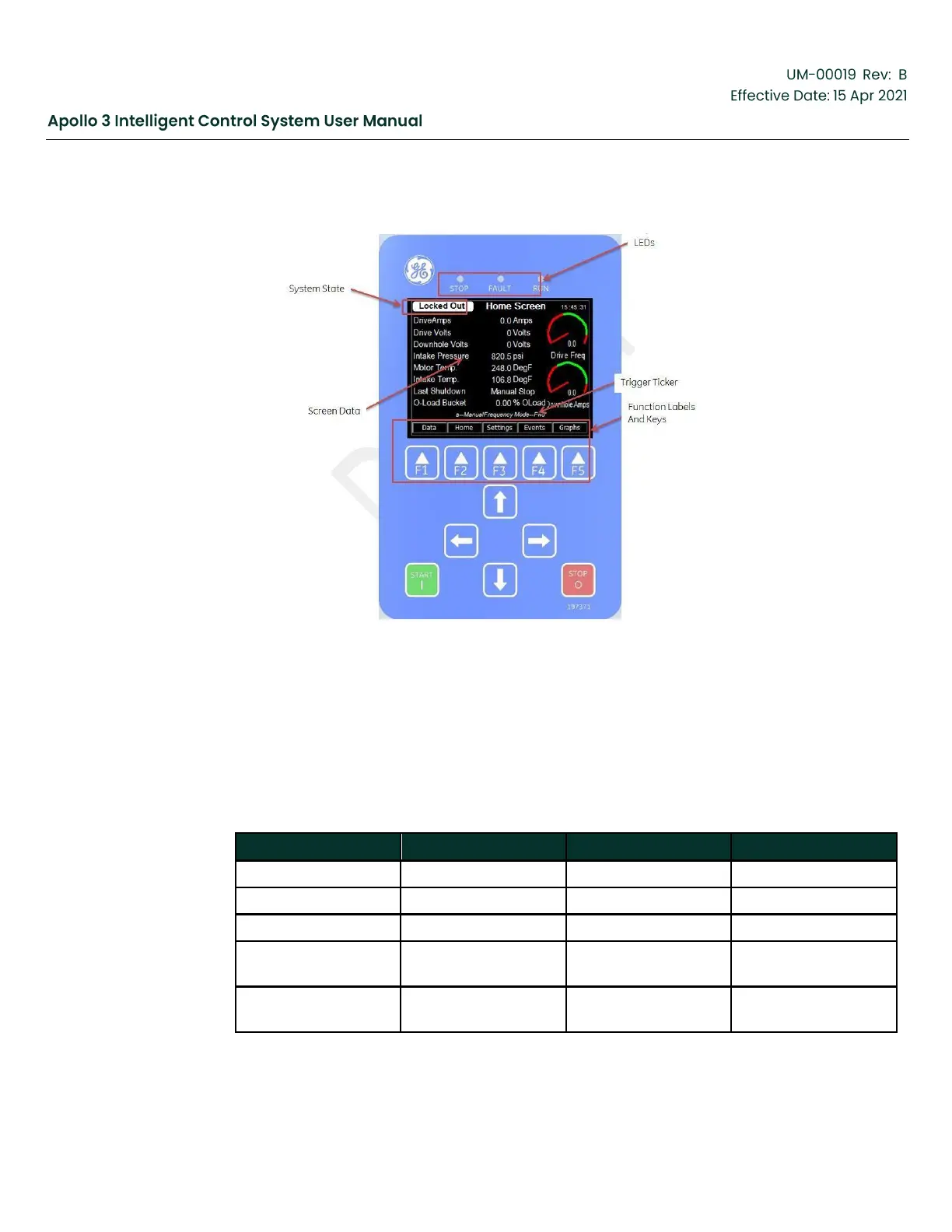
Figure 34: Apollo User Interface
3.6.1
LEDs
Three high intensity LEDs are located just above the LCD screen. These can be used “at a
glance” to determine the operating state of the Apollo system. The table below relates the
LED status to the drive state.
Table 18: LED Status
Drive State
Stop (Red)
Fault (Amber)
Run (Green)
Locked Out
On
Off
Off
Fault
On
On
Off
Ready
On
Off
Off
Restart (More than
1 minute)
On
Flash
Off
Restart (Less than
1 minute)
Flash
Flash
Off

Table of Contents