15-29
Catalyst 6500 Series Switch Software Configuration Guide—Release 8.7
OL-8978-04
Chapter 15 Configuring Access Control
Using VACLs in Your Network
To deny access to a server on another VLAN, perform this task in privileged mode:
Figure 15-7 Denying Access to a Server on Another VLAN
Restricting ARP Traffic
Note This feature is available only with Supervisor Engine 2 with PFC2, Supervisor Engine 720 with
PFC3A/PFC3B/PFC3BXL, and Supervisor Engine 32 with PFC3B/PFC3BXL.
Task Command
Step 1
Deny traffic from hosts in subnet
10.1.2.0/8.
set security acl ip SERVER deny ip 10.1.2.0 0.0.0.255 host
10.1.1.100
Step 2
Deny traffic from host 10.1.1.4. set security acl ip SERVER deny ip host 10.1.1.4 host
10.1.1.100
Step 3
Deny traffic from host 10.1.1.8. set security acl ip SERVER deny ip host 10.1.1.8 host
10.1.1.100
Step 4
Permit the other IP traffic. set security acl ip SERVER permit ip any any
Step 5
Commit the VACL. commit security acl SERVER
Step 6
Map the VACL to VLAN 10. set security acl map SERVER 10
C
o
S
0
a
n
d
1
C
o
S
2
a
n
d
3
C
o
S
4
a
n
d
5
C
o
S
6
a
n
d
7
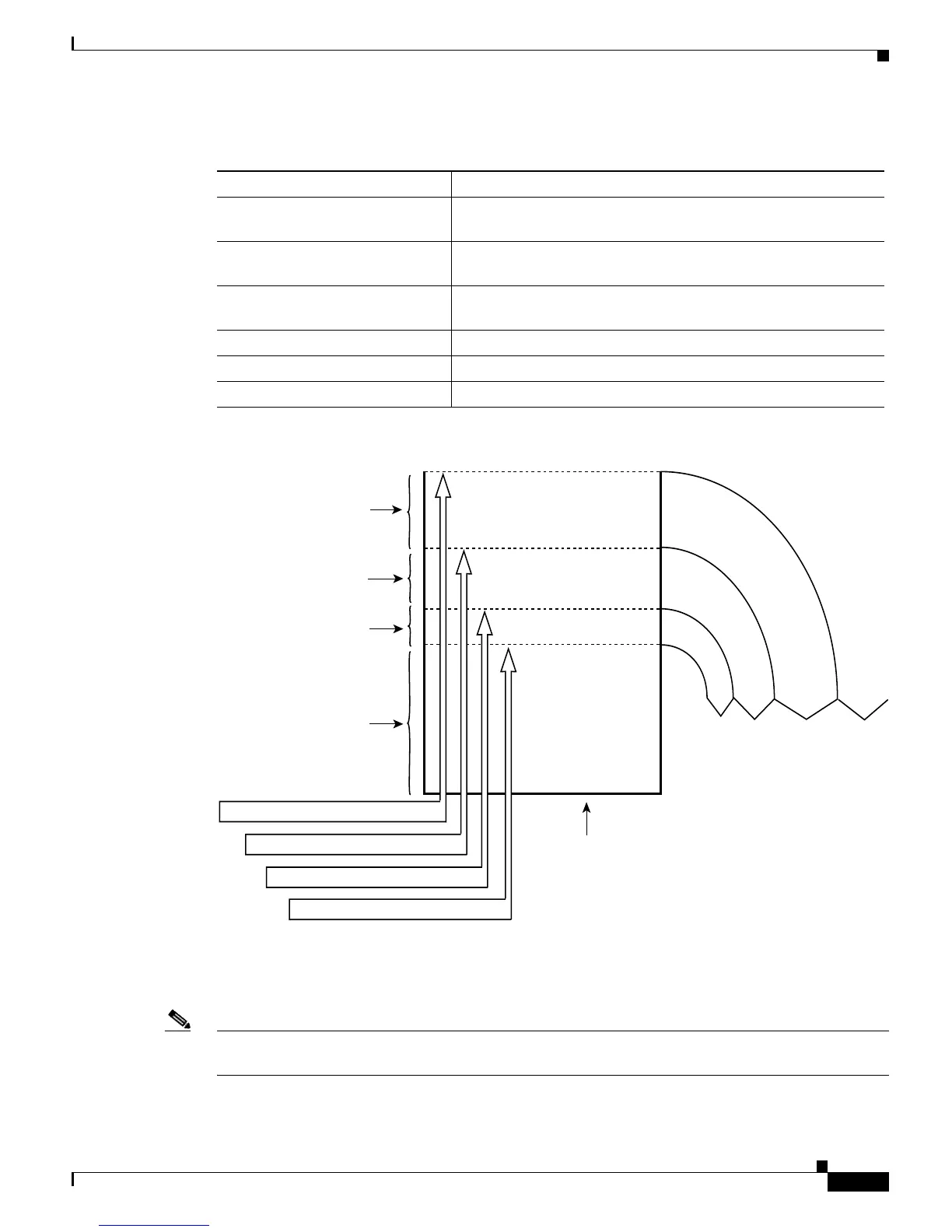
Traffic is dropped
Drop threshold 4: 100%
Drop threshold 3: 80%
Drop threshold 2: 60%
Drop threshold 1: 50%
Available for
traffic with any
CoS value
Reserved for
CoS 6 and 7
Reserved for
CoS 4 and higher
Reserved for
CoS 2 and higher
Receive queue
(Default values shown)
100% available for CoS 6 and 7
80% available for CoS 4 and 5
60% available for CoS 2 and 3
50% available for CoS 0 and 1
26249













 To Next Page