Dexcom G5 Mobile System User Guide
84Starting a Sensor Session: Inserting Sensor, Attaching Transmitter, and Starting Your Session
(Continued from previous page)
Step What you see What you do
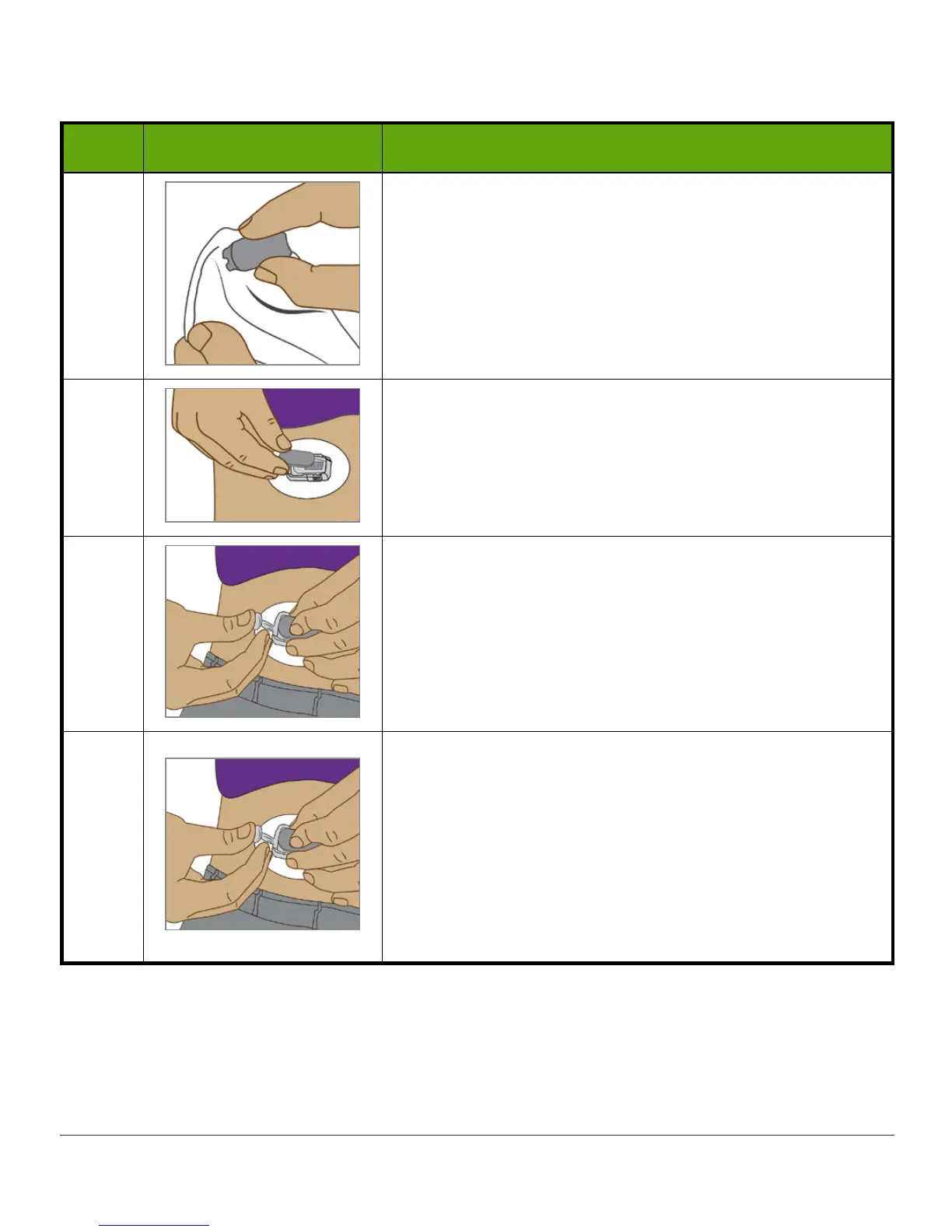
2
Wipe
back of
transmitter
with alcohol wipe.
Let dry for 2-3 minutes.
Don’t let the back of transmitter touch your skin.
Don’t scratch transmitter’s back, this can harm the
waterproof seal.
3
Flat side down.
Slide
transmitter’s small
end
under the sensor pod
lip located in front of pod’s ribbed tabs, away from
transmitter latch
.
4
Keep finger on
transmitter
holding it in place.
Push
transmitter latch
up and forward over the
transmitter’s wide end with your other hand.
You should hear 2 clicks.
5
Is transmitter secure?
Before removing transmitter latch, verify transmitter is
securely in place.
Make sure none of the transmitter’s sides popped out
of the sensor pod.
If transmitter isn't completely snapped in, you may
have a bad connection and it won’t be water tight.
(Continued on next page)



 To Next Page