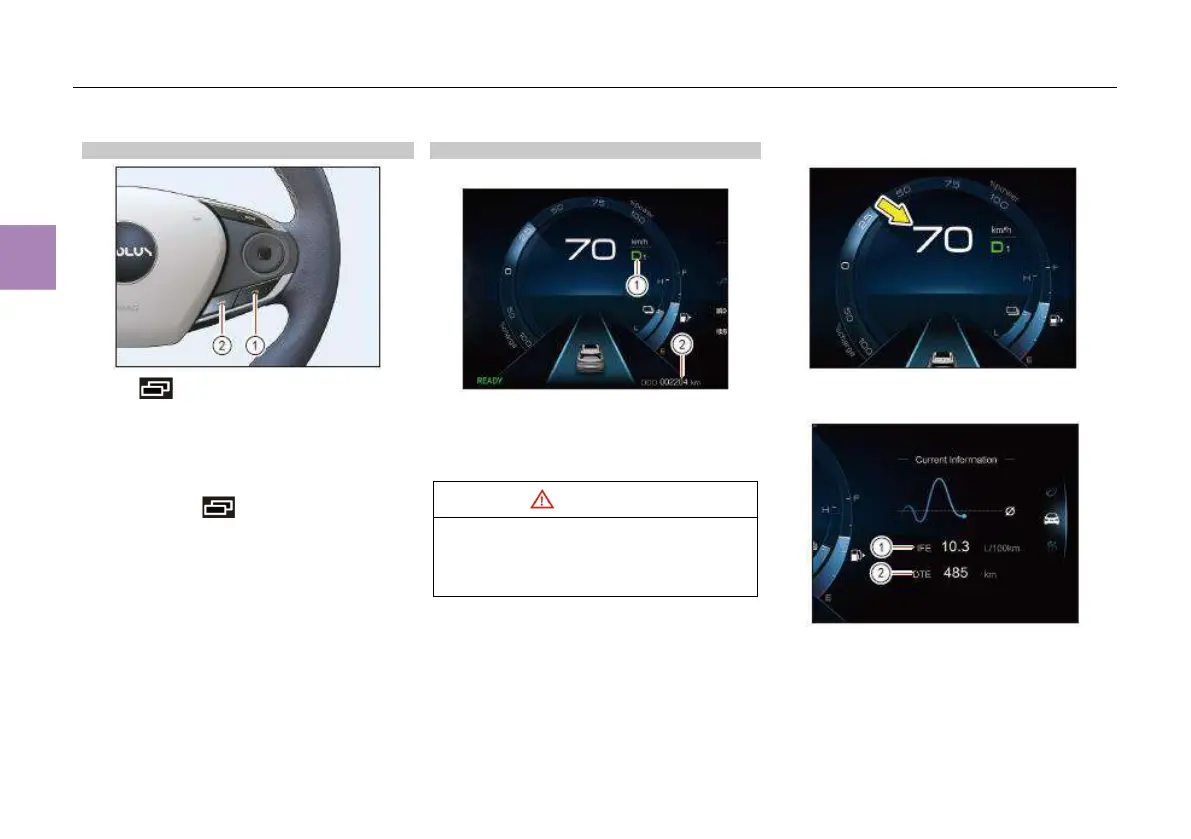
Instrument cluster operation button
Press page scrolling button ① for
switching between different driving information,
including instantaneous fuel consumption and
range, trip A, trip B, maintenance mileage,
multimedia information and energy flow
information.
Press and hold page scrolling button ①
to reset trip A or B.
Press “VIEW” button ② to switch the instrument
style (standard, panoramic navigation, AR
navigation*).
Driving information display
Gear position information and total mileage
① Gear position information: current gears: “P”,
“R”, “N” and “D”.
② Total mileage: the total mileage since the
vehicle left the factory, ranging 0km~999999km.
When the gear position displayed on the gear
position indica or flashes, the transmission
is malfunctioning. Pull over safely and
contact the authorized dealer for inspection.
Vehicle speed display
Current vehicle speed (km/h).
Driving range, instant fuel consumption
① Instant fuel consumption (L/100km)
② Driving range (km)



 To Next Page