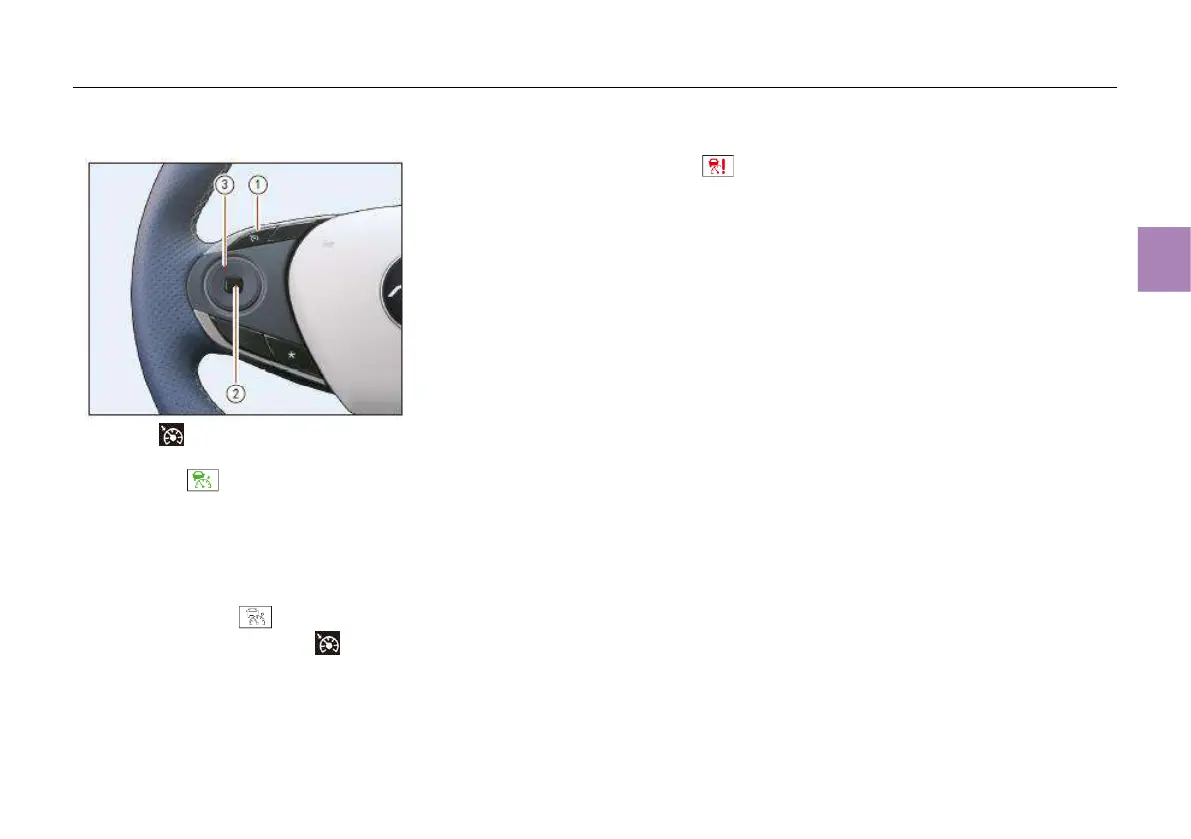
Use of function
Press the button ①. If all other activation
conditions are met at this time, the ACC indicator
lamp (green) on the instrument cluster
display will light up, accompanied by the
message “ACC On”. Afterwards, the ACC
system is activated and starts to work.
When the ACC system is activated, if the brake
pedal is depressed or the button ② is pressed,
the ACC system will be suspended and the ACC
indicator lamp (gray) will light up; If the
ACC function is turned off after button ①
is pressed, the ACC indicator lamp will go out.
When the ACC function is turned on and there is
a fault, the ACC indicator lamp (red) on
the instrument cluster display, accompanied by
the message “ACC fault”. If this warning lamp
remains on when the vehicle power supply is
switched to “OFF” mode and then switched to
“ON” mode again, contact the authorized dealer
for inspection as soon as possible.
Press the right part of round switch ③ to adjust
the headway to the lead vehicle.
Press the upper part of round switch ③ to
resume ACC function or increase the following
speed. If the system is suspended, the ACC
function will be reactivated at the previously set
speed.
Press the lower part of round switch ③ to
activate ACC function/reduce the following
speed.
Function switching
When the ACC system is activated, press the left
part of round switch ③ to switch to the ICA
mode.
Setting headway
Press the right part of round switch ③ to adjust
vehicle speed to keep an appropriate distance
from the lead vehicle. The following distance
may be switched among far, medium and near.
Reducing vehicle speed
If the ACC is already activated, reset to a lower
speed using one of the following methods:
● Press and hold the lower part of round switch
③ , so the cruising speed decreases by
5km/h. When the vehicle reaches the desired
speed, release the switch.
● Press the lower part of round switch ③; each
time the switch is pressed, the cruising speed
reduces by 1km/h.



 To Next Page