Preparation before driving
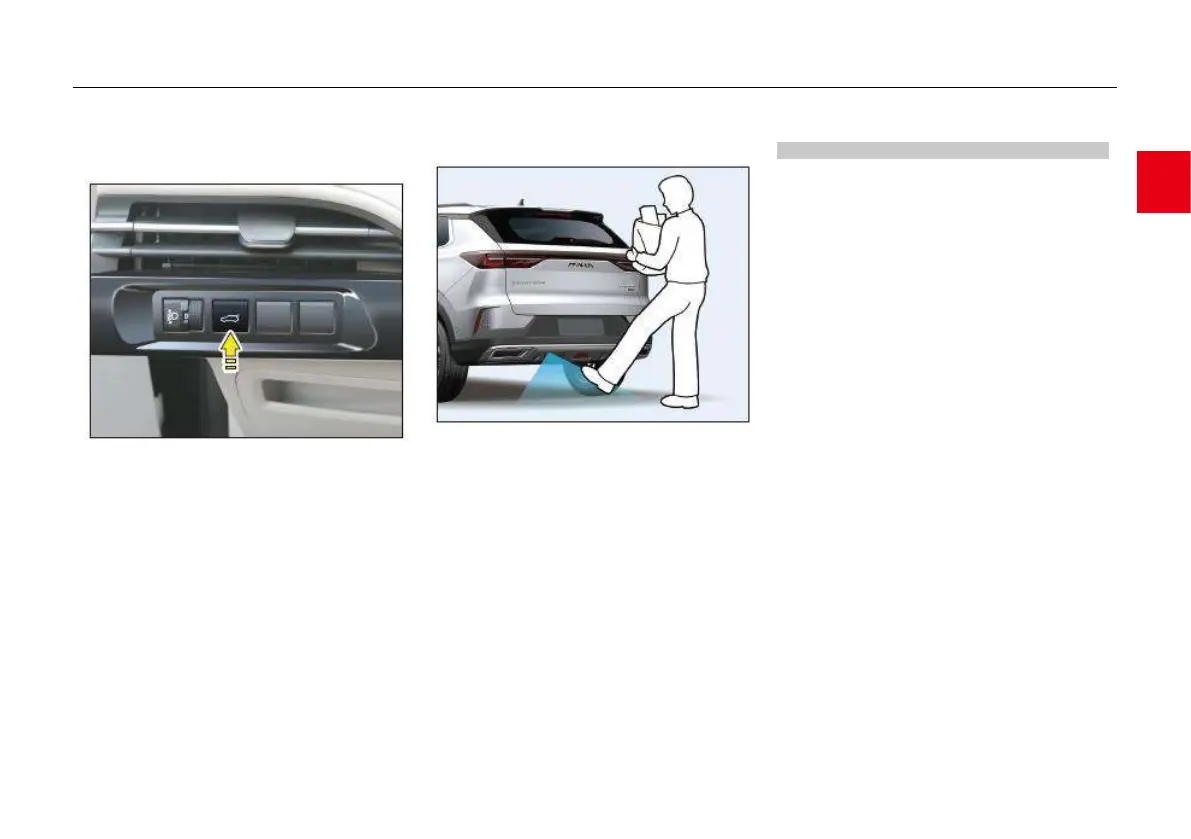
Closing with trunk lid switch on instrument
panel
When the trunk lid is open, press and hold the
trunk lid switch on the left side of the instrument
panel (≥ 0.5 seconds), so the power trunk lid will
automatically close after the buzzer makes a
beep; during closing, press the switch again, so
the power trunk lid will stop closing; press it for
another time, so the trunk lid will close
automatically.
Closing with AR projection*
When the AR projection function is turned on
(set in the MP5 system) and the trunk lid is open,
carry the smart key, stand close to the trunk lid,
and step on the projection, so the trunk lid waits
for closing. After you go 2m away from the
vehicle carrying the smart key, the trunk lid will
automatically close.
Power trunk lid function setting*
Setting of Lock at closing LG
● Enter “CarCenter” – “Body setting” – “DL and
key” – “Lock at closing LG” on the MP5
display, and use the slider on the right side to
turn on or off the Lock at closing LG.
● When the Lock at closing LG is turned on, if
the power trunk lid is closed and all doors are
closed, all doors will automatically lock.
AR projection switch function setting
● Enter “CarCenter” – “Body setting” – “DL and
key” – “AR projection trunk lid” on the MP5
display, and use the slider on the right side to
turn on or off the AR projection function.
● When the AR projection trunk lid function is
turned on, step on the projection to open or
close the trunk lid.



 To Next Page