Adjustment before driving
Preparation before driving
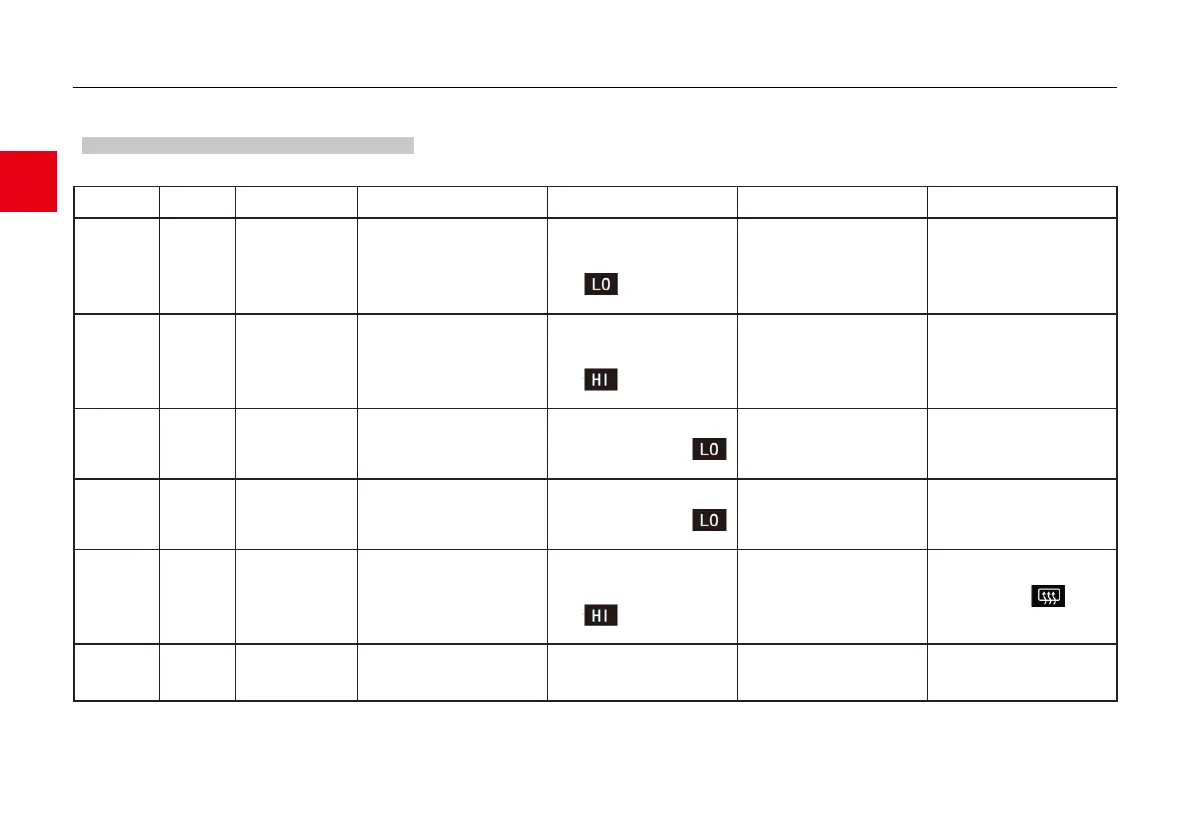
For better use of the A/C, please use the operation methods recommended in the table below in a reasonable manner.
Recirculation/fresh
air mode
First recirculation
and then fresh air
Adjust the A/C temperature,
observe the temperature value on
the A/C display, the lower the
value, the lower the temperature,
and icon appears at the
lowest temperature.
Press the fan speed up button
and observe the fan speed value
indicated on the MP5 display. The
larger the value, the greater fan
speed
When the compressor is working,
it consumes part of the engine
power, so there is a loss of engine
power.
First recirculation
and then fresh air
Adjust the A/C temperature,
observe the temperature value on
the A/C display, the higher the
value, the higher the temperature,
and icon appears at the
highest temperature.
Press the fan speed up button
and observe the fan speed value
indicated on the MP5 display. The
larger the value, the greater fan
speed
The heater heats the air through
the engine coolant, so the heated
air can only be blown out after the
engine has been running for a
while.
Adjust the A/C temperature, and
observe the temperature value on
the A/C display until the
icon is displayed.
Press the fan speed up button
and observe the fan speed value
indicated on the MP5 display. The
larger the value, the greater fan
speed
The fresh air from outside can be
blown into the vehicle. The air
volume can be adjusted according
to the comfort level.
Front
windshield
interior
defogging
Select the front windshield
defogger/air outlet mode
Adjust the A/C temperature, and
observe the temperature value on
the A/C display until the
icon is displayed.
Press the fan speed up button
and observe the fan speed value
indicated on the MP5 display. The
larger the value, the greater fan
speed
When fogging appears on the
front windshield, it will affect the
driver's sight, causing a safety
hazard.
Front
windshield
exterior
defogging
Select the front windshield
defogger/air outlet mode
Adjust the A/C temperature,
observe the temperature value on
the A/C display, the higher the
value, the higher the temperature,
and icon appears at the
highest temperature.
Press the fan speed up button
and observe the fan speed value
indicated on the MP5 display. The
larger the value, the greater fan
speed
The temperature can be set to the
highest position for quick
defrosting. The button
can be used to defog/defrost the
rear windshield.
Select the floor + front windshield
defogger/air outlet mode
Adjust the A/C temperature, and
observe the temperature value on
the A/C display until theLO icon
is displayed.
Press the fan speed up button,
observe the fan speed value
indicated on the MP5 display, and
reach the minimum value
After the setting is completed,
press the A/C OFF button to
deactivate the system.



 To Next Page