Adjustment before driving
Preparation before driving
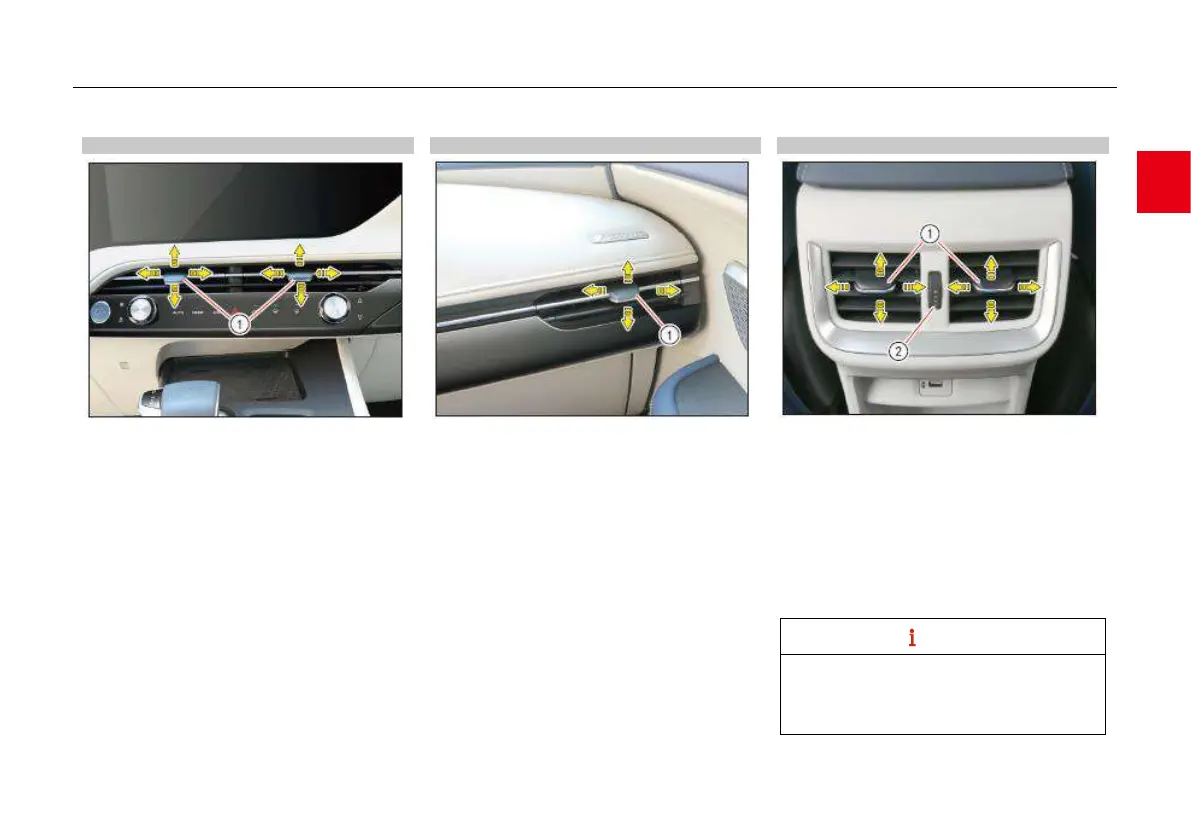
Center air outlet
Turn the control knob ① (up/down, left/right) to
adjust the direction of airflow at air outlet so as to
guide air to the required position.
Move the control button ① to the side to
increase the fan speed at the air outlets; move
the control button ① to the center to decrease
the fan speed at the air outlets until air outlets
are closed.
Front side air outlet
Turn the control knob ① (up/down, left/right) to
adjust the direction of airflow at air outlet so as to
guide air to the required position.
Move the control button ① to the side to
increase the fan speed at the air outlets; move
the control button ① to the center to decrease
the fan speed at the air outlets until air outlets
are closed.
Rear center air outlet*
Turn the control knob ① (up/down, left/right) to
adjust the direction of airflow at air outlet so as to
guide air to the required position.
Turn the knob ② upward to see that the white
color blocks on it become longer, and then the
air volume at the air outlet increases.
Turn the knob ② downward to see that the
white color blocks on it become shorter, and
then the air volume at the air outlet decreases
and finally disappears.
After the air outlet is closed, there may still be
a certain amount of air flow and the air may
come out of the air outlet, which is a normal
phenomenon.



 To Next Page