118
x Scanner Section
chap.3
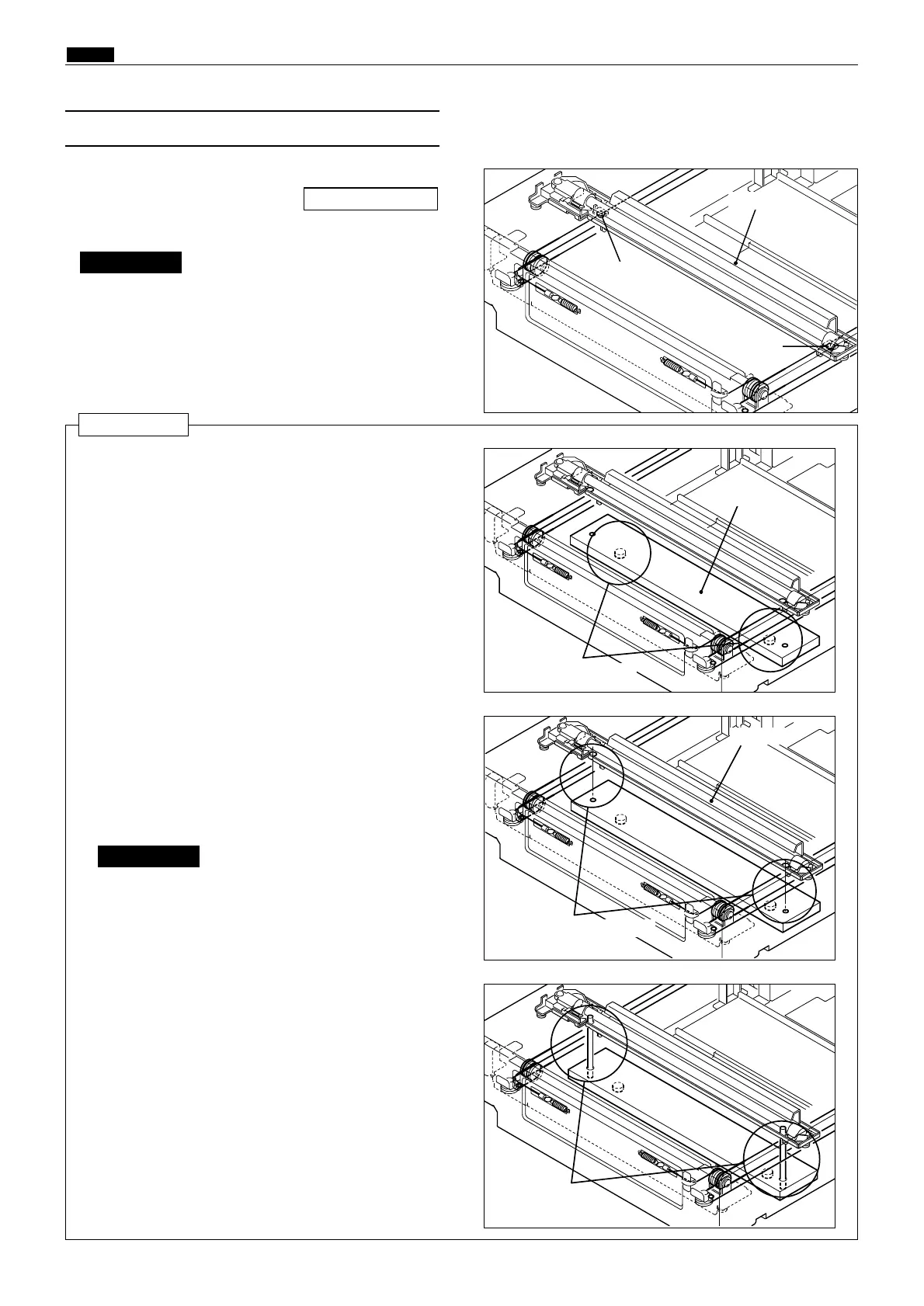
(7) Removal of Slider A
24S027
24S028
24S029
Place in opening
Slider A
1) Perform steps 1 through 4 of procedure (5).
2) Loosen the 2 screws shown, and remove slider A.
\See page 116
Reinstallation
¡ Required items
* Slider A attachation tool 1
* Slider A attachation tool 2
Screw
Screw
Slider A
24S030
Tool 2
Tool 1
Align opening positions
Do not move Slider A by hand.
IMPORTANT :
2) Turn the timing pulley and move Slider A so
that the Slider A positioning openings are
aligned with the Slider A attachation tool 1
positioning openings.
1) Attach 2 Slider A attachation tools 1.
3) Attach 2 Slider A attachation tools 2.
4) Fix the wire with 2 screws.
5) Remove the Slider A attachation tools 2.
6) Remove the Slider A attachation tools 1.
Do not move Slider A by hand.
IMPORTANT :










 To Next Page