119
x Scanner Section
chap.3
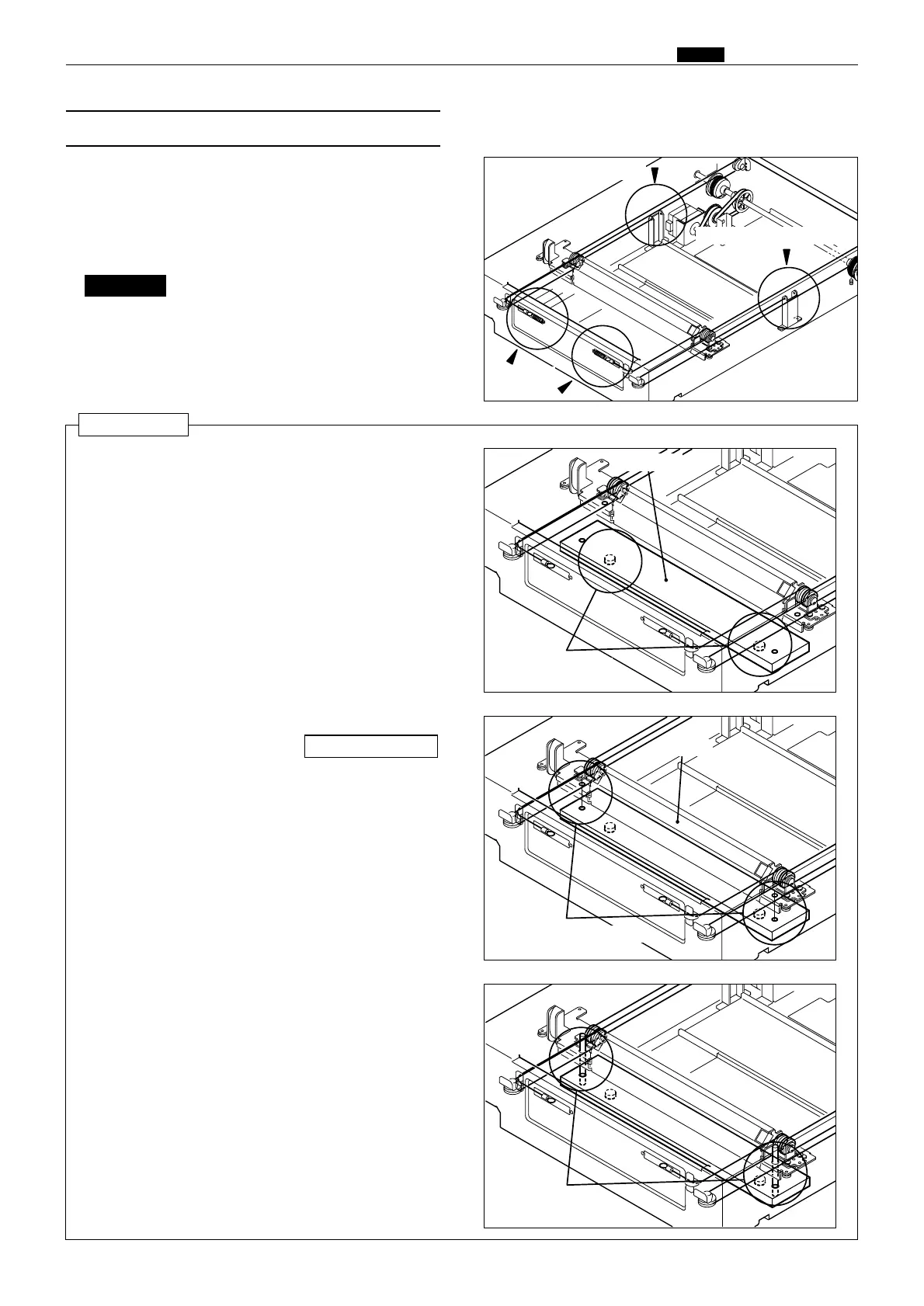
(8) Removal of Slider B
24S031
24S032
24S033
¡ Required items
* Wire fixing tools
1) Perform steps 1 through 3 of procedure (5).
2) To prevent loosening of the wire, attach 2 wire
fixing tools, one before and one after the wire pulley.
Do not remove the wire fixing tools
before Slider B is attached.
IMPORTANT :
Reinstallation
Fix the wire with the tool
24S034
2) Place the wire on the pulley, both before and
after.
\See page 148
Place in opening
Slider B
¡ Required items
* Slider B attachation tool 1
* Slider B attachation tool 2
Tool 2
Tool 1
Align opening positions
3) Move Slider B so that the Slider B positioning
openings are aligned with the Slider B
attachation tool 1 positioning openings.
1) Attach 2 Slider B attachation tools 1.
4) Attach 2 Slider B attachation tools 2.
5) Place the spring on the hook(wire).
6) Remove the Wire fixing tools.
7) Remove the Slider B attachation tools 2.
8) Remove the Slider B attachation tools 1.
Attach the
spring
Fix the wire with the tool
3) Remove the wire from the spring, in 2 locations
before and after the spring.
4) Remove Slider B.










 To Next Page