CR Console Operation Manual
2011. 06 897N0519M 3 - 55
3.5.1 Differences in the Operation of Connected Image Readers
Note that the operation required on the “Study Execution Screen” differs depending on the used
Image Reader. Differences in the operation are explained as follows taking the following readers as
examples.
• FCR Cassette type equipment
• FCR 5000 series Built-in type equipment
• FCR VELOCITY series Built-in type
NOTE
• Do not operate the CR Console (CR-IR 348CL) while images are being read (including the
operation to perform exposure for a cassette built-in type Image Reader).
Otherwise, images may not be read correctly or read images may be processed based on improper
menu information. Moreover, do not finish a study or start image QA processing before confirming
that all images concerning the study are read completely.
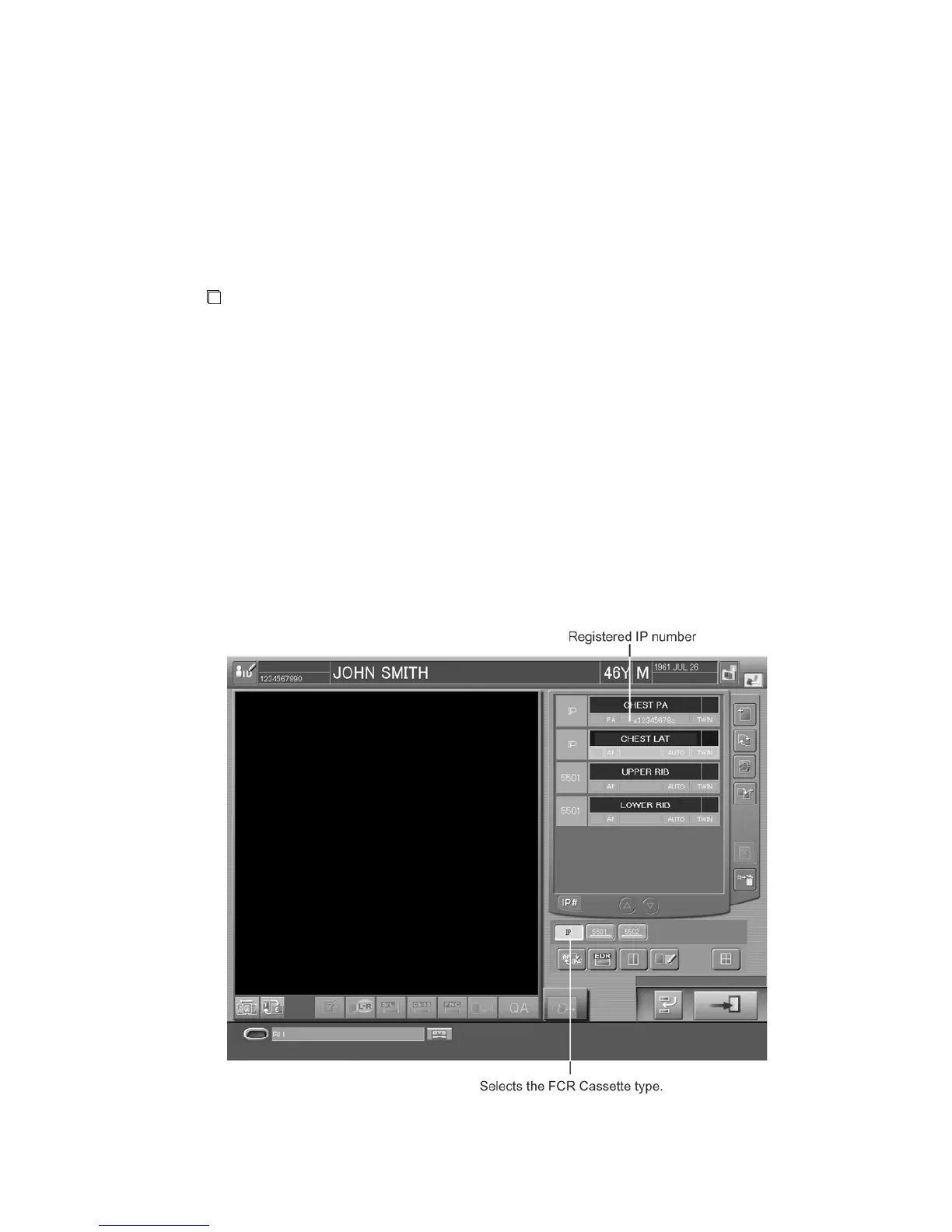
(1) FCR Cassette Type Equipment
Register an IP by reading a barcode of exposed IP with the barcode reader. When the IP registration
is completed, the unit displays the registered IP number at the exposure menu field. Carefully check
it for preventing mis-registration.
When a user repeats the selection of exposure menus and barcode reading above mentioned, multiple
IPs can be registered at once. Therefore, if studies are suspended after the IP registration, the image
reading for multiple studies can be performed at once.
Sample of one-image display example :



 To Next Page