81901 “MSW_GPC-40/600A”_03-2021_ENG_page 18
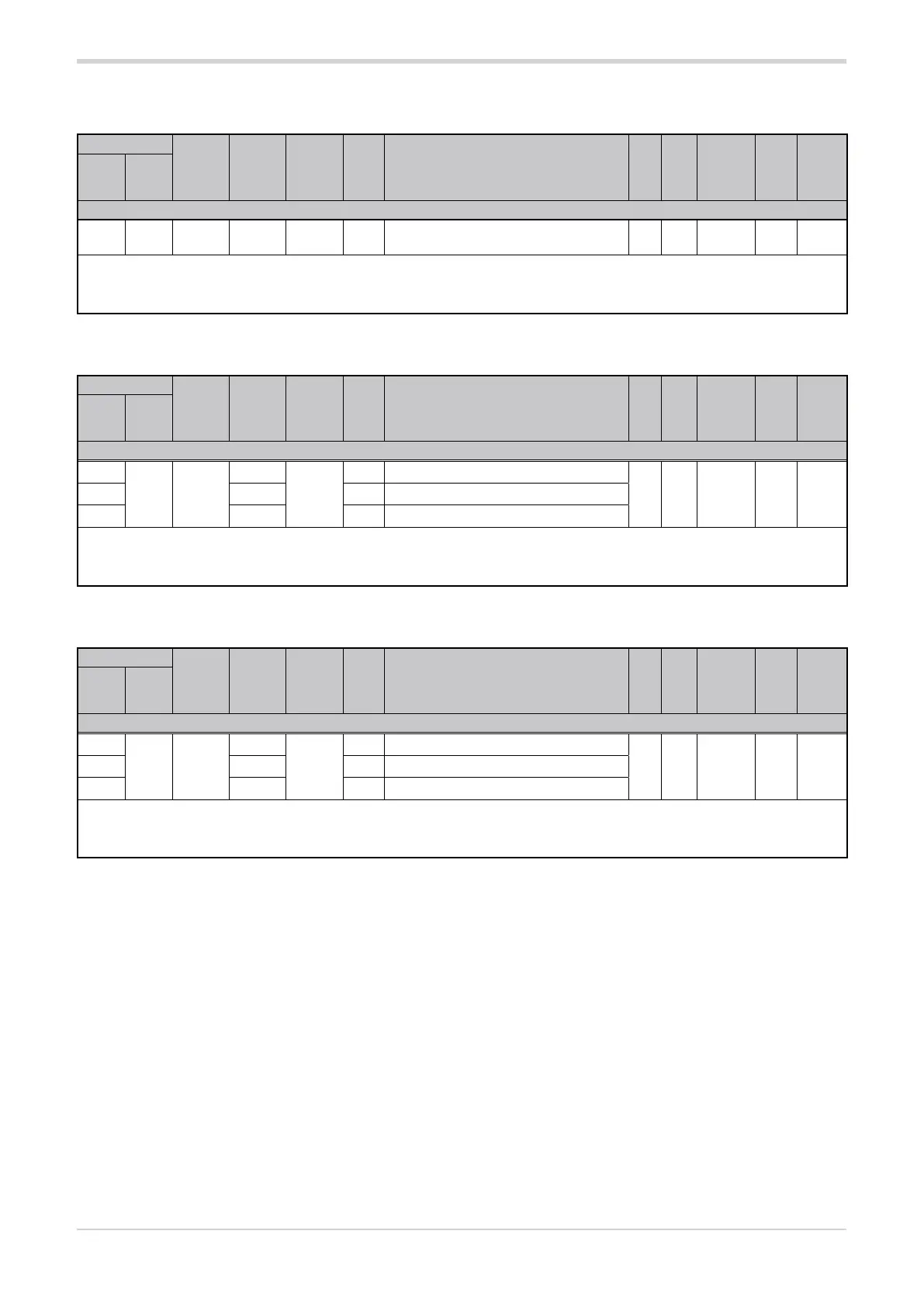
3.6.5. Communication error timeout
Address
Format
GPC-OP
menu
Acronym
Global /
M/E1/E2
GF_eXpress menu
Attribute
Retentive
Type
Unit of mea-
surement
Default
Single-
node
Multi-
node
Description
1914 890 16 bit 02.09 C.E.t Global
MainMenu → Global → Info → C.E.t
R/W
■
Unsigned
Short
sec. 0
The parameter sets the timeout time before a communication error is generated.
Setting the parameter to “0” disables the communication error.
min...max: 0...121
3.6.6. Power delivery mode with communication error
Address
Format
GPC-OP
menu
Acronym
Global /
M/E1/E2
GF_eXpress menu
Attribute
Retentive
Type
Unit of mea-
surement
Default
Single-
node
Multi-
node
Description
1915
891 16 bit
03.02.01
C.E.m
M
MainMenu → M → Controls → C.E.m_1
R/W
■
Unsigned
Short
02939 03.03.01 E1
MainMenu → E1 → Controls → C.E.m_2
4987 03.04.01 E2
MainMenu → E2 → Controls → C.E.m_3
The parameter defines what happens to the power delivered from the output of the GPC device when a communication error occurs.
Options: 0 = The power delivered is not changed
1 = The power delivered is forced to the value determined by the parameter C.E.P
3.6.7. Output power with communication error
Address
Format
GPC-OP
menu
Acronym
Global /
M/E1/E2
GF_eXpress menu
Attribute
Retentive
Type
Unit of mea-
surement
Default
Single-
node
Multi-
node
Description
1916
892 16 bit
03.02.02
C.E.P
M
MainMenu → M → Controls → C.E.P_1
R/W
■
Float
(####.#)
% 0.02940 03.03.02 E1
MainMenu → E1 → Controls → C.E.P_2
4988 03.04.02 E2
MainMenu → E2 → Controls → C.E.P_3
When a communication error occurs, if the parameter C.E.m has been set to “1”, the parameter sets the power delivered by the output of
the GPC device as a percentage value of the maximum power that can be delivered by the output.
min...max: 0.0...100.0





 To Next Page