CHAPTER 3
35
Setting up the GERBER SOLARA ION
4/29/10 Rev G
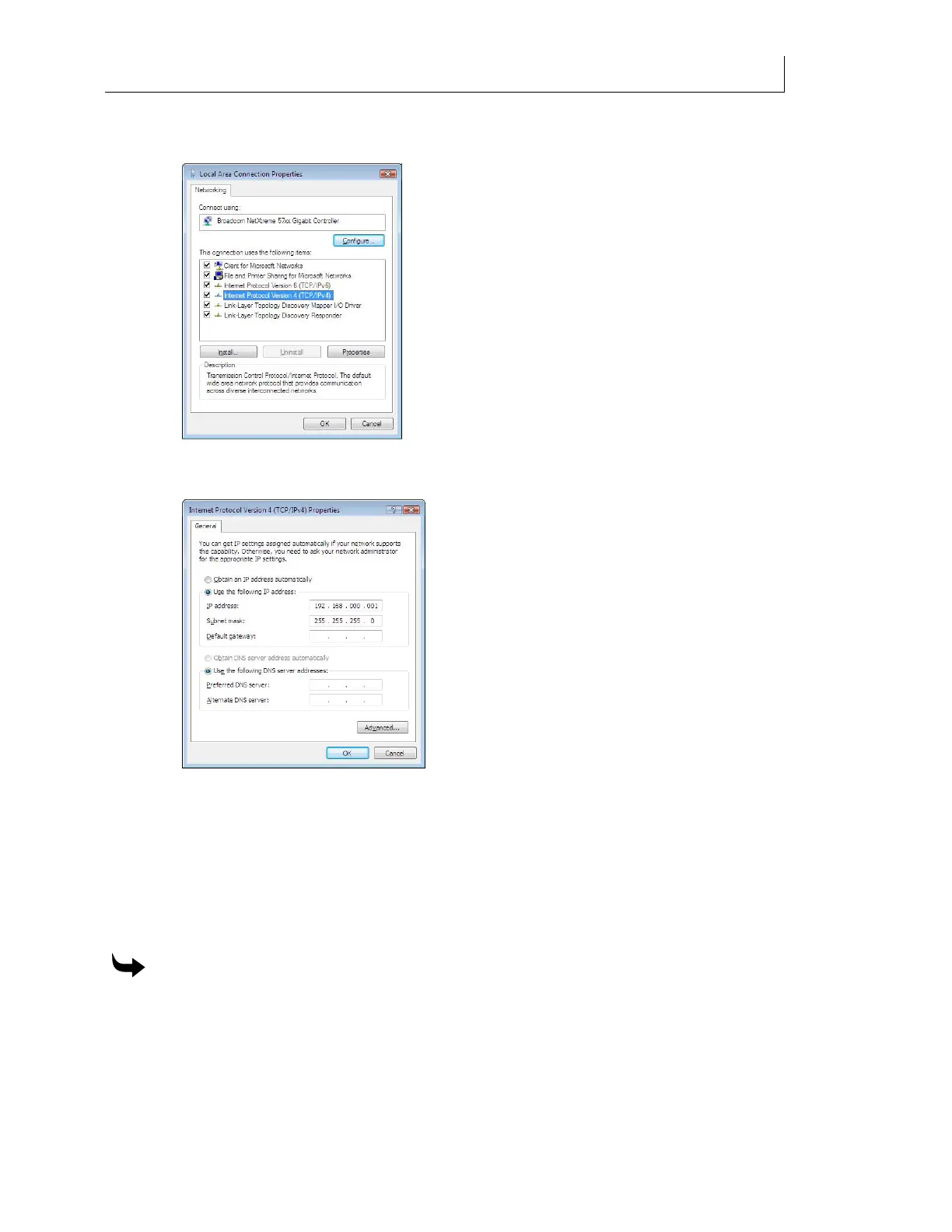
5 Right click the Local Area Connection and choose Properties to display the Local Area
Connection Properties dialog box.
6 Select Internet Protocol Version 4 (TCP/IPv4) and then click Properties. The following
dialog box displays.
7 Choose Use the following IP address to activate the address fields.
8 Enter 192.168.0.1 for the IP address of your computer.
9 Press Tab to automatically enter the correct Subnet Mask (255.255.255.0).
10 Do not enter a Default Gateway if using direct connection, or unless instructed by your
network administrator.
11 Click OK to save the settings and exit the Properties dialog box.
To set the IP Address and Subnet Mask for Windows XP
1 Click Start > Settings > Control Panel.
2 Double-click the Network Connections icon.
3 Double-click the Local Area Connections icon to open the Local Area Connections
Properties dialog box.



 To Next Page