INS
GUI User’s Manual
Inertial Labs, Inc
TM
Address: 39959 Catoctin Ridge Street, Paeonian Springs, VA 20129 U.S.A.
Tel: +1 (703) 880-4222, Fax: +1 (703) 935-8377 Website: www.inertiallabs.com
156
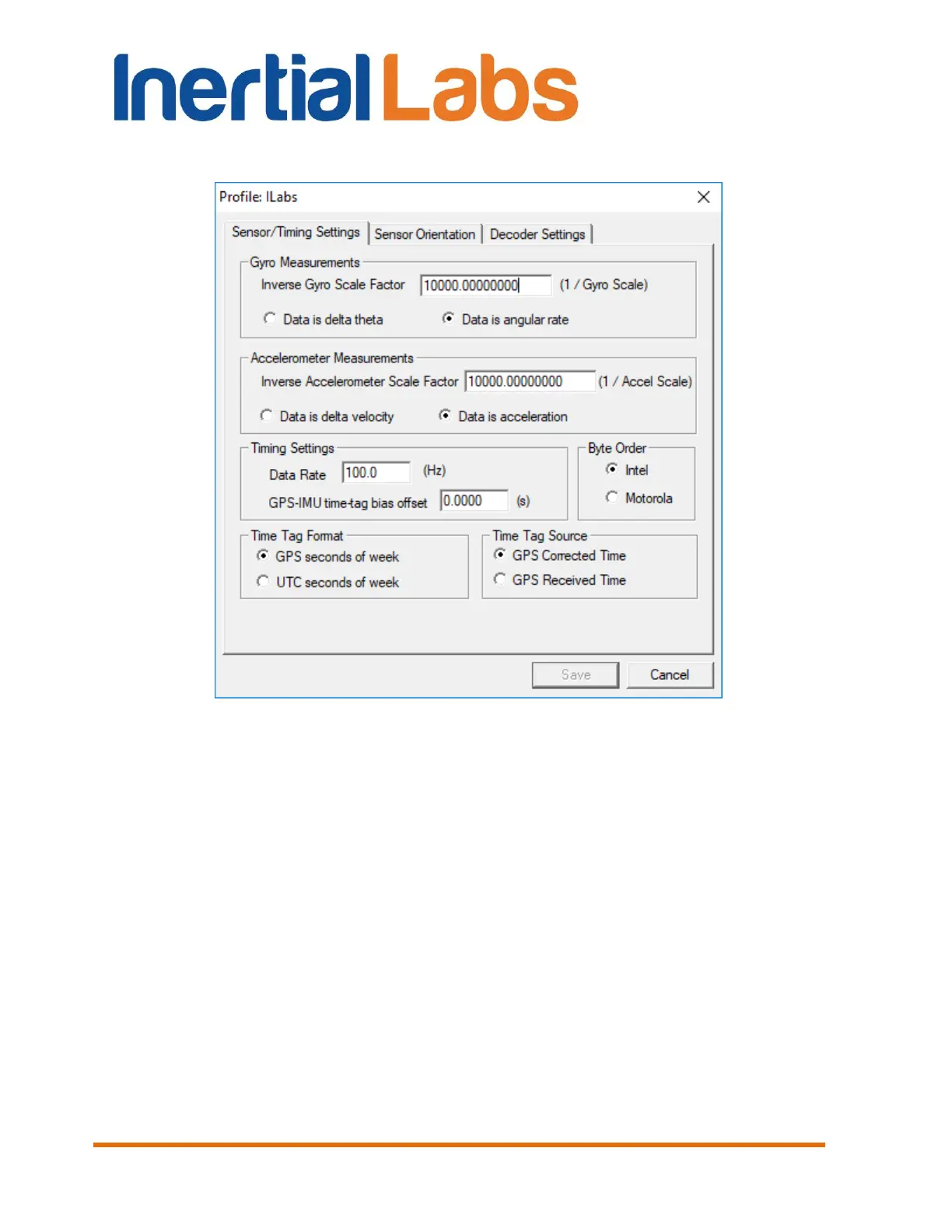
Select “Data is acceleration” radio button.
Fig. 12.6
In the “Timing Settings” field:
In the “Data Rate” edit box set the measurement rate according to the
value in the IMU tab of the “Device options” menu (see section 4.2.
Devices options);
Leave “GPS-IMU time-tag bias offset” value by default (0 s).
In the “Byte Order” field select “Intel” radio button.
In the “Time Tag Format” select “GPS seconds of week” radio button.
In the “Time Tag Source” select “GPS Corrected Time” radio button.
Step 4. To save all configurations and close this window click on the
“Save” button.

 To Next Page
 Loading...