INS
GUI User’s Manual
Inertial Labs, Inc
TM
Address: 39959 Catoctin Ridge Street, Paeonian Springs, VA 20129 U.S.A.
Tel: +1 (703) 880-4222, Fax: +1 (703) 935-8377 Website: www.inertiallabs.com
72
5.2. Cockpit style of visualization
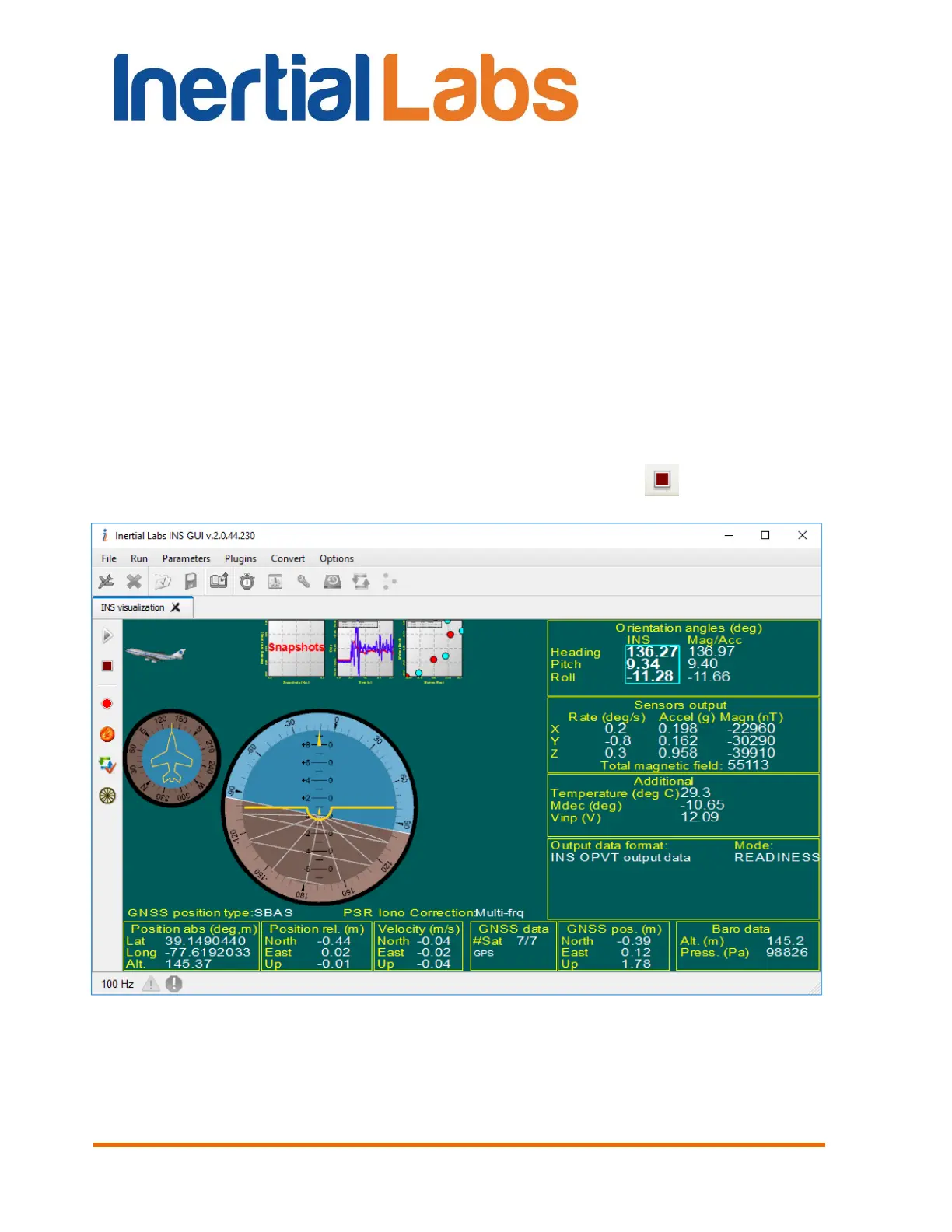
“Cockpit” window allows to show current attitude of the INS in “Cockpit
display” style (see Fig. 5.3). To switch visualization to this mode click on
preview shown in the Fig. 5.2 (b) and window shown in the Fig. 5.3 will
appear.
There is heading indicator in the upper left corner of the tab. In the center
part of the tab an attitude indicator (artificial horizon) is shown. Its vertical
scale corresponds to pitch, limb corresponds to roll.
To switch to other than “Cockpit” style click on appropriate preview in the
upper part of the “INS visualization” tab (Fig. 5.3).
To stop data output from the INS click the “Stop” button .
Fig. 5.3


 To Next Page
 Loading...