INS
GUI User’s Manual
Inertial Labs, Inc
TM
Address: 39959 Catoctin Ridge Street, Paeonian Springs, VA 20129 U.S.A.
Tel: +1 (703) 880-4222, Fax: +1 (703) 935-8377 Website: www.inertiallabs.com
24
4.2. Devices options
To set and control of INS operation parameters, select “Devices
options…” from the “Options” menu (Fig. 3.7), or click button (Fig. 3.1).
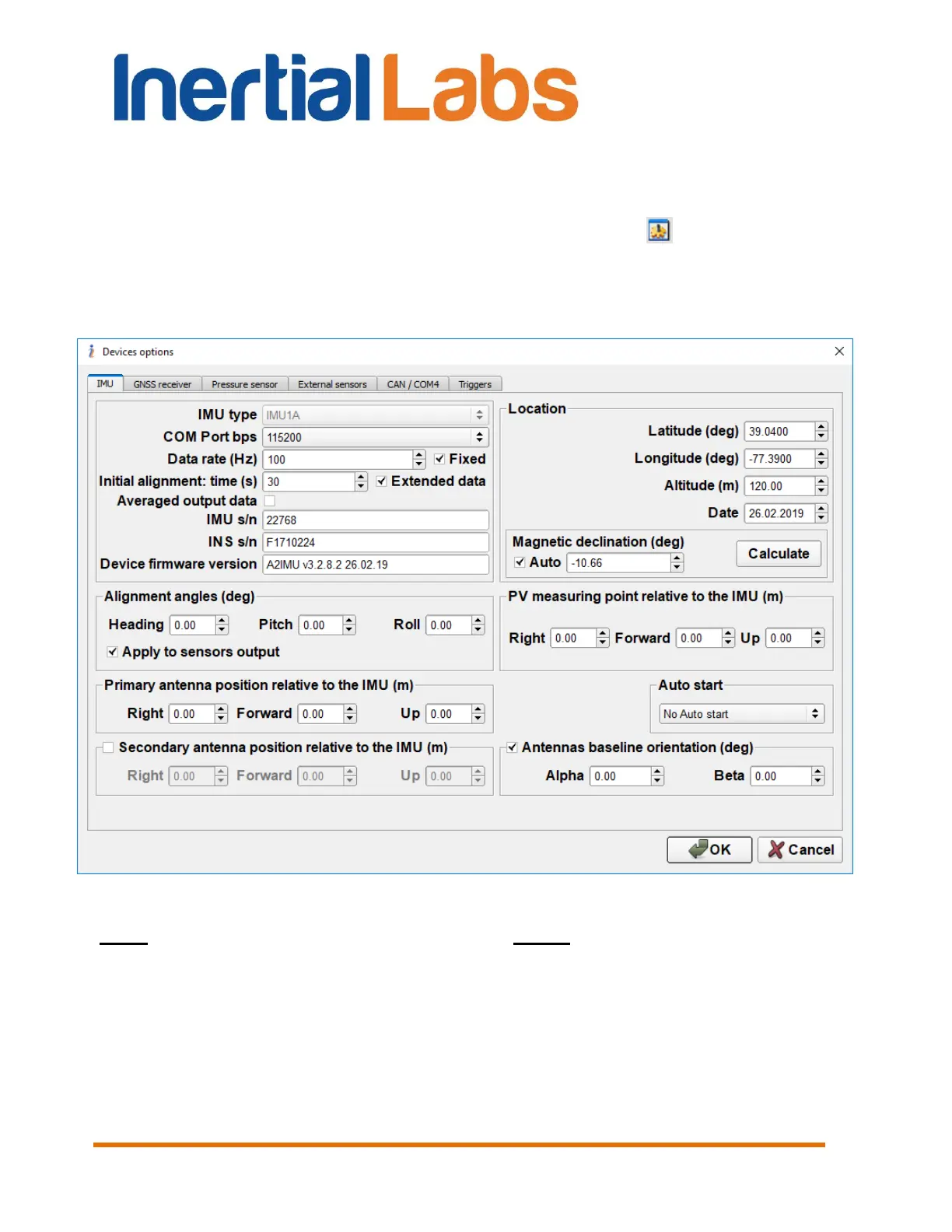
A “Devices Options” (Fig. 4.2) dialog box will be opened. There are six
tabs “IMU”, “GNSS receiver”, “Pressure sensor”, “External sensors”, “CAN /
COM4”, “Triggers”.
Fig. 4.2
Note: “Device option…” item is available only if:
INS is powered,
and INS is connected to computer,
and СОМ port number and its baud rate are chosen properly,
and INS initialization time (about 25 sec after power on) is completed
so LED indicator lights red.


 To Next Page
 Loading...