Chapter 5: Console Operation
Smart Faders (SFADs): The Concept
Eclipse User Guide 2.0 149/ 526
Smart Faders (SFADs)
The Concept
So far we have described how any mono input may be
controlled directly from a Fader strip or Smart Panel controller.
However, to manage larger shows where the number of
sources may exceed your physical faders, Eclipse provides a
unique “layering” solution – Smart Faders (SFADs).
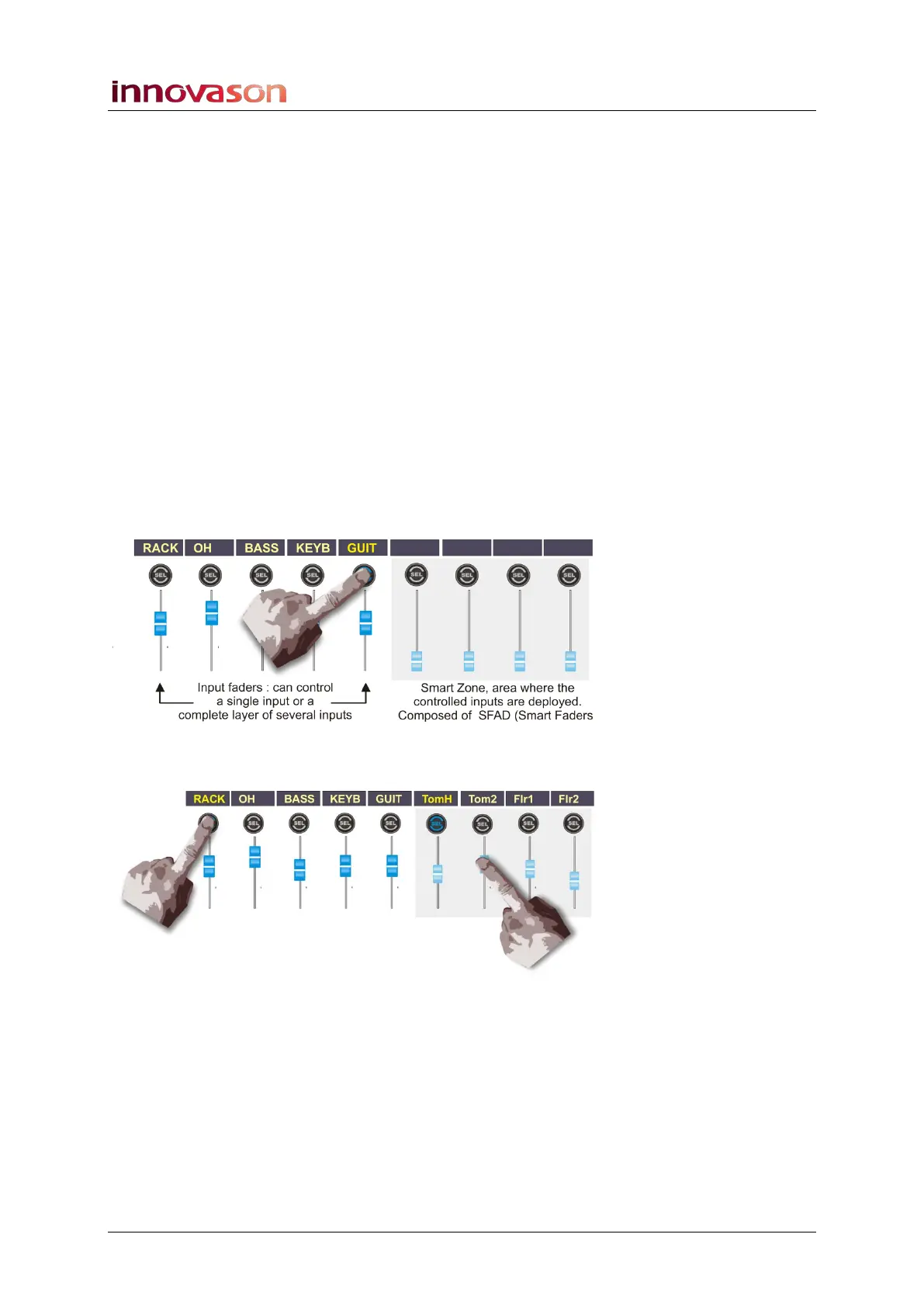
This solution works by using a Smart VCA (SVCA) to control a
number of input slave channels. Each time you press the SEL
button on the Smart VCA, its slaves are deployed to a pre-
defined zone on the console (SZONE), thereby controlling
multiple sets of “layered” inputs from very few physical faders.
The following examples illustrate the principles of Smart
Faders.
If a standard input is selected, the SZONE is unused:
Select a Smart VCA (e.g. RACK) and its slaves are deployed
into the SZONE:
You can now control the individual levels of the four Racks
drum channels (TomH, Tom2, Flor1 and 2).



 To Next Page