Chapter 11: Technical Procedures
Using M.A.R.S as a Backup for Nova
502/ 526 2.0 Eclipse User Guide
Chapter 11: Technical Procedures
Using M.A.R.S as a Backup for Nova
In the unlikely event that the Nova computer fails, it is possible
to use the M.A.R.S computer as a replacement. This will allow
the show to go on! In this case, M.A.R.S. cannot be used.
How to Proceed
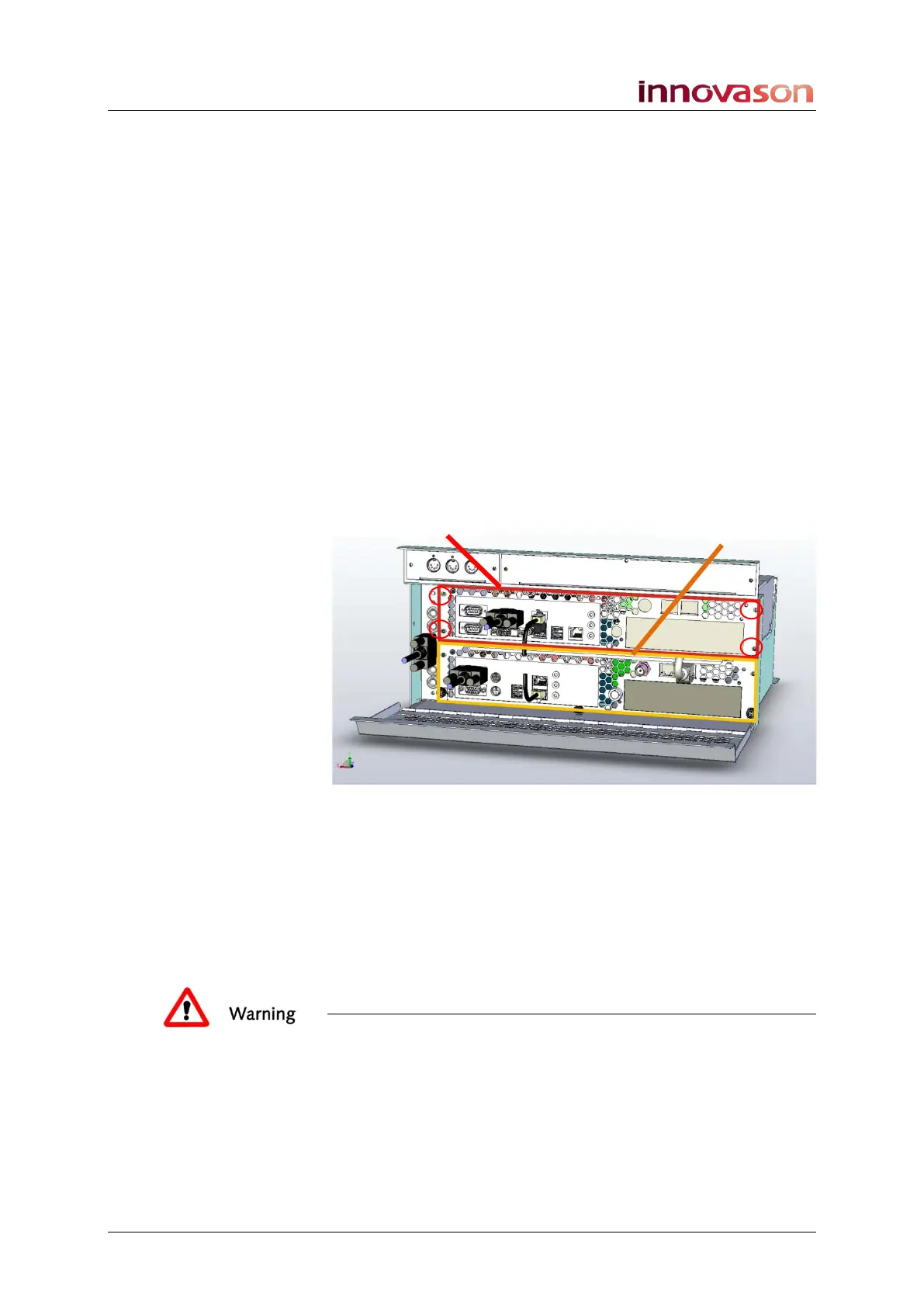
Both computers are mounted like drawers in the desk making it
easy and fast to remove them.
1. Disconnect the cables (VGA, USB and Net Link).
2. Remove the 4 screws which hold each “drawer” in place.
3. And pull out the drawers:
4. Insert the M.A.R.S. computer into the Nova (top) drawer.
5. Reconnect the VGA and USB cables and restart the
console.
During the restart, a message invites you to press [F4] to force
the computer to start as Nova instead of M.A.R.S.
6. When the message appears, press [F4].
The replacement computer restarts with Nova.
Warning
DO NOT install the failed computer, or any other computer
device, in the M.A.R.S. drawer
Please contact Innovason service for information on a
permanent repair.



 To Next Page