Chapter 10: M.A.R.S.
Playing Back the Demo Project
448/ 526 2.0 Eclipse User Guide
Playing Back the Demo Project
To get started quickly with M.A.R.S. and Eclipse, every system is
shipped with a demo song. This section describes how to play
back the demo. To learn more about recording your own sound
check, then please skip to Page 465.
To use the demo project, you must perform two operations:
1. Open the M.A.R.S. project called “Walking” – this loads 64
tracks of pre-recorded audio onto the M.A.R.S. system.
2. Load the Nova file called “Walking” – this configures the
console so that the demo (which is 44 tracks) will replay
across pre-configured Fader strips, with user Labels and a
mix to match.
Loading a Project in M.A.R.S.
1. Press the M.A.R.S. button on the TRANSPORT panel to
switch the touch-screen to the M.A.R.S. control computer.
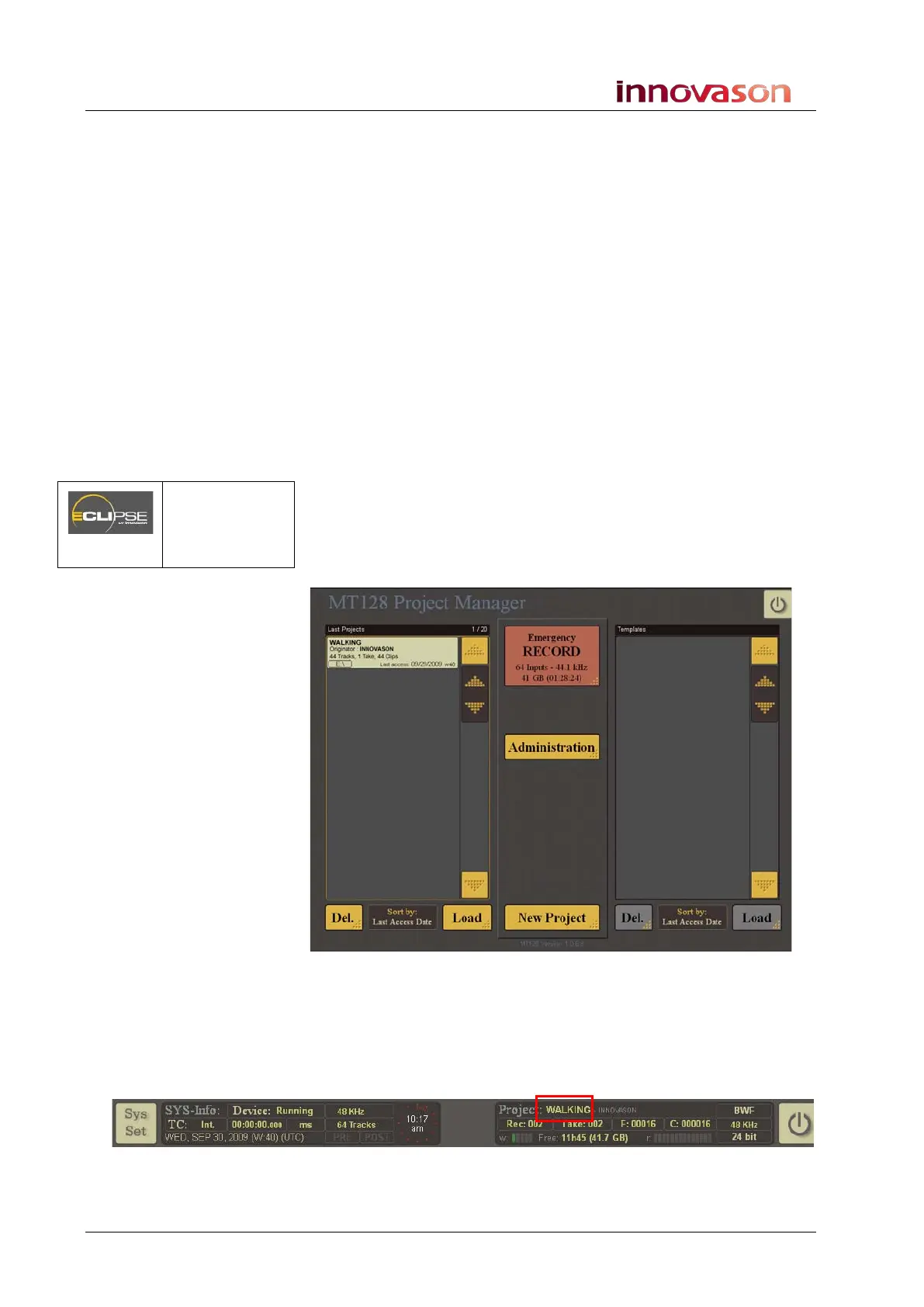
If you have just started the system, then the MT128 Project
Manager window is in view:
If you do not see this window, then a project has already been
loaded or created. To return to the MT128 Project Manager:
2. Select the current Project name from the bar running
across the top of the display – in our example, touch or
click on WALKING:
M.A.R.S.
(TRANSPORT
Panel)



 To Next Page