Chapter 6: Console Configuration
The Personal Console Builder: Overview
Eclipse User Guide 2.0 221/ 526
The Personal Console Builder
Overview
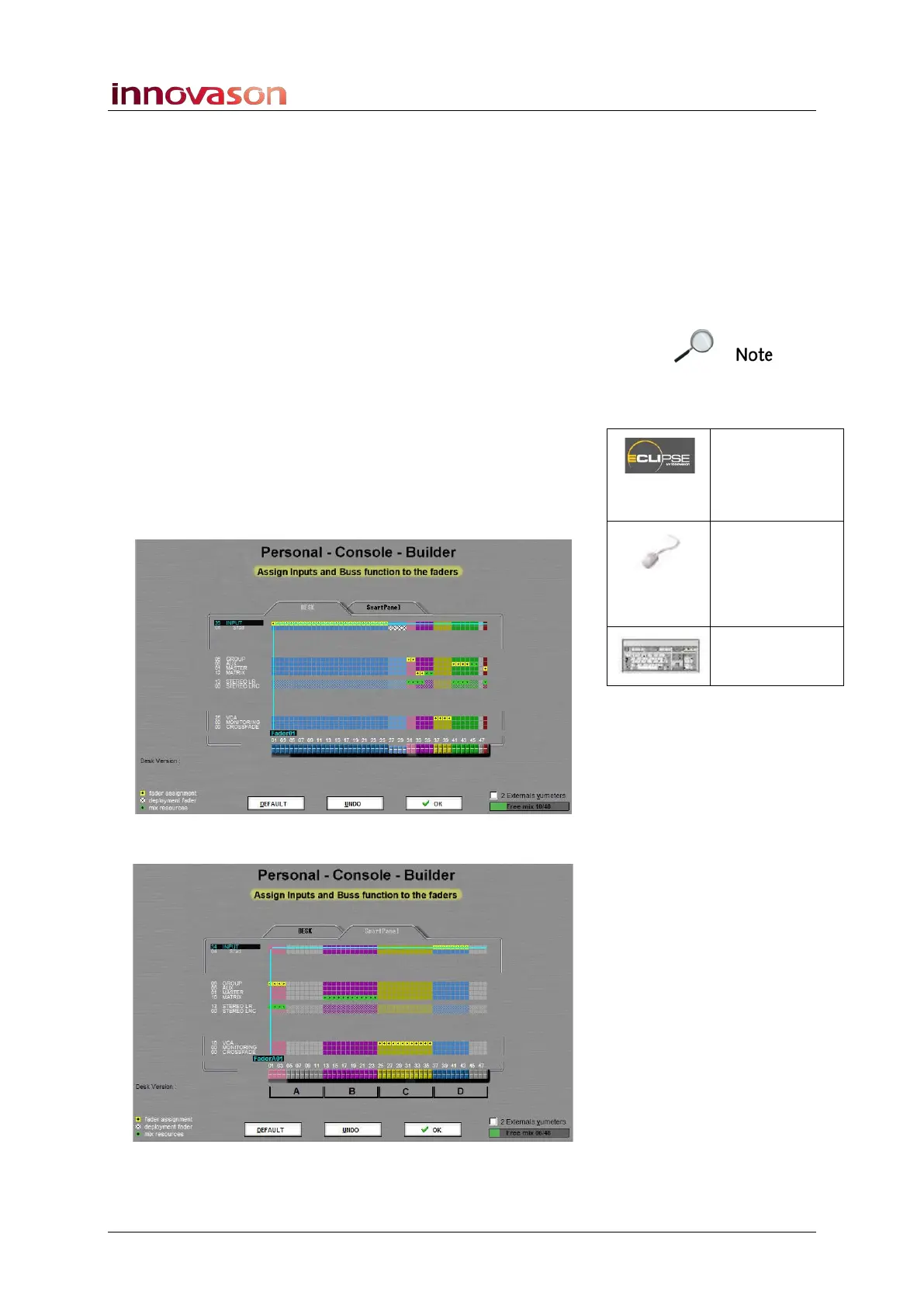
This display is used to assign different channel types (inputs,
Auxes, VCAs, etc.) to the 48 Faders strips and Smart Panel. It
is also where you determine whether each mix bus (Aux,
Group, Master and Matrix) is mono, stereo LR or stereo LRC.
The PCB configuration is stored each time you save a File.
However, you cannot store different PCB configurations in
Pages. If you wish to load different Fader strip or Smart Panel
assignments during a show, save a File for each configuration.
1. Select “UTIL -> Personal Console Builder”.
A switch on the User Defined panel can also be assigned to
open this window, see Page 322.
The grid shows the assignments of channel types (on the left)
to the DESK faders or Smart Panel controllers (at the bottom):
2. Click on the DESK and SmartPanel tabs to switch view:
The Smart Panel controllers are represented as 48 “faders”; the
A, B, C and D markers represent the four layers of controls.
PCB
(USER
DEFINED)
“UTIL ->
Personal
Console
Builder”
[ALT] + [C]



 To Next Page