Chapter 2: Installation
Checking the Hardware Status
56/ 526 2.0 Eclipse User Guide
Checking the Hardware Status
At the end of boot-up, settings from the last File are loaded, and
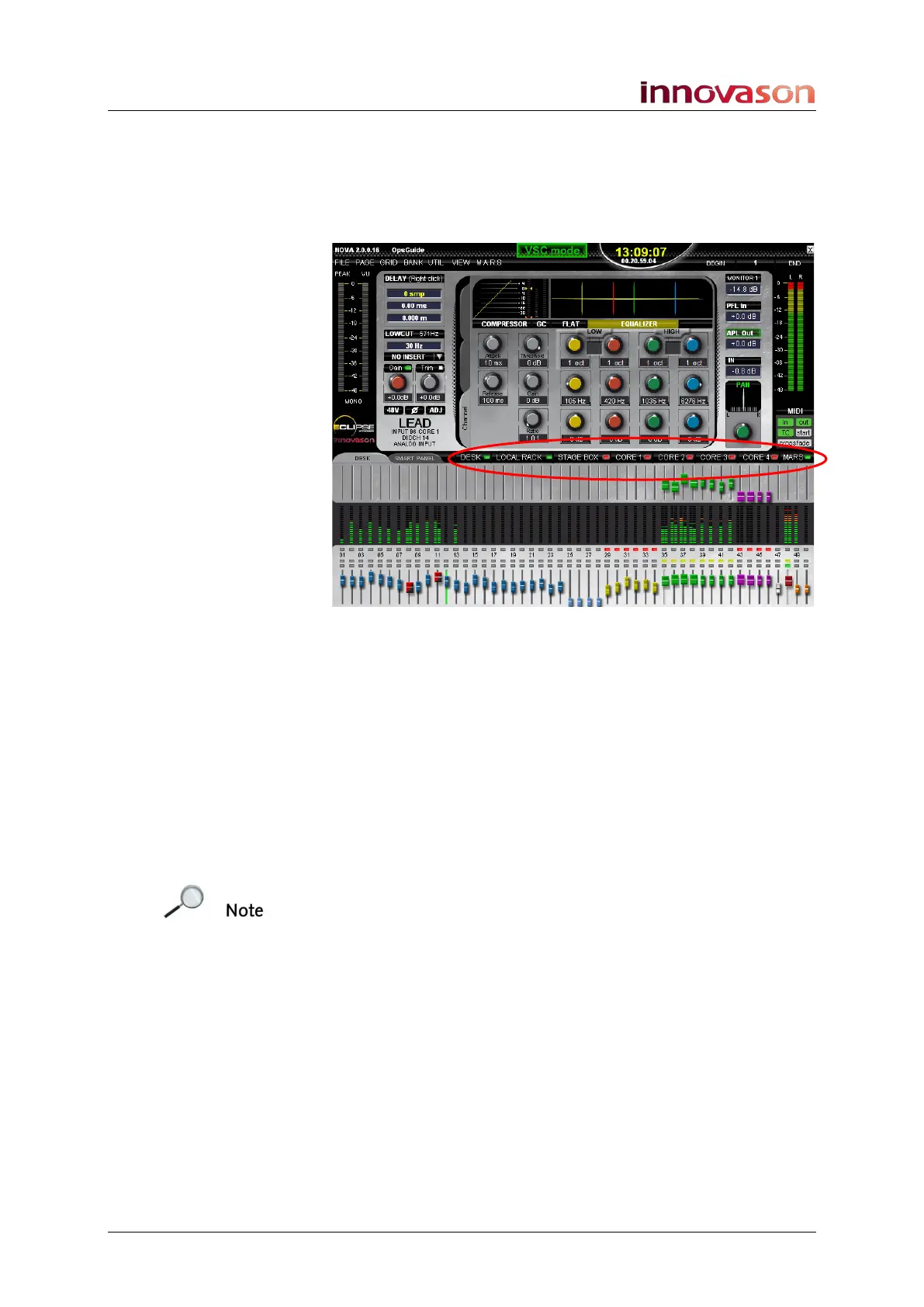
the Nova screen shows the Main Mix display. You will see the
status of the hardware components in the middle of the display:
• DESK – the control surface.
• LOCAL RACK – the console rear cards.
• STAGE BOX – a remote Muxipaire StageBox (optional).
• CORE 1 to CORE 4 – up to 4 remote DioCores (Core 1
is standard).
• MARS – the M.A.R.S. hard disk recorder.
The LEDs turn green if the device is powered and
communicating correctly.
If the status LED is red, then there is a problem; check your
connections and power.
Note that for CORE 1 to CORE 4 and MARS, the status LED
may be red if the device is not recognised on the Ethersound
network, see Page 270. Also, a third status colour (orange)
indicates a data error; check your Ethersound connections and
cable length.
The MARS LED may also be red if MARS has not booted
correctly. Reboot the M.A.R.S. control computer, see Page 496.



 To Next Page