Chapter 6: Console Configuration
Ethersound Networks
270/ 526 2.0 Eclipse User Guide
DioCore Configuration
If there are more than four DioCores connected to the network,
then you need to select which units are in use. You can check
the DioCore configuration from the PATCH INPUT display as
follows:
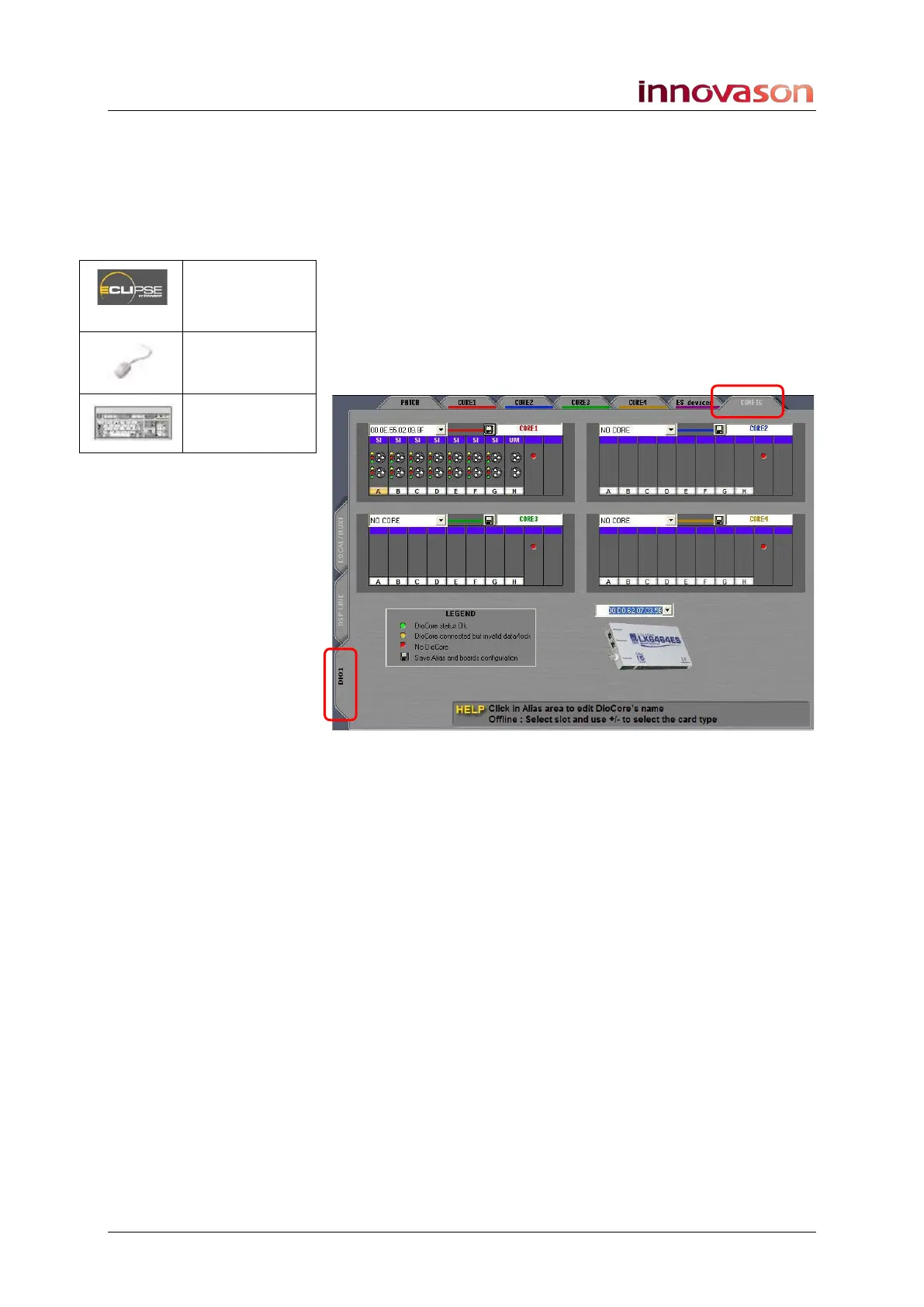
1. Select the PATCH INPUT display.
2. Select the DIO1 tab on the left followed by the CONFIG
tab at the top of the display.
The display updates to show the 4 DioCores and M.A.R.S.
saved in your configuration:
Our example shows a standard Eclipse package which includes
one DioCore unit (Core 1). You can see the MAC address of
the unit, its name (Core 1) and I/O card configuration (SI = SI-
8D3 card, UM = UM-8PO card, etc.)
If the DioCore is powered and correctly connected to the
network, then its status LED will be green. In our example, the
DioCore is not connected and so its status LED is red).
Above the picture of the M.A.R.S. Ethersound card, you should
see its MAC address. For more details on M.A.R.S., see Page
444.
Patch IN
(UTILITIES)
“GRID ->
Patch Input”
[F11]



 To Next Page