Chapter 5: Console Operation
Assignable Delays
Eclipse User Guide 2.0 197/ 526
Assignable Delays
Eclipse offers a pool of 48 delays, assignable to any input or
output (mix bus) channel. Each delay may be adjusted from 0 to
222ms.
Note that assigning a delay to a stereo LR channel uses two
delay resources; assigning a delay to stereo LRC channel uses
three resources.
Assigning a Delay Resource
On an input channel, the delay is always inserted pre-fader.
However, on an output channel you can choose whether to
insert a delay pre-fader, post-fader or both.
To assign a delay to an Input channel:
1. Select the channel (press SEL on the fader or Smart
Panel controller).
The Main Mix display updates to show the parameters for the
selected channel.
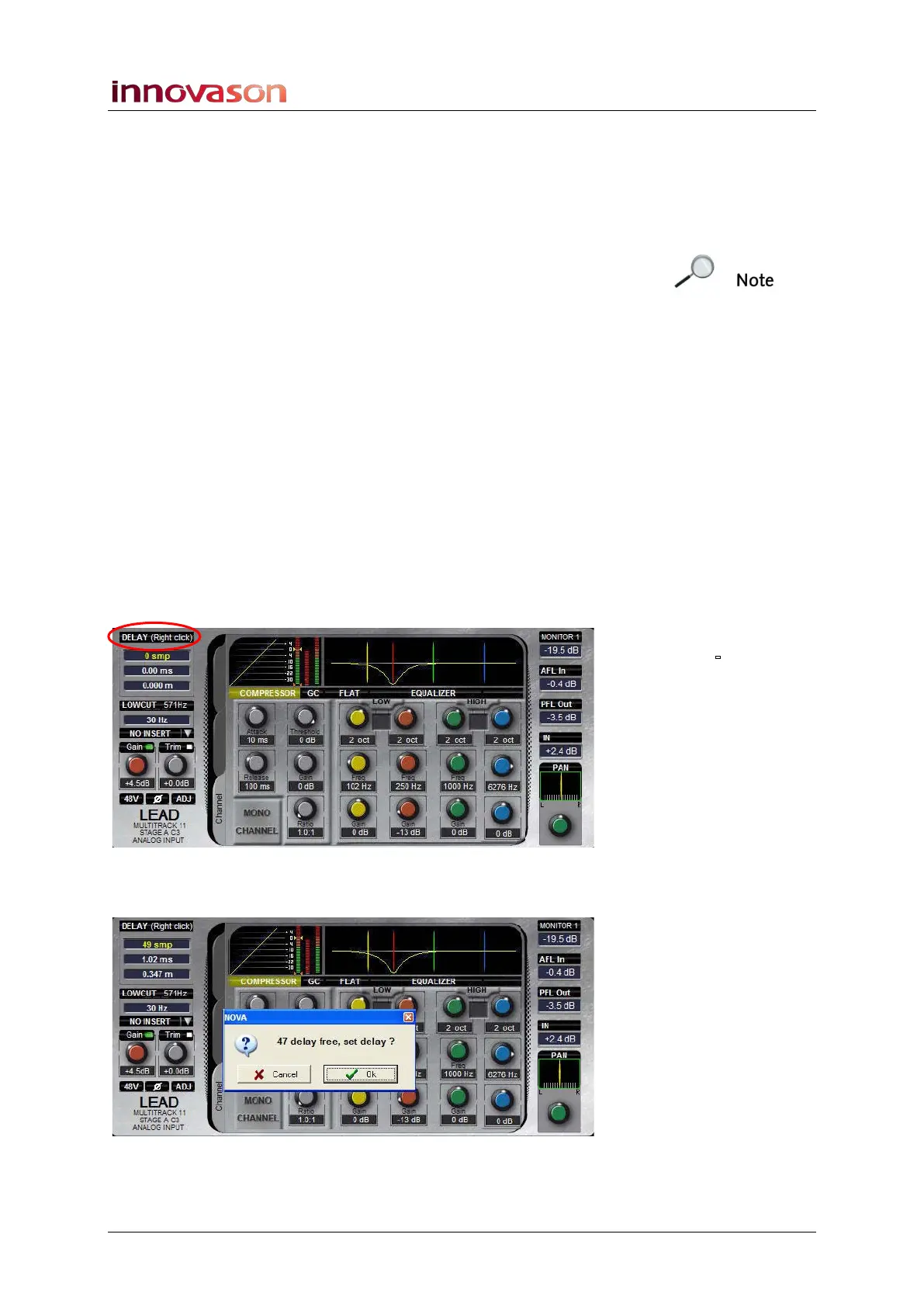
2. Press the DELAY ON button on the console, or right-
click on the DELAY box on the Main Mix display:
A pop-up appears indicating the number of delay resources
available – in our example, 47 out of 48:
3. Press OK to assign the delay.



 To Next Page