Chapter 1: Overview
Signal Flow
24/ 526 2.0 Eclipse User Guide
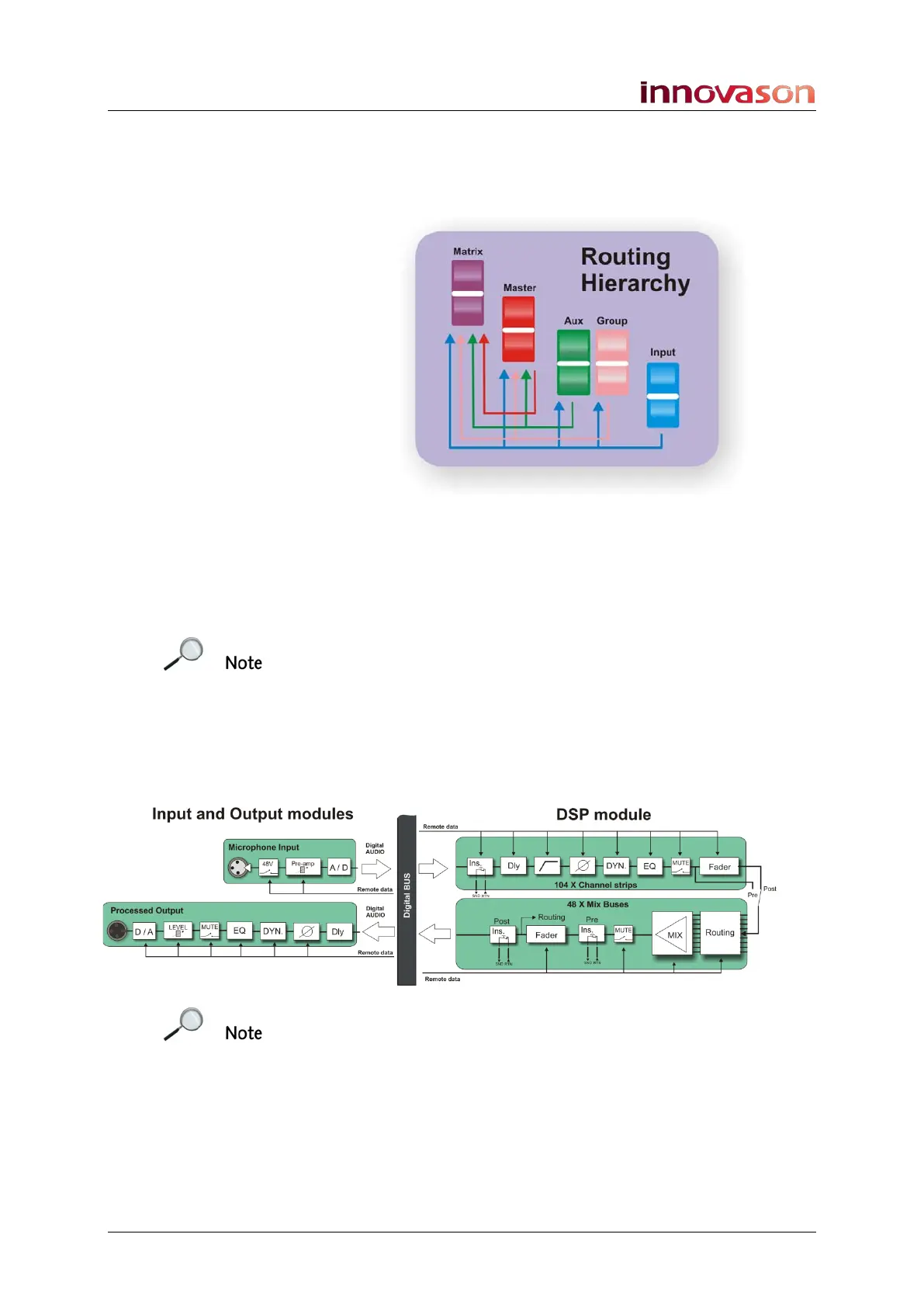
Each mix bus may be configured as an Aux, Group, Master or
Matrix output, allowing you to build your console signal flow to
meet each show’s requirements:
To apply signal processing to a mix bus you can either insert
one of 16 internal “floating” DSP paths, or route the bus to a
physical output. Every output of a UM8-PO card provides output
processing (Compressor, Gate, 8-band Parametric EQ, 31-
band Graphic EQ and Delay).
Note that there is an important difference between inserting
DSP and using a processed output. Inserted processing is
applied to everything downstream of the mix bus channel,
whereas UM8 processing applies to the physical output. This
allows you to patch say a single Matrix bus to multiple outputs
each with its own delay tim9nh 1e’/e, graphic EQ, etc.
The following diagram shows the division between processing
on the I/O cards and processing on Eclipse’s DSP module:
Note that in addition to the 48 configurable mix busses, a stereo
bus is included for monitoring.
You can find more details on input channels on Page 131, mix
busses on Page 159, output channel processing on Page 173,
and monitoring on Page 206.



 To Next Page