Home
INNOVASON
Music Mixer
Eclipse
Page 513
INNOVASON Eclipse - Page 513
525 pages
Manual
Save Page as PDF
To Next Page
To Next Page
To Previous Page
To Previous Page
Loading...
Appendice
s
Appendix
B: Plug
-
in
Effects
5
14
/
526
2.0
Ec
li
pse
User Guide
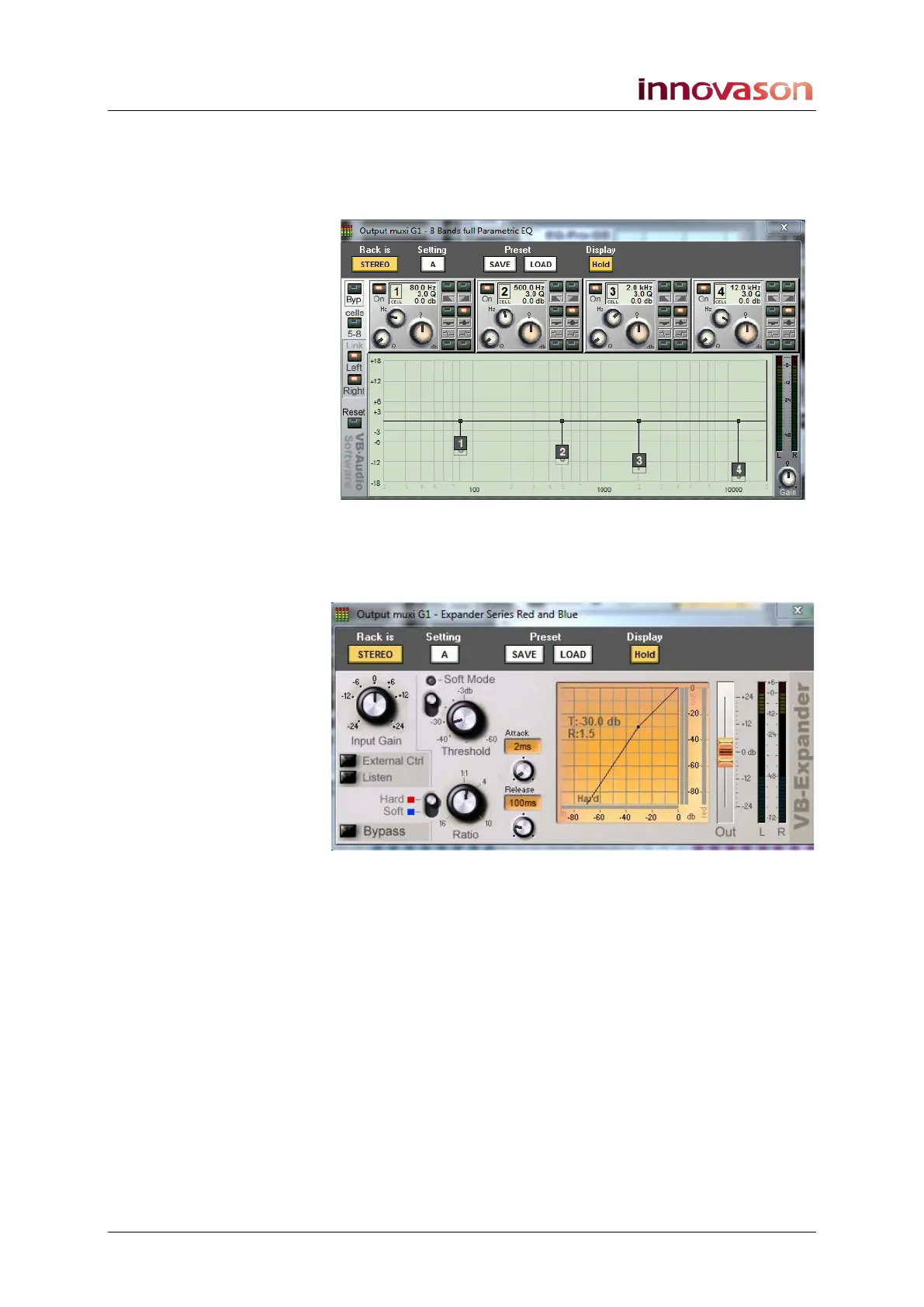
The EQ Pro
G8
An 8
-
band EQ
where each band can be paramet
ric, shelving, a
Notch, a high pass filter
or low pass filter:
The Expande
r
An Expander wi
th Hard or Soft behaviour:
512
514
Table of Contents
Main Page
default chapter
3
New in Nova 2
3
Table of Contents
5
Table of Contents
6
About this Manual
10
How to Use this Manual
10
Conventions
11
CHAPTER 1: OVERVIEW Welcome
12
Control Surface Overview
12
System Overview
17
Signal Flow
22
Channel Types
24
Smart Faders (Sfads)
25
Nova Software
26
Internal Effects (FM-8VB Card)
28
Console Reset and Automation
29
The Standard Template
31
Chapter 2: Installation
32
Introduction
32
Before Installing this Device
33
The Standard Eclipse Package
34
Handling and Transportation
39
Dimensions and Weight
40
Ambient Conditions
42
Power
43
System Connections
44
Audio Connections
51
Switching on the Power
54
Checking the Hardware Status
55
Chapter 3: Operating Principles
56
Introduction
56
Fader Strips and the Smart Panel
57
Fader Strips
58
Smart Panel "Strips
62
The Nova Touch-Screen
64
Routing, Sends and the SEL Button
73
Nova Operating Principles
80
Chapter 4: Getting Started (the Standard Template)
87
Introduction
87
Loading a File
88
Interrogating the Fader Strips
91
Interrogating the Smart Panel
92
Signal in to out
93
Default Patching
94
Default Bus Routing
98
Your First MIX
99
Saving Your Settings
117
Chapter 5: Console Operation
118
Introduction
118
Fader Strips and the Smart Panel
119
Fader Strips: User Pot Assignment
119
Fader Strips: Pot Configurations
122
Input Channels
130
Smart Faders (Sfads)
148
MIX Busses
158
MIX Bus Sends
162
Output Channels
172
Stereo Channels
183
Vcas
192
Assignable Delays
196
Labels
199
Monitoring
205
Talkback
217
Chapter 6: Console Configuration
219
Introduction
219
The Personal Console Builder
220
Digital Patching
229
The Patch Input Display
230
The Patch Output Display
246
The Patch Direct Display
255
Ethersound Networks
262
The Muxipaire Stagebox
284
Patch Grids: Input and Output Names
286
Default Patch Memories
287
Internal Effects (the FM-8VB Card)
288
Inserts
308
Fast Configuration
317
User Defined Panel
321
Chapter 7: Reset and Automation
340
Introduction
340
Files and Pages
341
File Management
343
Page Management
355
Sequence Playout
362
The Play List (Automation)
363
Automation Enable Buttons
380
Processing Libraries
381
Personal Mixes
386
Chapter 8: Utilities & Preferences
391
Introduction
391
FLAT (Parameter Reset)
392
Copy and Paste
393
Over Ram
398
Relax (Automation Isolate)
403
Request Mode
405
Pre/Pan
407
Link Cards
407
Linking
408
Offline Mode
422
Test Signal (Oscillator)
424
Fader Start
426
General Preferences
427
Lock (Password Protection)
431
Help (Keyboard Shortcuts)
433
About
434
Console Shutdown (Quit)
435
CHAPTER 9: OFFLINE CONFIGURATION Introduction
436
Saving and Importing to the Console
437
Mouse and Keyboard Operation
438
Building a Configuration
440
Adjusting MIX Parameters
441
M.a.r.s
443
Introduction
443
Overview
444
Connecting M.A.R
444
Audio Routing
445
Playing Back the Demo Project
447
Transport Control
452
Recording
464
Advanced Functions
472
Project Management in M.A.R
481
Troubleshooting
495
Replacing the M.A.R.S. Hard Disk
500
Chapter 11: Technical Procedures
501
Using M.A.R.S as a Backup for Nova
501
Installing a New Release of Nova Software
502
Resolving Communication Issues
505
The System Setup Window
506
Appendices
507
Appendix A: the Standard Template
507
Appendix B: Plug-In Effects
511
Glossary
518
Technical Data
520
Control Surface
520
Audio Rack
521
I/O and FX Cards
521
Options
521
Index Directory
522
Related product manuals
INNOVASON SY80
244 pages



 To Next Page