8 ADDITIONAL FUNCTIONS DACS-W Operation Manual
8-18
8.4.2.17 Output Signal 1 ON Time
This item defines the length of time Output Signal 1 is output. The setting range is 0 to 29999ms. If
30000ms is set, signal will be output continuously.
Follow this procedure to set the parameter.
8.4.2.18 Output Signal 2 ON Time
This item defines the length of time Output Signal 2 is output. The setting range is 0 to 29999ms. If
30000ms is set, signal will be output continuously.
Follow this procedure to set the parameter.
1. Display the Reject Setting menu.
2. Press or to align the cursor with
"Double Item Signal".
3. Press .
The Double Item Signal menu appears.
4. Set the output signal via the ten-key pad.
An asterisk (*) will appear below the set
item.
5. If this item is reset, the asterisk will disappear.
(Setting cleared)
6. Press .
The setting for this parameter will appear on
the Reject Setting menu.
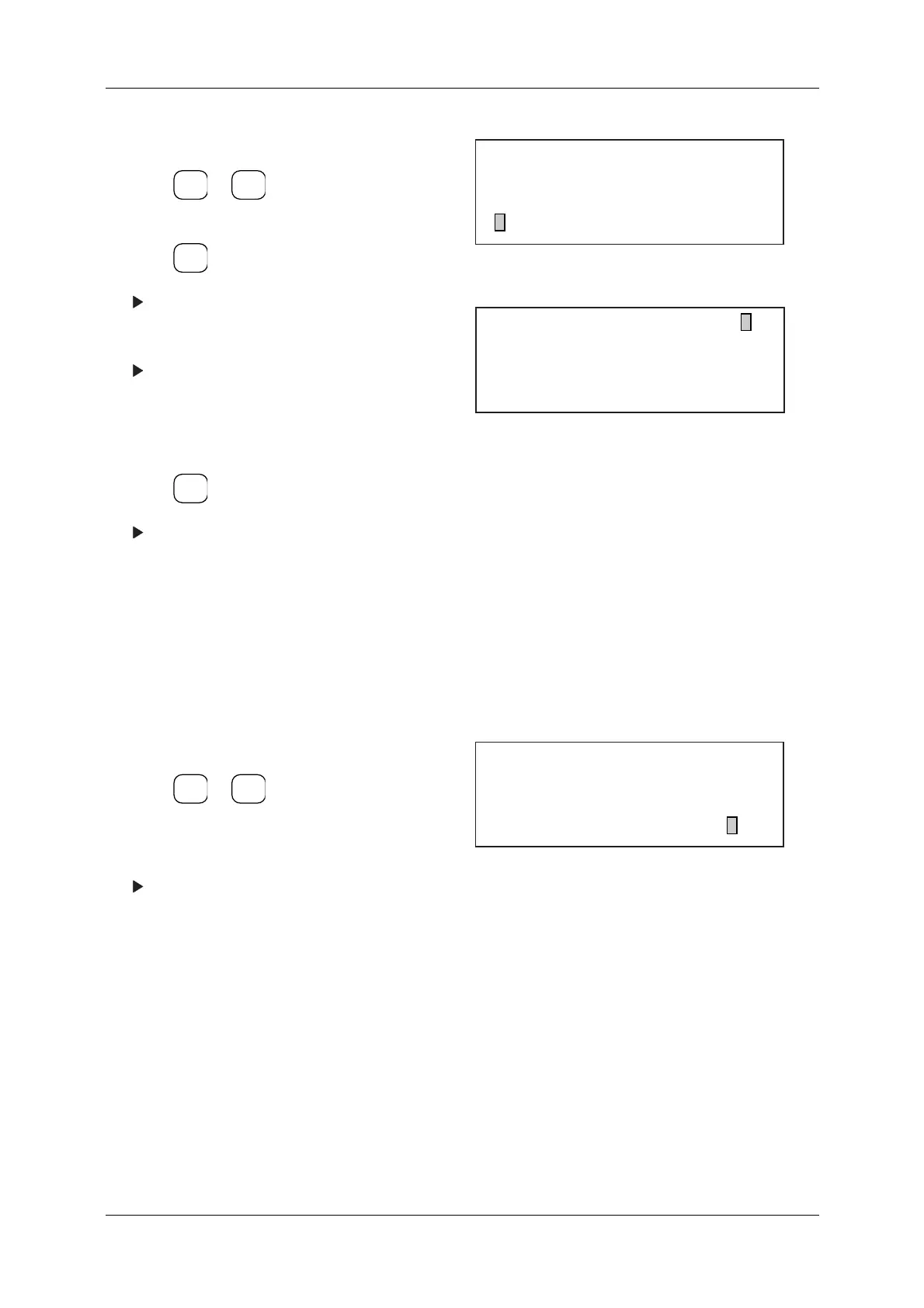
Figure 8-40 Reject Setting Menu
Figure 8-41 Double Item Signal Menu
1. Display the Reject Setting menu.
2. Press or to align the cursor with
"Output Signal 1 ON Time".
3. Enter the ON Time value in milliseconds.
The set ON Time is displayed.
Figure 8-42 Reject Setting Menu
ENTER
▼
▲
SELECT
ITEM
EXIT
[Reject Setting]
* Ext.2 Output Signal OFF
* Zero Error Signal OFF
* Dobule Item Signal OFF
[Dobule Item Signal]
Signal No. : 1 2 3 4 5
Output Pattern :
No.5 : Reject Buzzer Signal
ENTER
▼
▲
[Reject Setting]
* Zero Error Signal OFF
* Dobule Item Signal OFF
* Output Signal 1 ON Time 200 ms



 To Next Page