DACS-W Operation Manual 5 NORMAL OPERATIONS & FUNCTIONS
5-17
5.6 Site Engineer Level Functions
This section explains the procedures for operating the Site Engineer Level functions.
5.6.1 Preset Setting
The preset setting function is used to set the required weighing parameters prior to starting production.
One set of the following 12 preset parameters is registered for each product:
Reference Weight, Upper Limit, Lower Limit, Product Length, Product Name, Product Code, Timing
Setting, Over Weight Accept, Metal Detection, Preset Tare, Dynamic Calibration, and Continuous N/G
Count.
There are 100 settable preset numbers,No.0 to No.99.
• The following setting items: Over Weight Accept, Metal Detection, Tare and Dynamic Calibration are only
available when set to ON in the System Configuration menu. (See "8.4.3 System Configuration Setting")
• Although there are 12 preset parameter items in this menu, only 3 are visible on the display at one time. To Access
the other items by scrolling the menu, press the or keys.
5.6.1.1 Reference Weight
This weight is set as a standard reference point to judge whether a pack is over, under or proper weight.
The setting is entered in units of 0.1g.
Follow the procedure described below to set the Reference Weight.
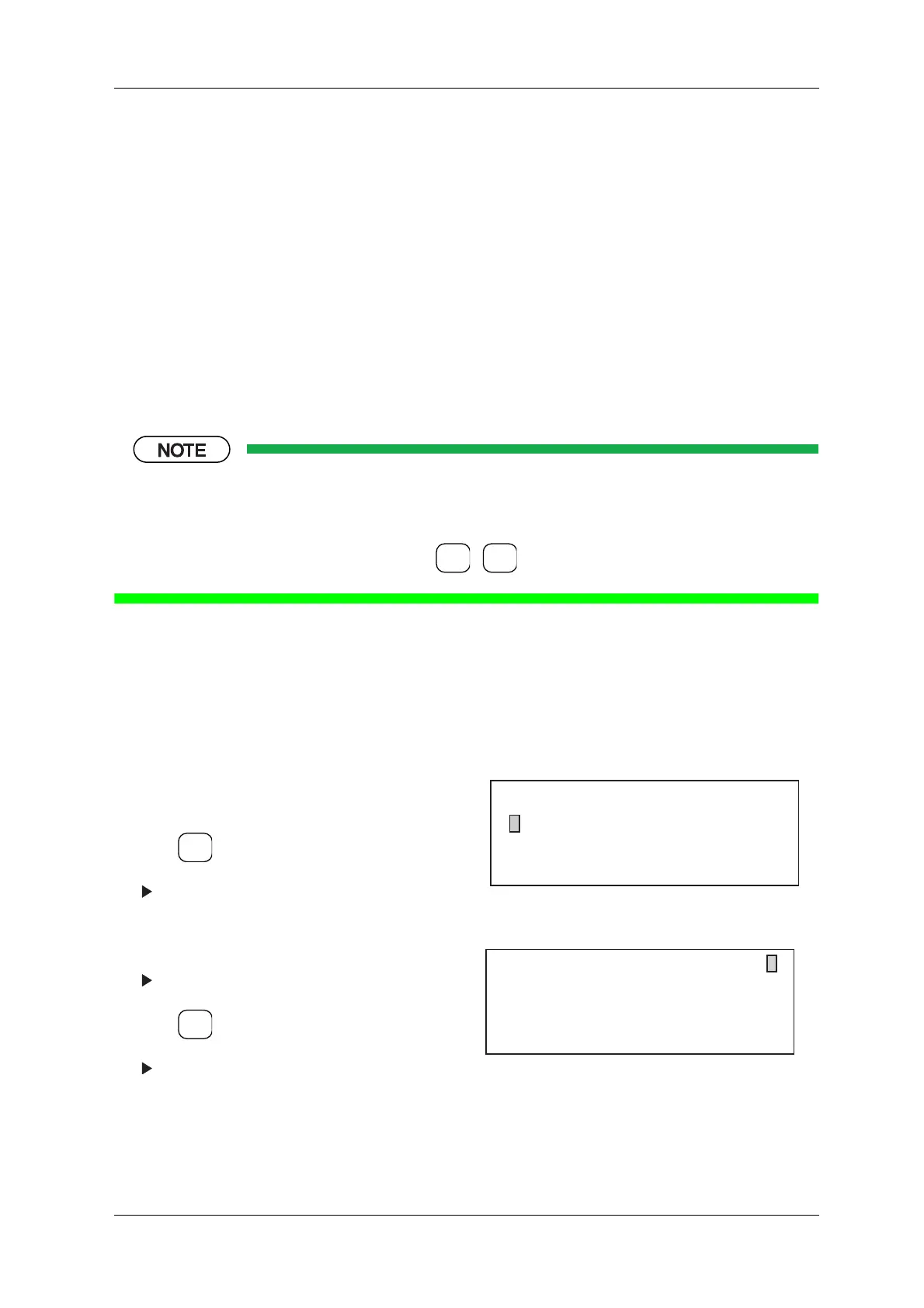
1. Call up the Level 1 Setup Menu. (See "5.4.2
Changing to the Site Engineer Level")
2. Press .
The Preset Number menu appears.
3. Enter the desired preset number via the ten-key
pad.
The selected preset number menu appears.
4. Press .
The Preset menu appears.
Figure 5-30 Setup Menu (Level 1)
Figure 5-31 Preset Number Menu
ENTER
▼
▲
SELECT
ITEM
SELECT
ITEM
[Setup Menu]
* Preset 0
* Access Level Change Level 1
* Statistics & Print Setting
[Preset Number]
0: 80.0 Candy 4:300.0 Chocolate
1: 90.0 Candy 5:120.0 Gum
2: 100.0 Candy 6:200.0 Hound's tooth
3: 100.0 Cookies 7:150.0 Licorice
Enter Preset No.
2



 To Next Page