Diagnostic aids 3-33
5062
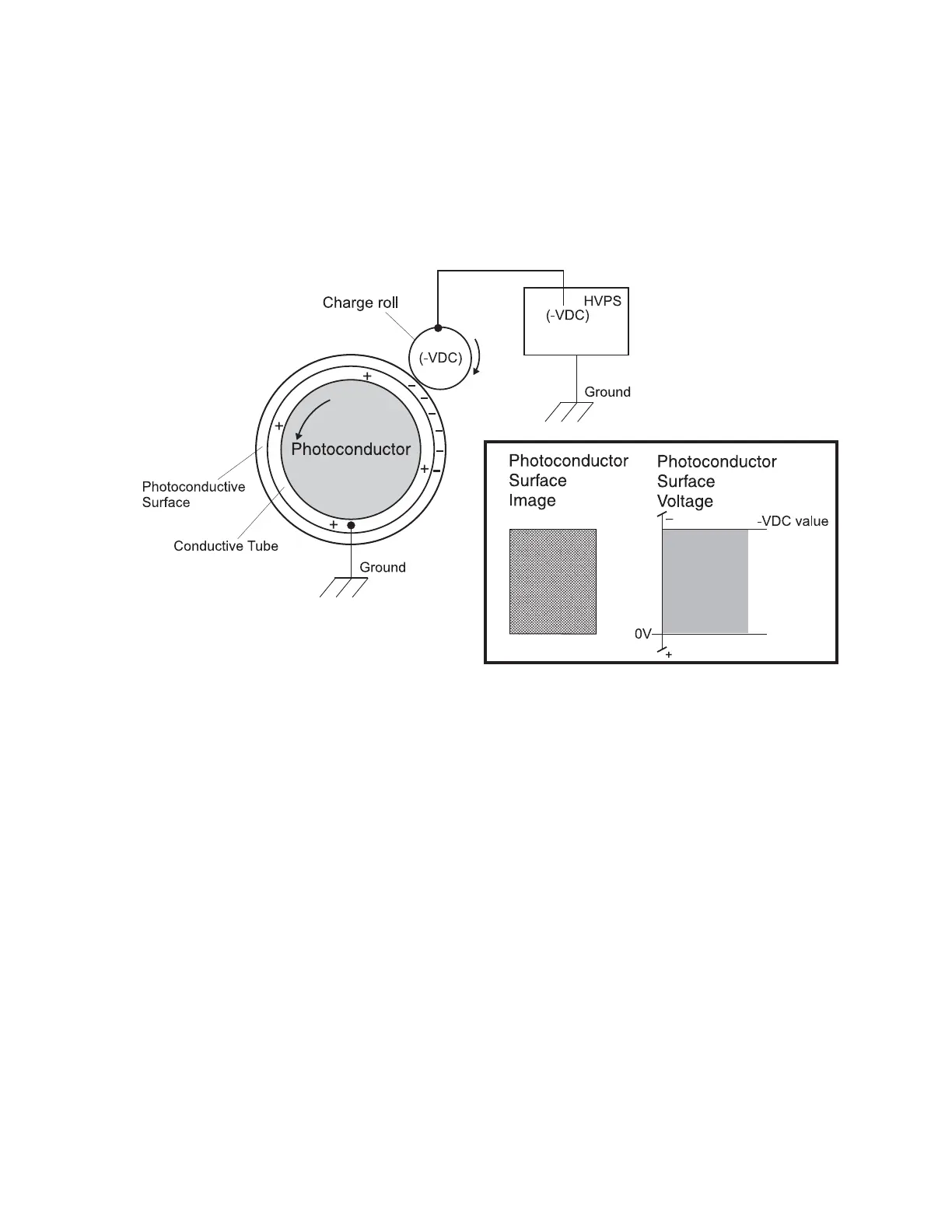
Step 1: Charge
During the charge step, voltage is sent from the HVPS to the charge roller beside each of the four
photoconductors. In this printer, the charge roller is part of the photoconductor unit in the print cartridges.
The charge roller puts a uniform negative charge over the entire surface of the photoconductor to prepare it for
the laser beam.
Service tips
• If the surface of the charge roller is damaged (such as a nick or pit), it will cause the charge to be
uneven on the photoconductor. This will cause a repeating mark on the printed page. Check the
service manual for the repeating marks table.
• If the charge roller is severely damaged, the surface of the photoconductor will not be charged
properly and heavy amounts of toner will be deposited on the photoconductor. This will cause the
printed page to be saturated with 100% of each color. The imaging basket will need to be replaced
sooner.



 To Next Page