4.5 Sequence Operation
BP4610
4-41
Operation procedure <2>
The settings of the step number (STEP), step time (TIME), DC voltage (DC VOLT), DC current (DC
CUR), superimposed AC voltage (AC VOLT), superimposed AC current (AC CUR), frequency
(FREQ), jump step (JUMP STEP), jump count (JUMP NUM), and branch (BRANCH0/BRANCH1),
are performed with the following procedure.
In the following example, the step time (TIME) is set.
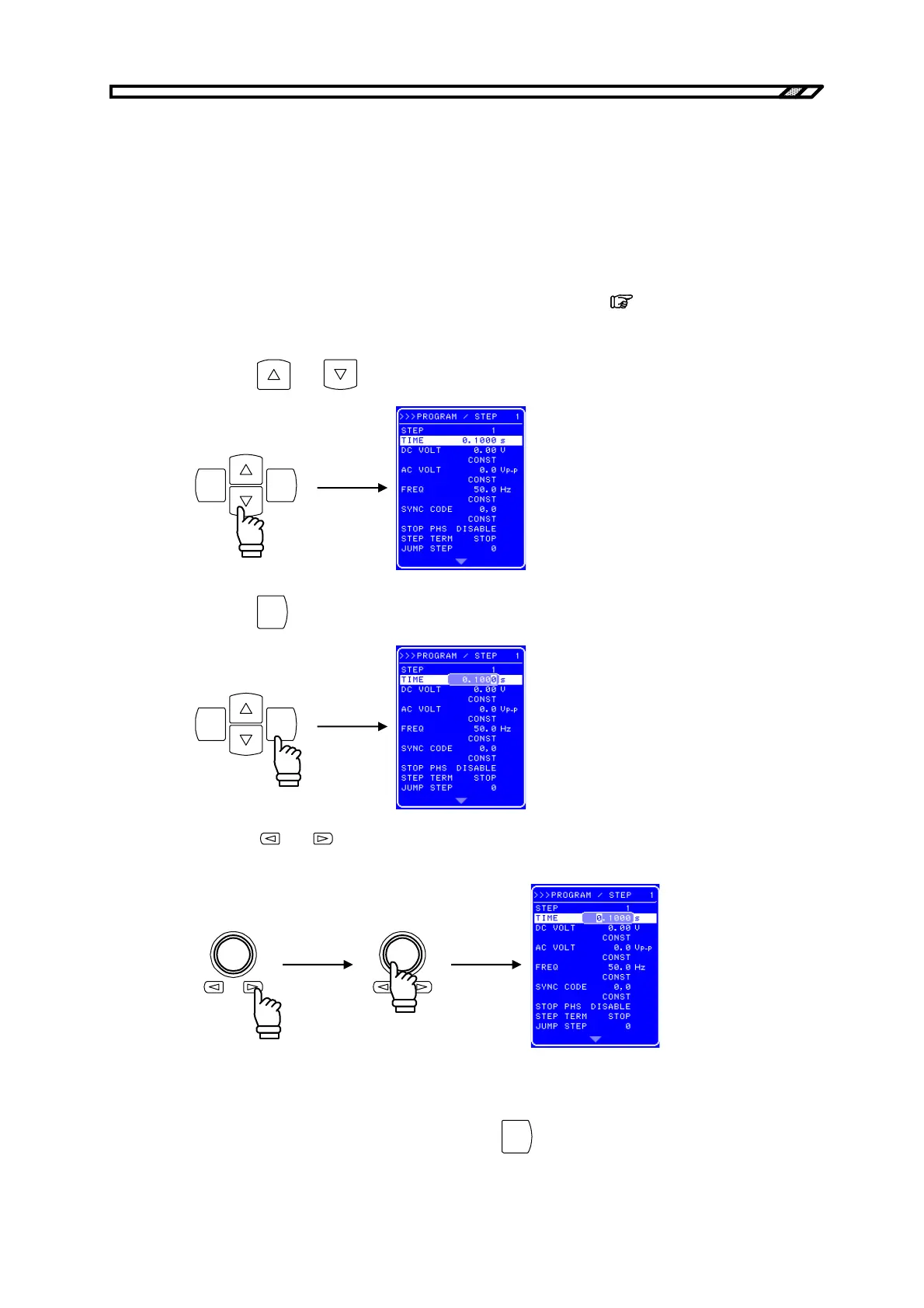
<1> Open the SEQUENCE screen and display the PROGRAM screen.
For the procedure up to the display of the PROGRAM screen,
refer to “4.5.2 Setting of
sequence”.
<2> Press the
and key to move the cursor to [TIME].
ENTERCANCEL
<3> Press the
ENTER
key to display the Modify box.
ENTERCANCEL
<4> Press the
and keys to move the cursor to the digit to be changed and then turn the
[MODIFY] dial to set the desired value.
<5> In the same way, set all the digits.
<6> Once all the digits have been set, press the
ENTER
key. This enables the setting values and
completes the step time setting procedure.



 To Next Page