APPENDIX F – Obsolete Features OMRON
Page 324 Release 2.0
Both programs (extension .EXE) or Dynamic Link Libraries (extension .DLL) are listed in the Files
of Type field.
The Browse dialog functions identically to the File Open dialog described in chapter 6, Projects
except the file list offered shows icons as opposed to pages.
1, 2, 3…
1. On return to the Change Icon dialog, select the required icon from those
presented.
2. Change the icon’s label (if required).
3. Click the Open pushbutton to return to the Insert Object dialog.
4. On return to the Insert Object dialog click the OK pushbutton to return to
the current page and embed the selected object into it at the current insertion
point.
Creating an Object From a File
Creating an object from a file allows linking or embedding of objects created at sometime in the past.
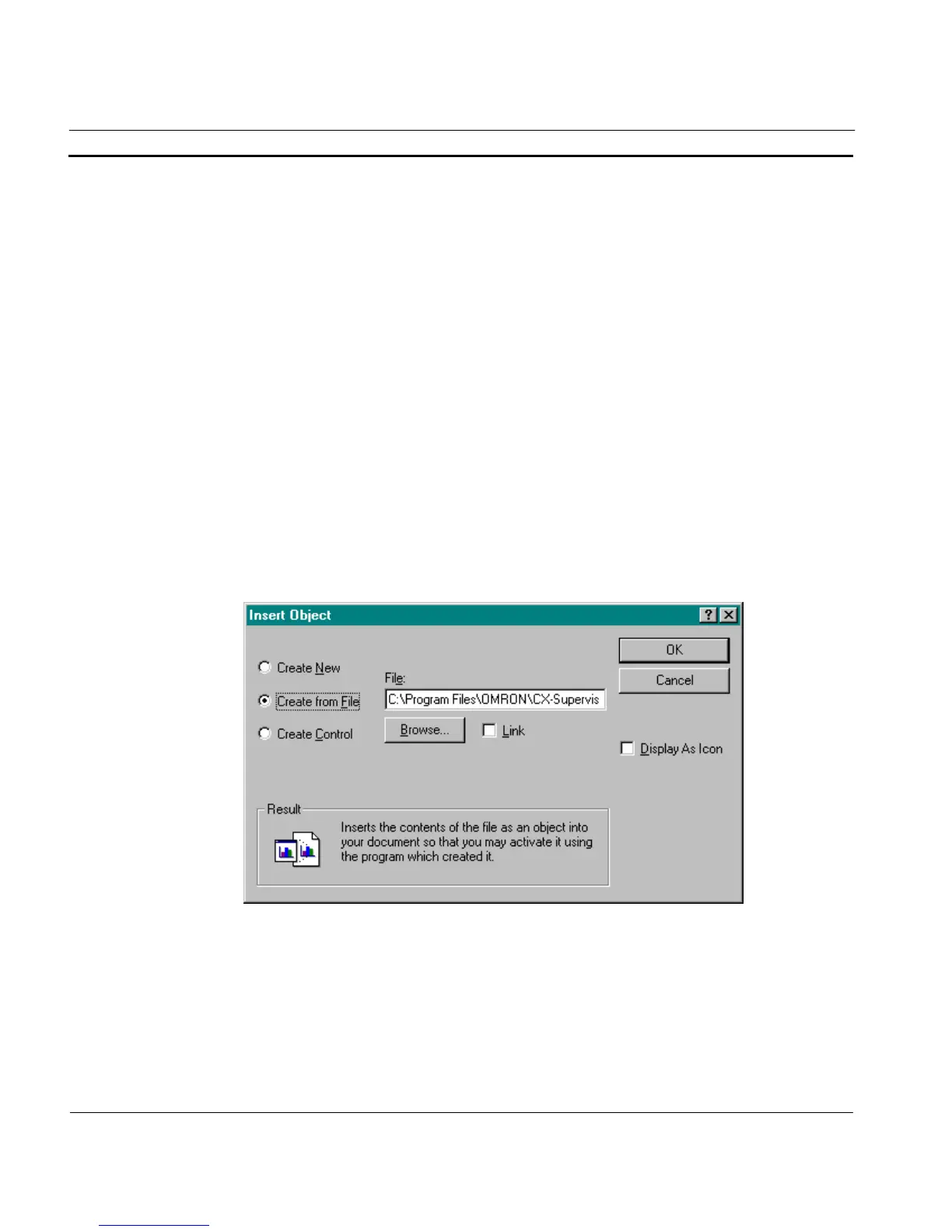
As before, select Insert New Object from the Edit menu, and the Insert Object dialog is displayed.
Click the Create From File: setting and the dialog changes to a format similar to that of the
following:
Type the full path of the file containing the object to be inserted, ending with the full file name, into
the Create from File: field. To locate an existing file name or a different path, click the Browse
pushbutton to display the Browse dialog.
A Browse dialog similar to that used for changing an object’s icon is displayed, the difference being
that the List Files of Type field has a single entry of All Files (extension .*).
1, 2, 3…
1. Use the Look in: field to navigate to the appropriate location.




 To Next Page