OMRON APPENDIX F – Obsolete Features
Release 2.0 Page 325
2. Select the file from the list offered and click the Open pushbutton to return
to the Insert Object dialog.
3. On return to the Insert Object dialog click the OK pushbutton to return to
the current page and embed the selected object into it at the current
insertion point.
To display the object as an icon, follow the procedure detailed in the previous chapter and click the
OK pushbutton to return to the current page and embed the selected object, in icon form, into it at the
current insertion point.
It is often more appropriate to link to an object rather than embedding it in the current page. By
linking to an object rather than embedding it CX-Supervisor always has access to the most up-to-date
copy of the object every time the page containing it is opened.
Placing a check mark in the Link field forges a link between the page and the file containing the
object.
All other activities are carried out in an identical manner to those explained previously.
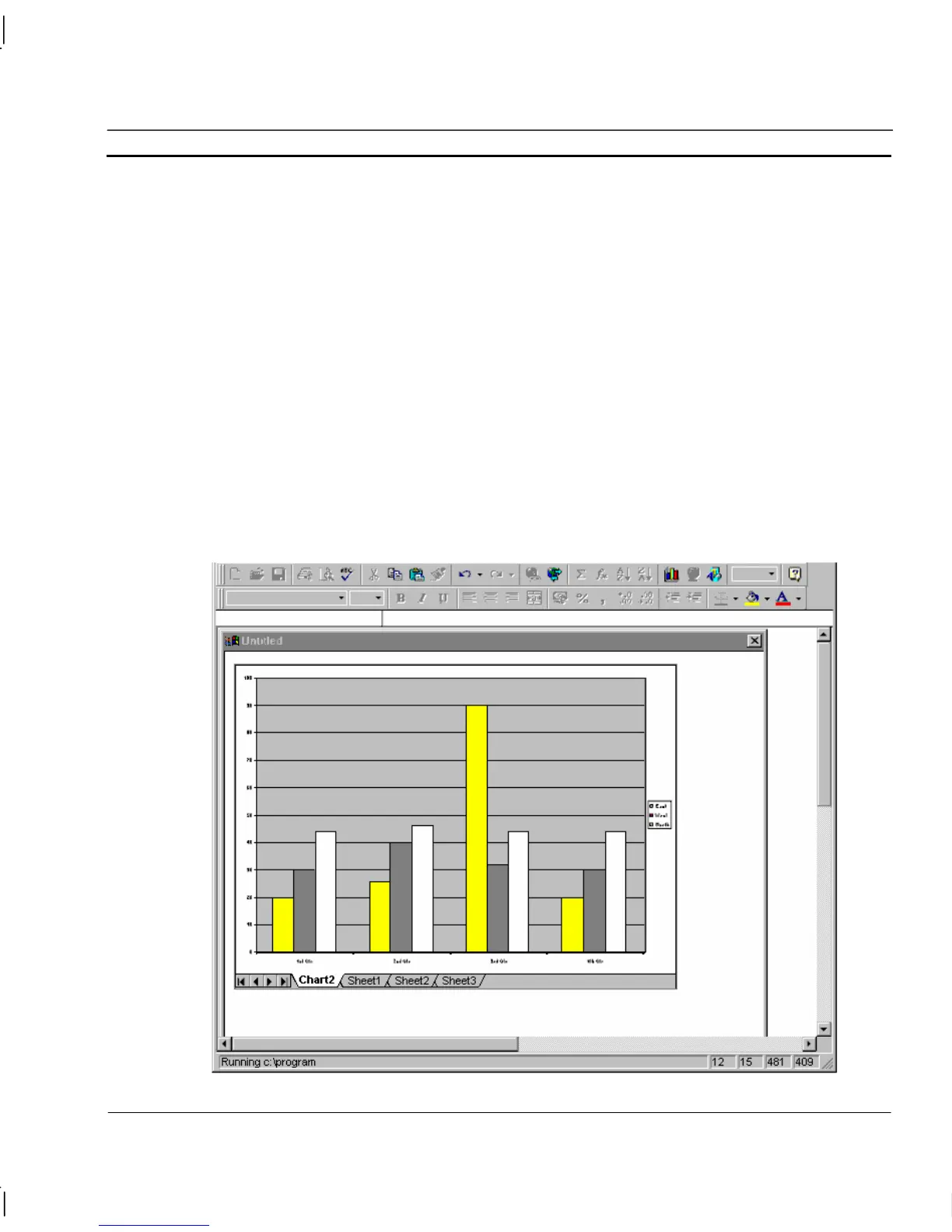
The following illustrates a Microsoft Excel Chart object which has been inserted in a page:




 To Next Page