91 / 374
SOCT User Manual Version 10.0 rev. A
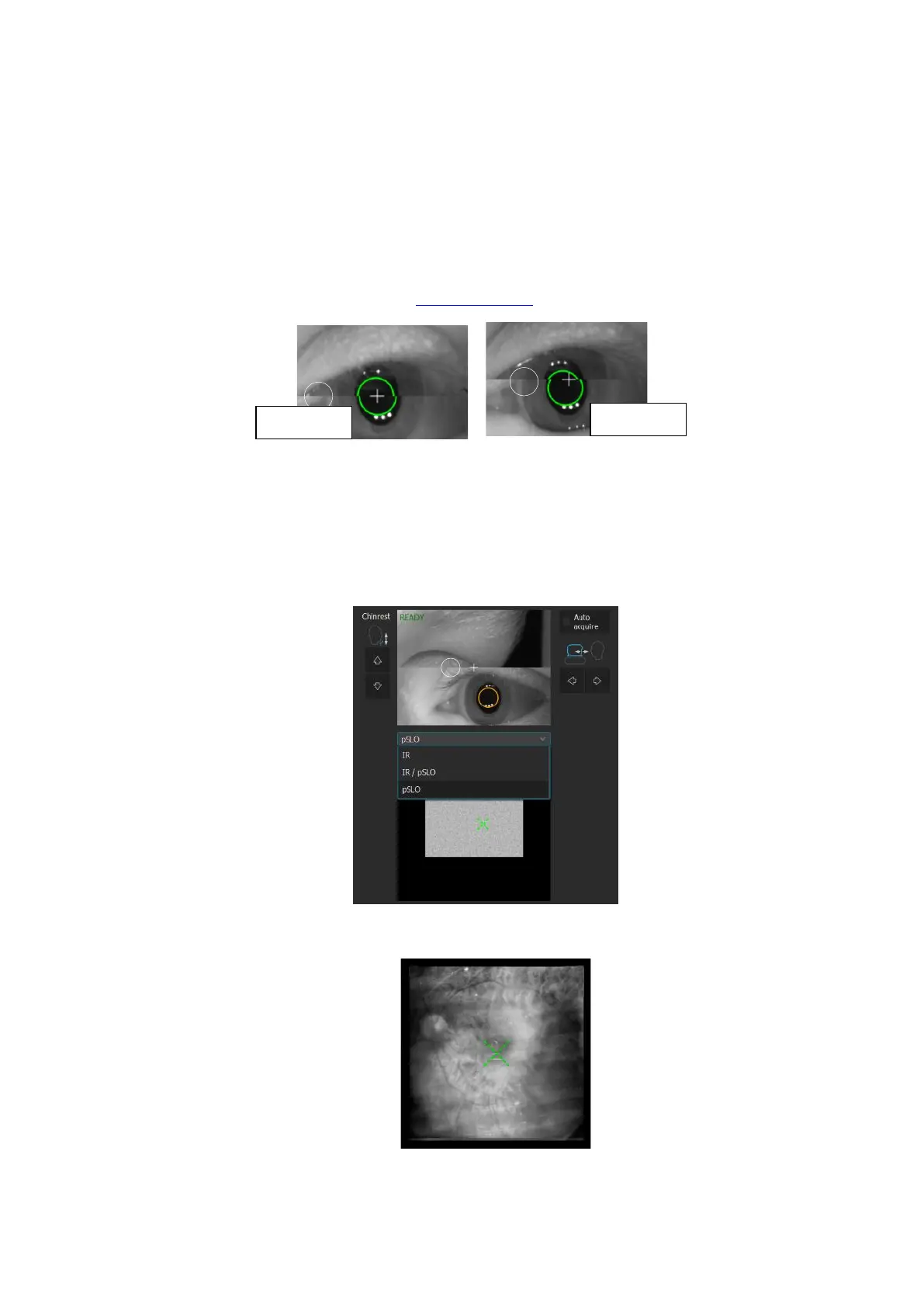
4. The software aligns the position of the scanning head. The operator has to
a) Verify the position of the scanning head in Z direction. Two pupil images should create
one plane.
b) Verify the pupil size (a white circle identifies the minimum pupil size). If the pupil is
too small, dim the light or optionally dilate the pupil.
c) If necessary, correct the alignment of the pupil position. Make sure that the cross on
the Eye preview window is in the center of the pupil. You may correct the pupil
position as described in chapter 7.5 Eye preview.
Figure 54. Eye preview window and pupil position
d) To verify the correctness of the fundus alignment position, change the Live fundus
preview to IR to verify the optimal fundus alignment.
NOTE: When the IR preview is ON, the OCT signal is not visible.
Figure 55. Live fundus preview modes
Figure 56. Live fundus preview IR mode



 To Next Page