Because RFL™ and Hubbell® have a policy of continuous product improvement, we reserve the right to change designs and specifications without notice.
4. E1 Signaling
E1 Signaling can be set to CCS or CAS. If this is a T1 network, the E1 Signaling setting is ignored. If
this is an E1 network, set the E1 Signaling to match the local E1 multiplexer setting. For example, if
the local E1 multiplexer is set to CCS, set the E1 Signaling to CCS. If the local E1 multiplexer is set to
CAS, set the E1 Signaling to CAS. This locks out the use of time slot 16 for CAS (channel associated
signaling).
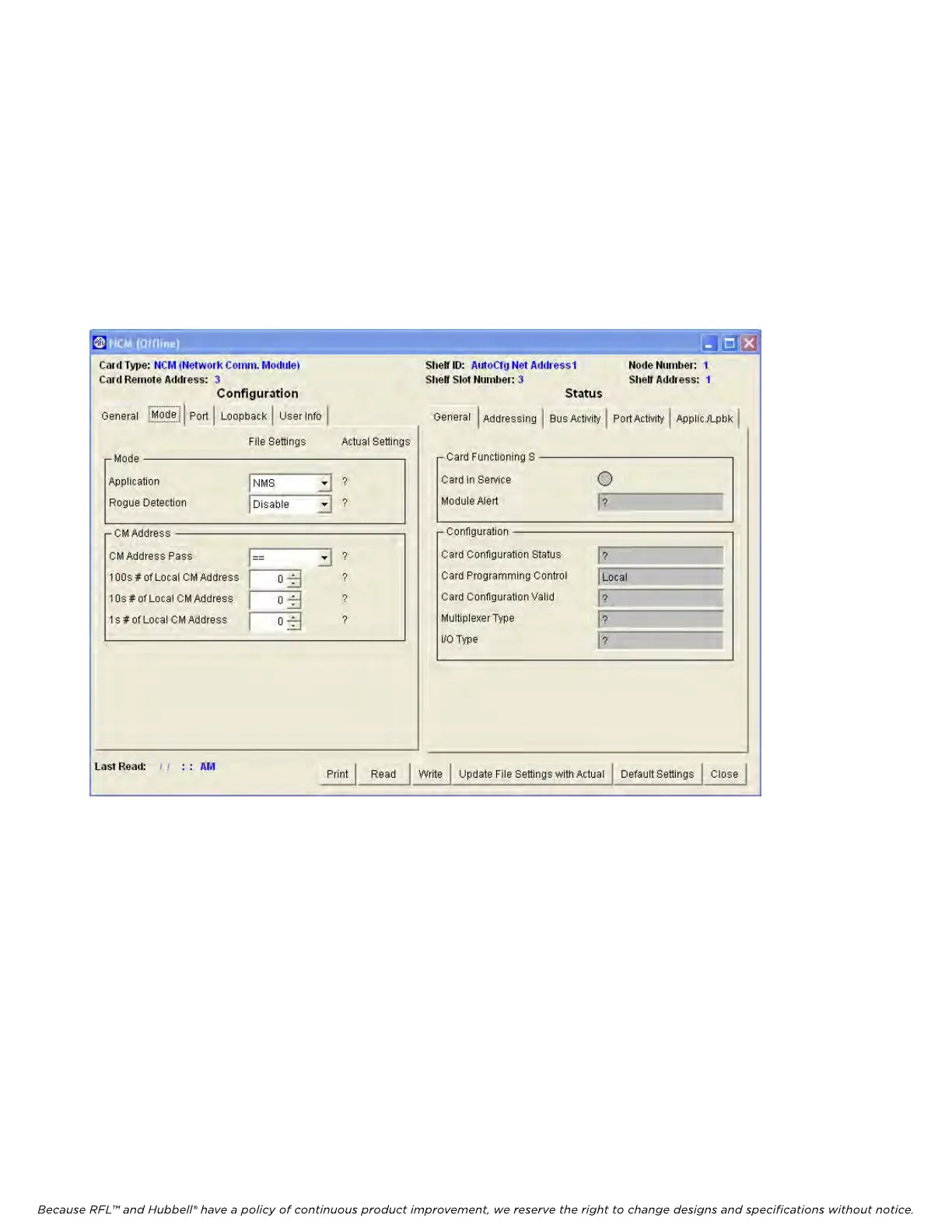
After all settings are made on the General page (Figure 12), click on the Mode tab to get to the Mode
window as shown in Figure 13. The Mode window has two major selections, Mode and CM Address.
Set the local CM address first.
Figure 13. NCM Mode Configurations and Status window for Node 1
MODE
1. Application
There are three basic types of network application:
1. Broadcast mode
2. NMS mode
3. A combination of Master, D&I Slave and End Slave modes.
Each of these modes is described in the following table.
RFL NCM RFL Electronics Inc.
November 1, 2012 35 (973) 334-3100



 To Next Page