Because RFL™ and Hubbell® have a policy of continuous product improvement, we reserve the right to change designs and specifications without notice.
Chapter 2 - Installation
SNMP Access Gateway User’s Manual - v1.0 -- 11/99 - Page 4
2.3 - Serial Ports
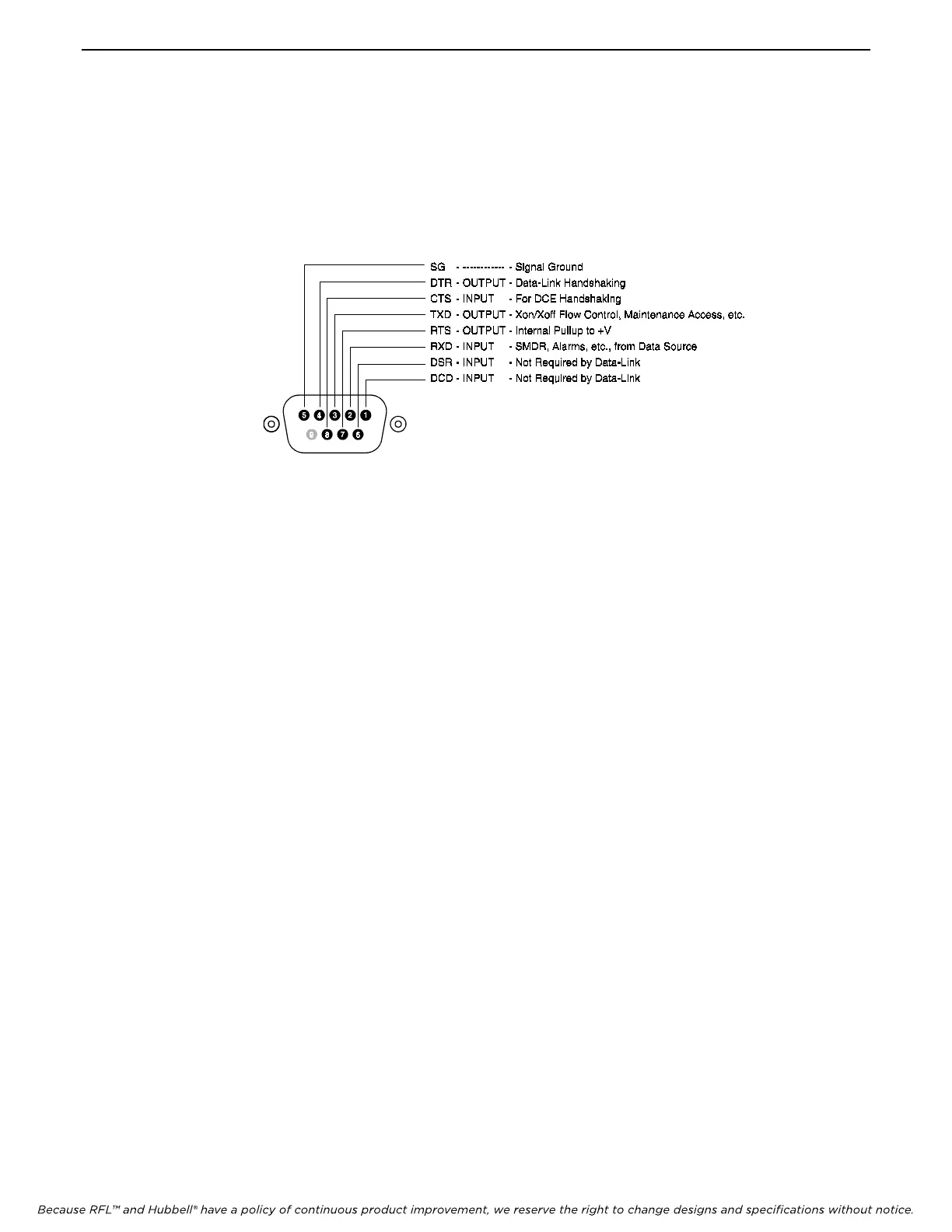
The I/O 2 serial port is configured as a DTE port using a male, DB-9 connector. The I/O 1 serial port is configured
as a DTE port using an RJ-12 connector which is similar to that used on the COM ports of an IBM-compatible
personal computer. Figure 3 shows the pin configuration of the I/O 2 port. Figure 2B shows the pin configuration of
the I/O 1 port.
Figure 3. - SNMP Access Gateway DB9 Pin Out
The main pins which must be noted are the received data signal line on pin 2 and the signal ground on pin 5. When
receiving serial data, these are the only two connections which the SNMP Access Gateway needs. However, if pass-
through access to connected serial devices is required, then the transmitted data signal line on pin 3 must be
connected as well. Additionally, some equipment may require an RS-232 high signal on one or more of its signal
lines in order to transmit or accept data. Consult the manual for your other equipment as needed.
The DCE, DB-9 female cable ends which mate with the serial port connectors of the SNMP Access Gateway will
often have a pair of screw-down cable locks. These cable locks should be used to assure a solid connection of the
cable with the SNMP Access Gateway serial port connectors.
2.4 - Ethernet
The ethernet 10BaseT connector is an RJ-45 connector. This connector is the commonly used 10BaseT connector,
which would connect the SNMP Access Gateway to an ethernet hub or switch.



 To Next Page