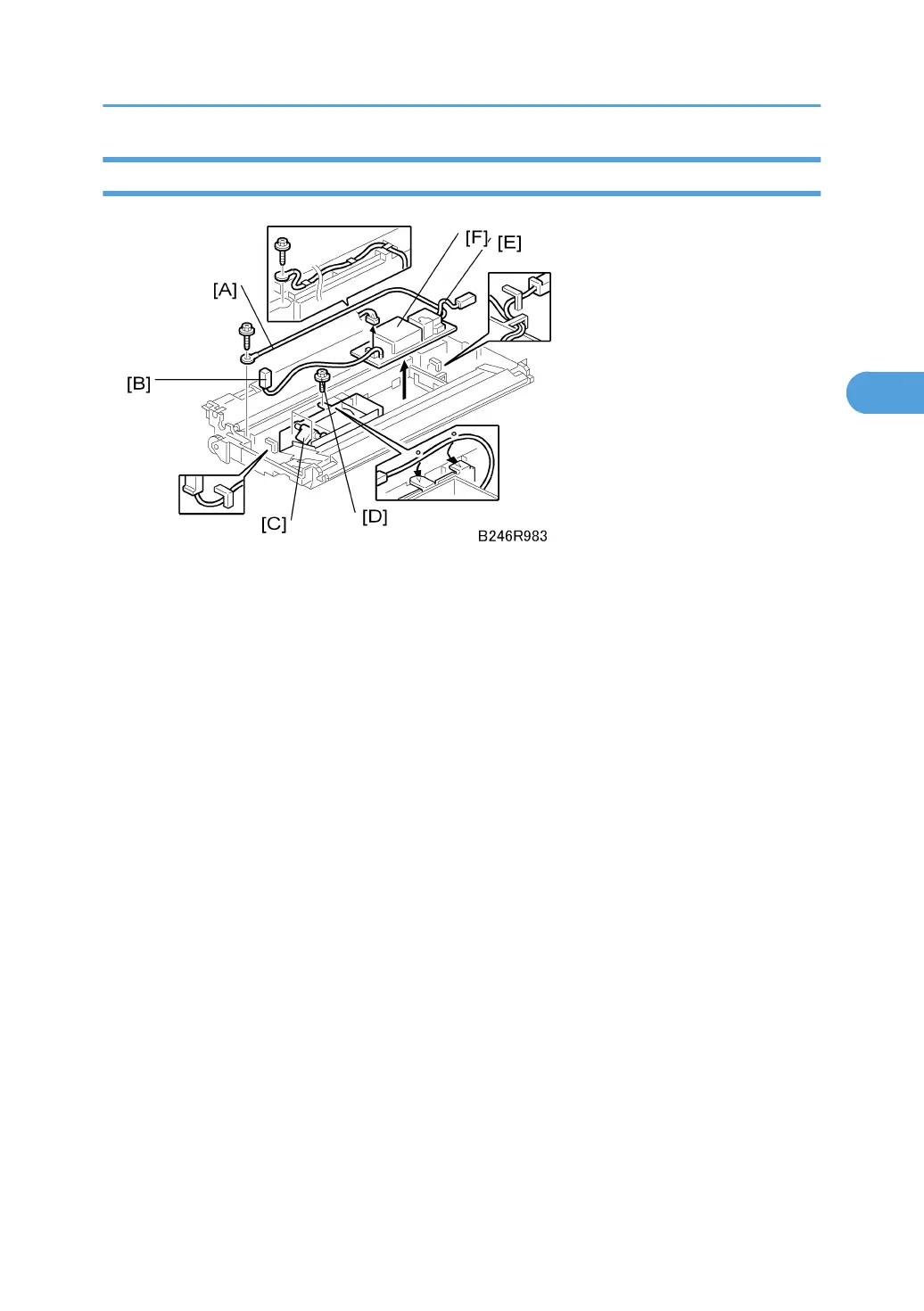
Transfer Power Pack
Remove:
• Transfer belt unit . See "Transfer Belt Unit Removal"
1. Wire ( x 1) [A] (all wire guides)
2. Ground terminal wire [B] (wire guide x 1)
• This terminal wire does not disconnect from the power pack.
• Loosen the two left screws of the transfer belt lift solenoid [C], and remove the top screw [D] to
free the ground terminal wire.
3. Transfer current terminal wire [E] (wire guides x 2)
4. Transfer power pack [F] ( x 1)
• Disconnect the two standoffs on the right edge of the power pack and remove.
Re-installation
• Confirm that the left edge of the power pack is below the tabs on the left.
• Confirm that the transfer current terminal wire is below the wire guides on the right.
• Pass the ground terminal wire under the top connector of the solenoid bracket and tighten all the
screws of the solenoid bracket.
• Make sure the wire is below all the wire guides at the top.
Transfer Belt Unit
177



 To Next Page