4. Troubleshooting
Overview
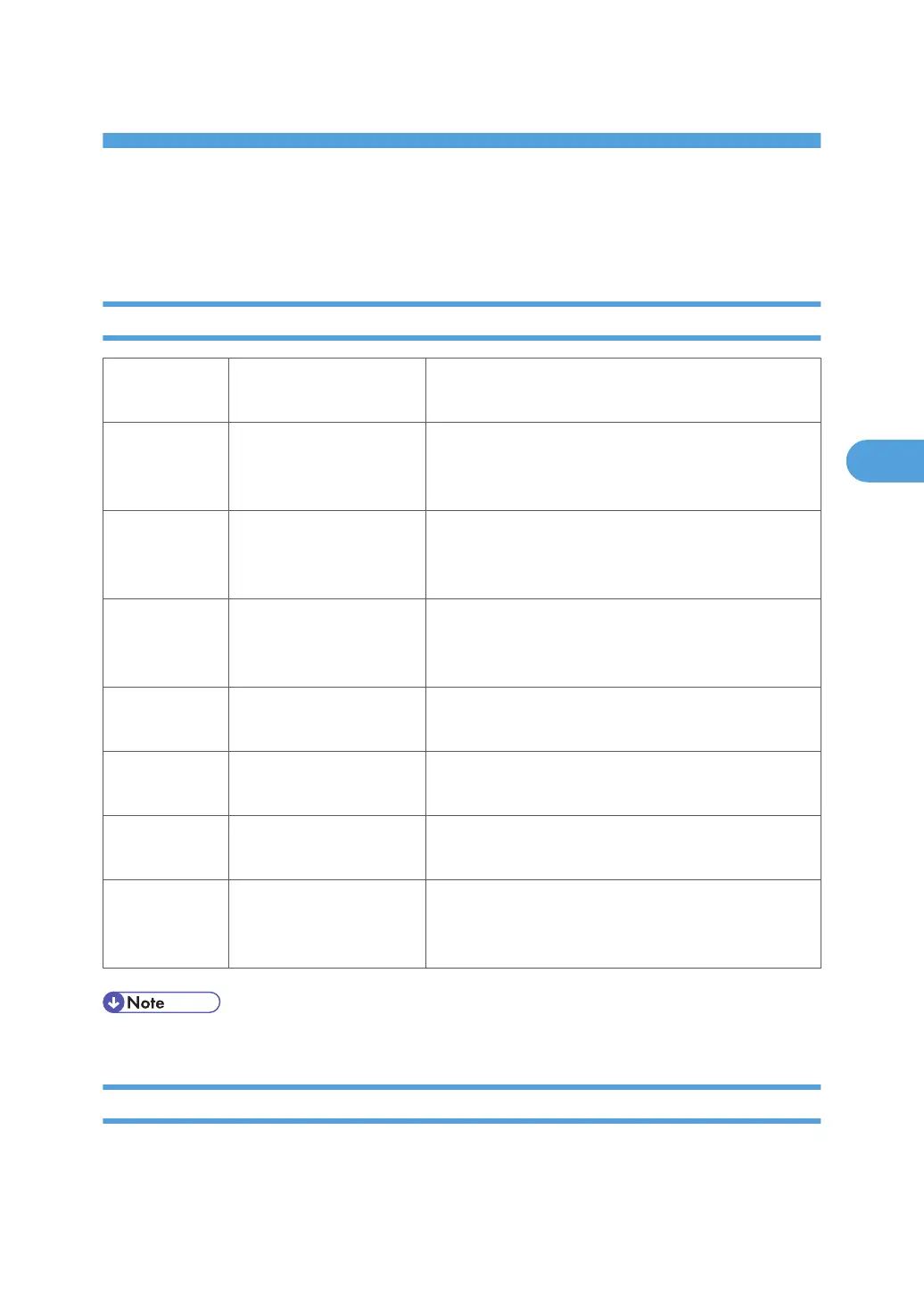
Important SP Codes
SP5802 Free Run Mode
Execute this SP to force base engine to run in the free run
mode for testing.
SP5803 Input Check
Displays the signals received from sensors and switches.
Refer to the detailed tables in Section "5. Service Ta-
bles”.
SP5804 Output Check
Switches electrical components one by one for testing.
Refer to the detailed tables in Section "5. Service Ta-
bles”.
SP5990 SMC Printout
Prints the SMC Report. Some SC codes (logged SPs) are
shown only in the SMC Report and do not show on the
operation panel display.
SP7801 ROM Version Display.
Displays the version number of the main machine and
connected peripherals.
SP7832
Self-Diagnostic Result Dis-
play
Execute this SP to display a list of error codes. No errors
have occurred if nothing is displayed.
SP7801 Firmware Version
Displays the current numbers of all versions of the firm-
ware in the system.
SP7403 Status of Issued SC
Execute to display the following information about the
most recently issued SC: 1) Source file name, 2) SC
number, 3) Result
• For more information about these and other SP codes, see “4. Service Tables”.
Program Download
Here are some important points to keep in mind when downloading software:
237



 To Next Page