Feed roller [A] > No rotation
Separation roller [D] > Free to rotate
Grip roller [B] > Rotates
Paper Feed and Separation
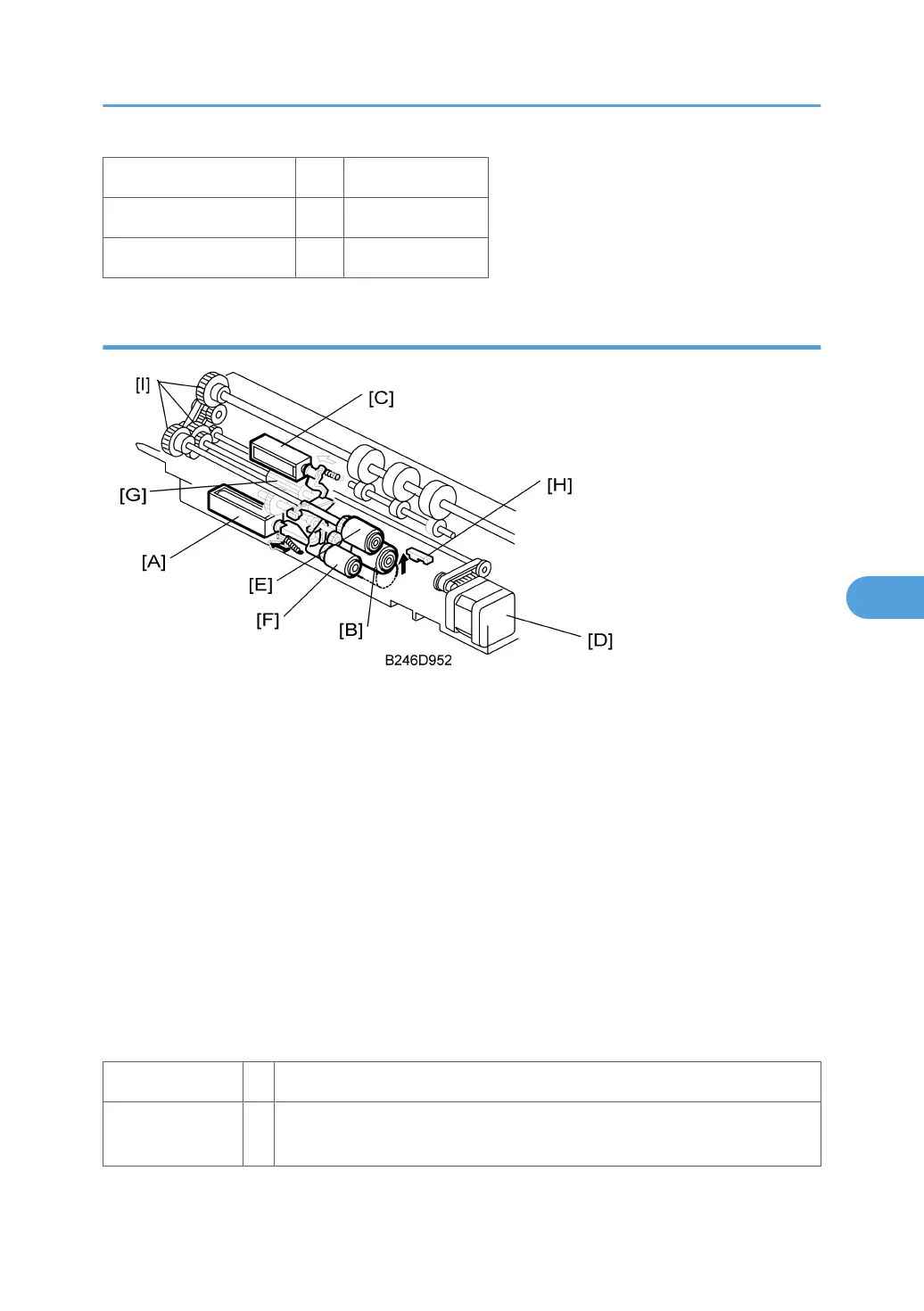
If a paper feed station is not selected, its separation roller solenoid [A] stays off and the separation roller
[B] can turn freely in the opposite direction to feed paper.
When the paper feed station is selected and the start key is pressed, the following mechanisms activate:
• Separation roller solenoid [A] > separation roller [B] contacts feed roller [E]
• Pick-up solenoid [C] > pick-up roller [F] lowers to contact the paper
• Paper feed motor [D] > turns feed roller [E] and pick-up roller [F] via gear [G]
When the paper feed sensor [H] detects the leading edge of the paper:
• Pick-up solenoid [C] switches off, and pick-up roller [F] lifts.
• The feed roller [E] then feeds the sheet to the registration roller.
Note the three one-way clutches [I]: One for the grip roller, one for the feed roller, and one for the separation
roller.
When the feed motor rotates forward:
Feed roller > Rotates
Separation roller >
Rotates in accordance with the FRR principle
Handling Paper> Paper Feed Methods> Forward and Reverse Roller (FRR)
Paper Feed
485



 To Next Page