Chapter 5 Useful Functions
102
Calculating the Total Number of
Copies [ID Counter Report]
Performing [Report Output]
1
Touch [ID Counter Report] in the
[Functions] tab screen.
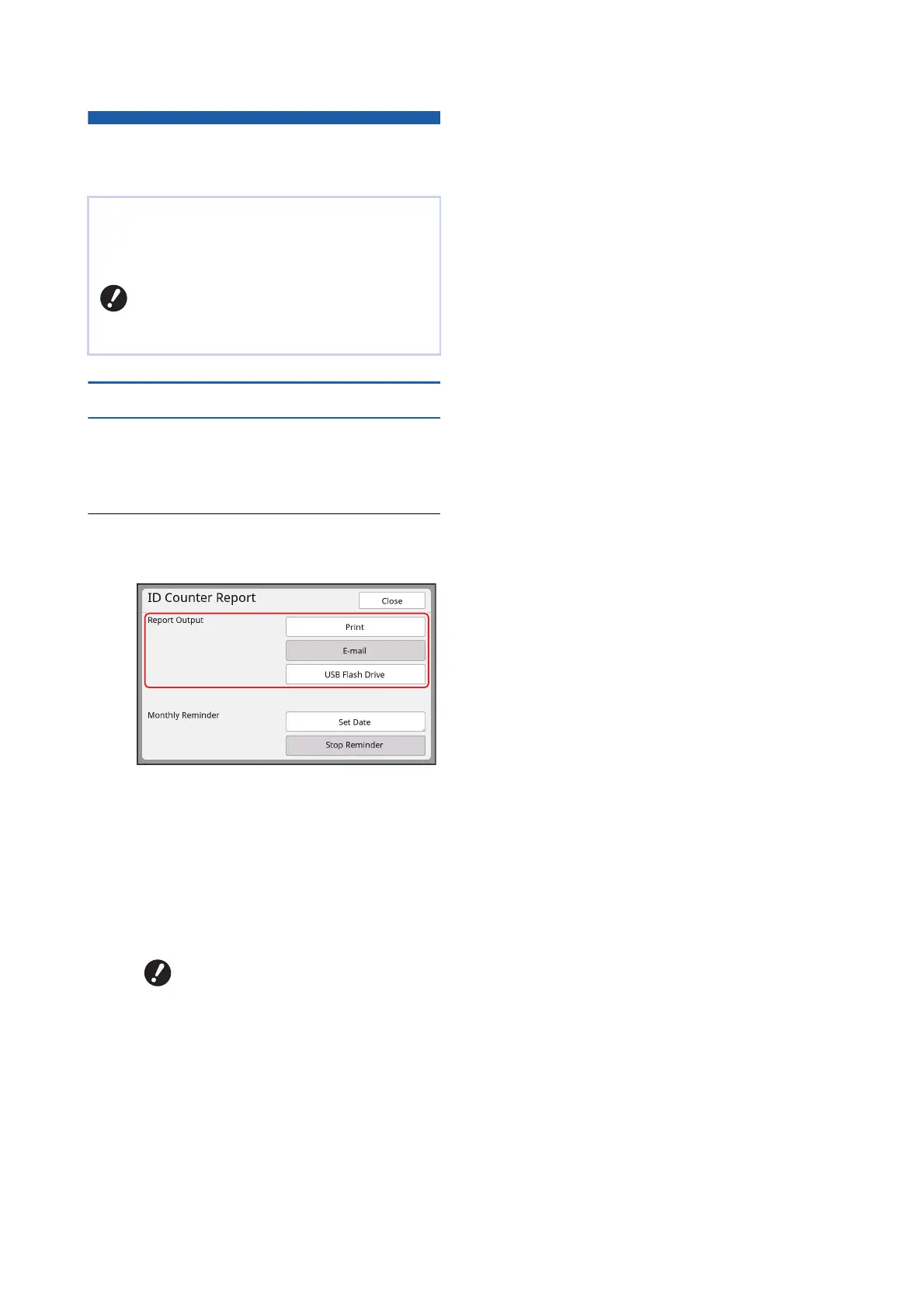
The [ID Counter Report] screen is displayed.
2
Select a method for [Report Out-
put].
■ [Print]
Touch this button to print the total count report
on this machine.
■ [E-mail]
Touch this button to send the CSV format file to
the e-mail addresses that have been specified
in advance.
■ [USB Flash Drive]
Touch this button to save the CSV format file to
a USB flash drive. Before touching [ID Counter
Report], you must insert the USB flash drive
into the USB slot.
You can print the total counts of master making pro-
cesses and the total number of printed sheets of all
users. You can also save these data to a file.
BTo manage and calculate the total num-
ber of copies, [High/Full Management]
must have been set for [Management
Level] in [User Management] (A 129).
BIf [E-mail] is not displayed, spe-
cial settings are required. For
more information, consult your
dealer or authorized service rep-
resentative.
BIf [E-mail] is grayed out, the
required settings have not been
performed. For the setting proce-
dure, see [ID Counter Report]
(A 104).



 To Next Page