Chapter 7 Setting the Operation Conditions
117
7
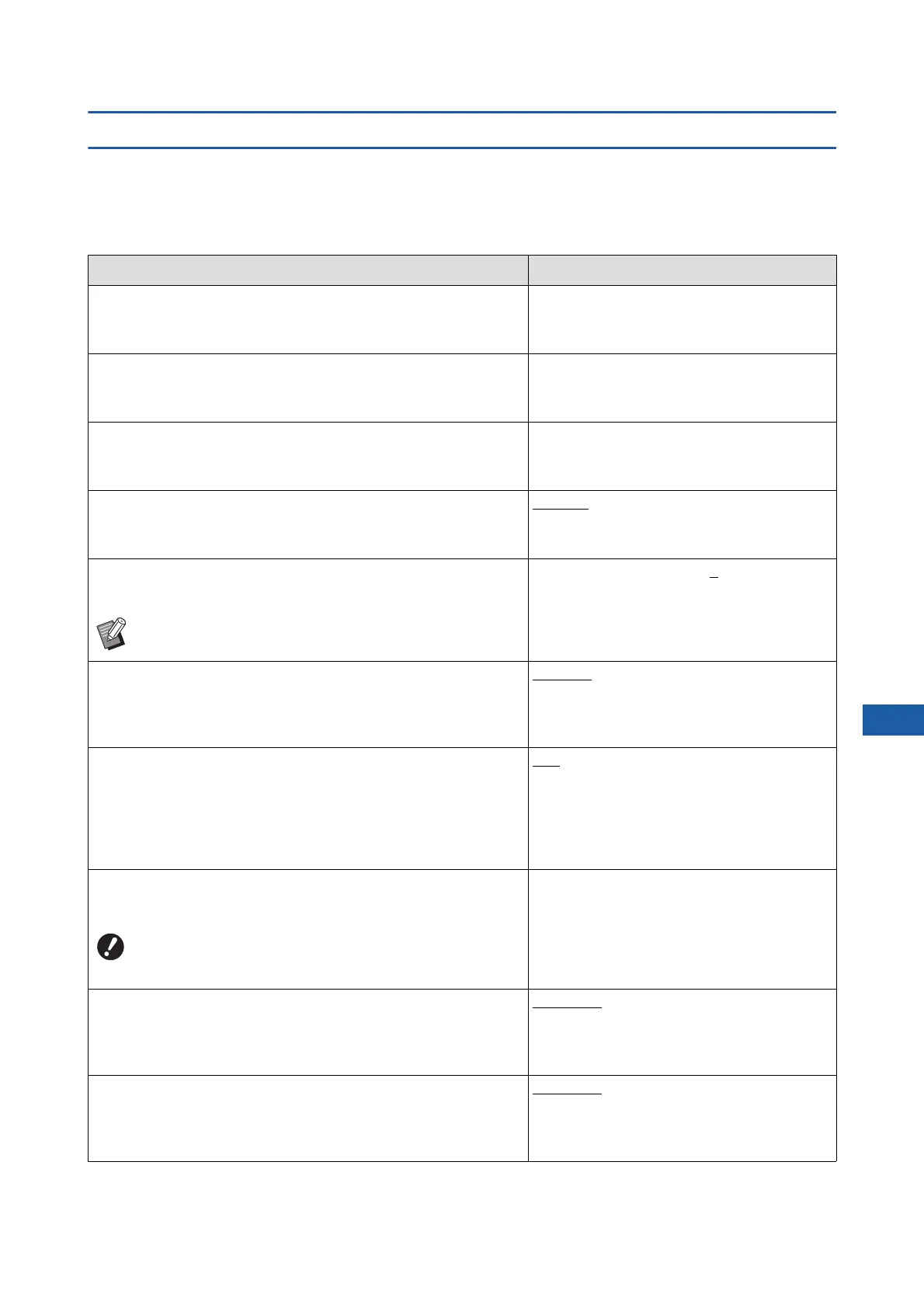
List of setting items
• The factory default settings are underlined in the following list.
• The items marked with an asterisk (*) are displayed only when an optional accessory is installed.
■ Display
This screen is used for the settings related to the display of the touch panel screens.
Setting item Description
[DirectAccess Entry]
You can register the frequently used functions in the [Basic] tab
screen for each mode.
A 124 “DirectAccess Entry”
[Selections Entry]
You can register the frequently used functions in the [Selections]
tab screen for each mode.
A 125 “Selections Entry”
[Display Priority]
You can change the screen that is displayed after this machine
has started up.
Home Screen, RISO Print, Scanning
[Start-Up Screen]
You can change the animation pattern that is displayed when this
machine starts up.
Pattern1, Pattern2
[Display Adjustment]
You can adjust the display on the touch panel screens.
[Backlight Lightness]: -2 to
0 to +2
BWhen [ECO mode] (A 122) is set to [ON], [Backlight
Lightness] is fixed to [-2].
[Job list display]
You can change the method for displaying the long file names on
the screens that display a list of original data ([Job List], [Storage
Selection], and [USB Job List]).
From top, From bottom
[Metric/Inch Switch] (displayed only for SF9490)
You can switch the unit to be used for the screen display.
The types of papers to be handled also switch in accordance with
the displayed unit.
When [inch] is selected: Legal, Ledger, etc.
When [mm] is selected: A3, B4, etc.
inch, mm
[Displayed Language]
You can change the language to be displayed on the screen.
#1 and on
A number is assigned to each language.
You can change the displayed language by
selecting the number of the language that you
want to display.
BWhen changing the setting, consult your dealer or
authorized service representative.
[Service contact]
When this item is set to [Displayed], [Contact] is displayed in the
service call error (A 160) screen. For the contact information, con-
sult your dealer or authorized service representative.
No display, Displayed
[TEL:]
[FAX:]
[Supply contact]
When this item is set to [Displayed], [Contact] is displayed in the
consumables error (A 160) screen. For the contact information,
consult your dealer or authorized service representative.
No display, Displayed
[TEL:]
[FAX:]



 To Next Page