Chapter 2 Basic Operations
42
When [ID print] is set
1
Check that the master making
basic screen is displayed.
If a screen other than the master making basic
screen is displayed, press the [MASTER MAK-
ING] key (A 24).
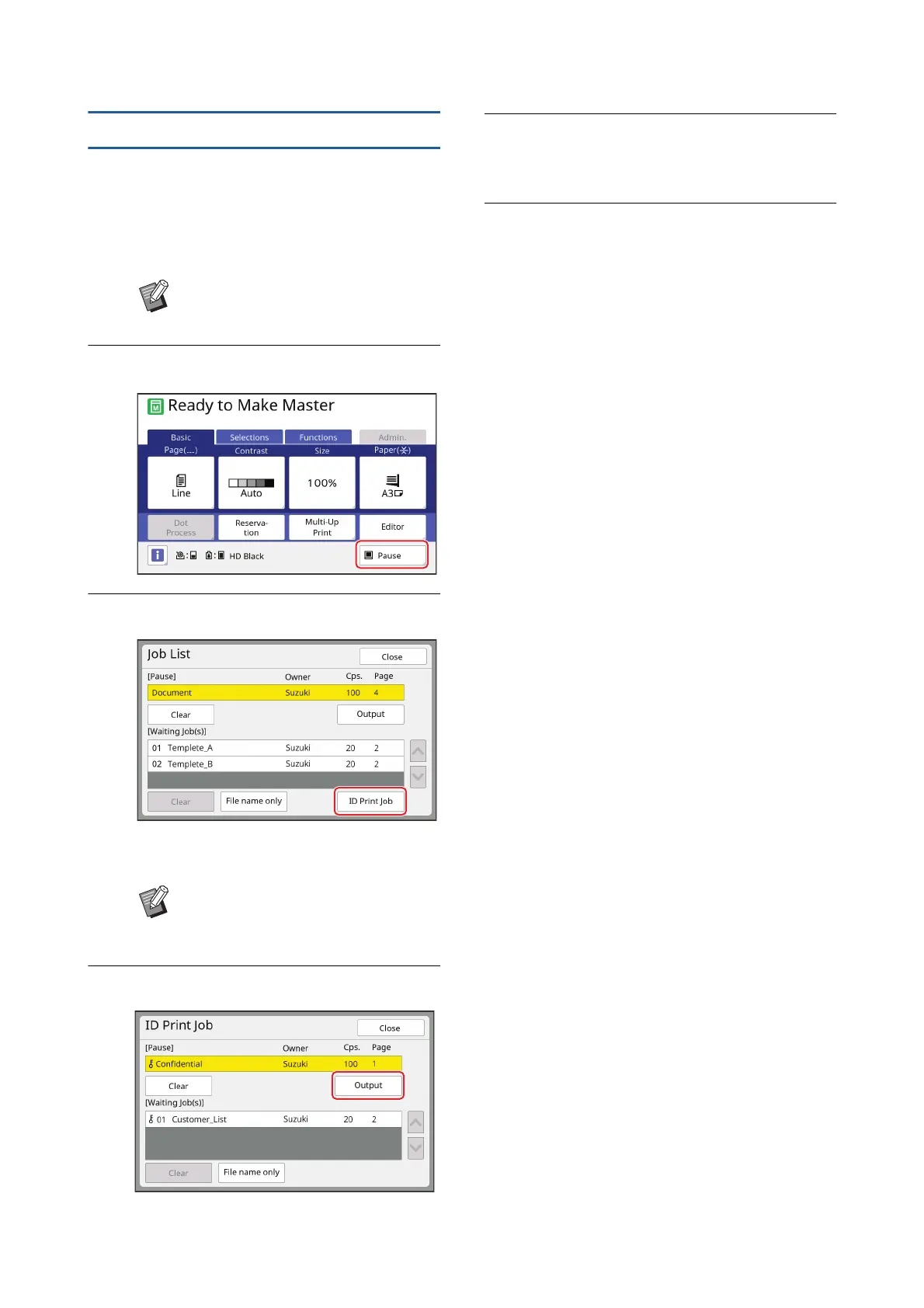
2
Touch [Pause].
3
Touch [ID Print Job].
Perform job identification according to the
instructions on the screen.
4
Touch [Output].
5
Check the master making condi-
tions.
(A 25 “Touch Panel Displays”)
6
Press the [START] key.
Printing starts.
• When [Auto Process] is [ON]:
Master making is followed by the printing pro-
cess.
• When [Auto Process] is set to other than
[ON]:
Perform the necessary operation according to
the settings.
(A 40 “When [Auto Process] is set to other
than [ON]”)
BWhen the [Job List] screen is dis-
played, go to step 3.
BIf there are only jobs set with [ID
print], the screen in step 3 will not be
displayed. Go to step 4.



 To Next Page