Chapter 7 Setting the Operation Conditions
128
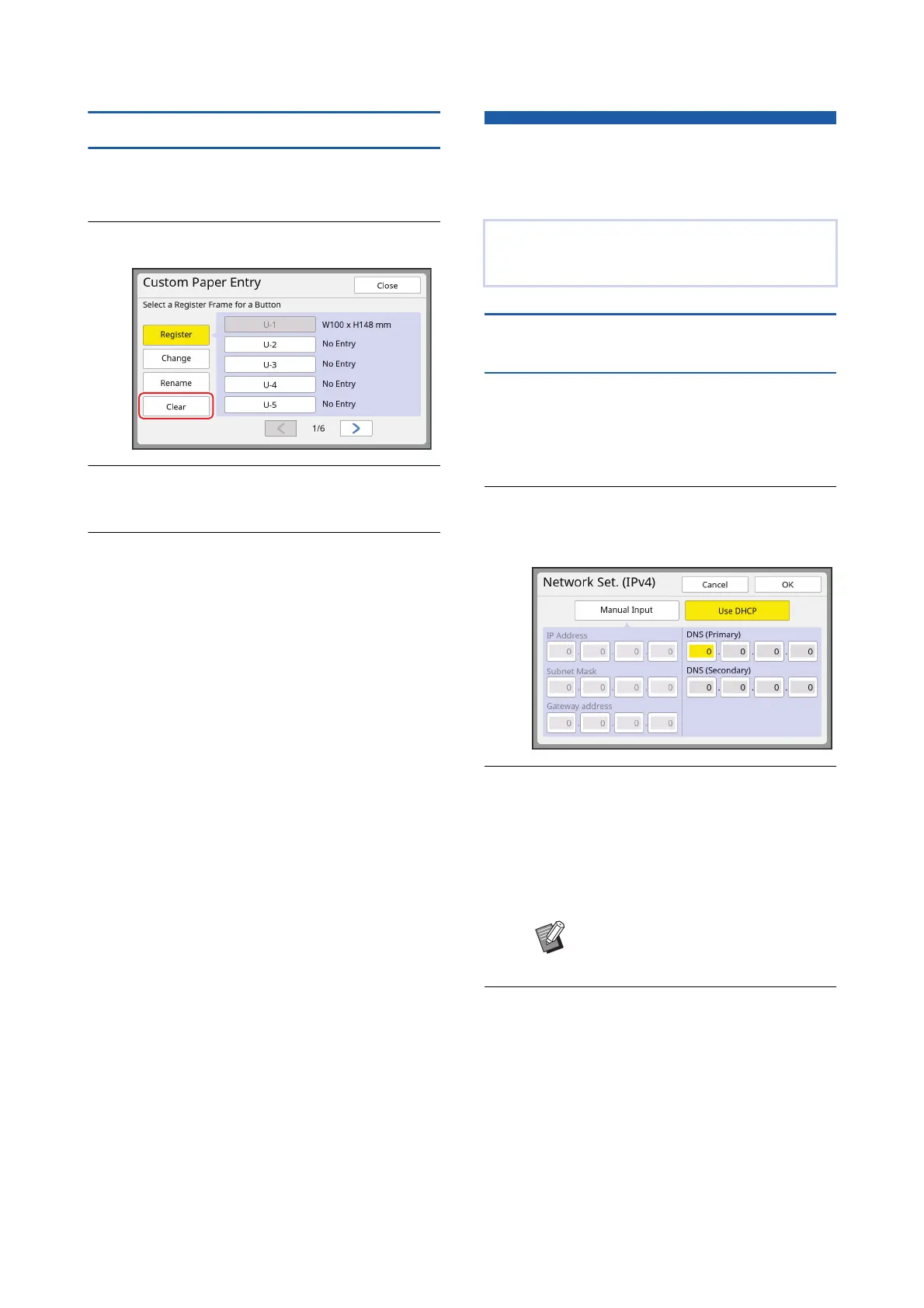
Erasing the paper size
1
Touch [Custom Paper Entry] in the
[Admin.] screen.
2
Touch [Clear].
3
Touch the button that you want to
erase.
4
Touch [OK] in the confirmation
screen.
The selected paper size is erased, and the
[Custom Paper Entry] screen is displayed.
Connecting to the Network
[Network Settings (IPv4)]
[Network Settings (IPv6)]
When connecting to
the IPv4 network
Set this item when you allocate an Internet Protocol
version 4 address to this machine.
1
Touch [Network Settings (IPv4)] in
the [Admin.] screen.
2
Select a setting method.
Touch either [Manual Input] or [Use DHCP]
according to the connection environment.
3
Enter a value.
You can enter a value into the active entry field.
You can change the target for entry by using
either of the following methods.
• Pressing the [U] key
• Directly touching the entry field
4
Touch the [OK] key.
The [Admin.] screen is displayed.
To connect this machine to a network, perform set-
tings such as the IP address according to the con-
nection environment.
BPressing the [C] key returns the
value of the active entry field to "0".



 To Next Page