Chapter 9 Replacing Consumables
148
Replacing the Ink Cartridge
1
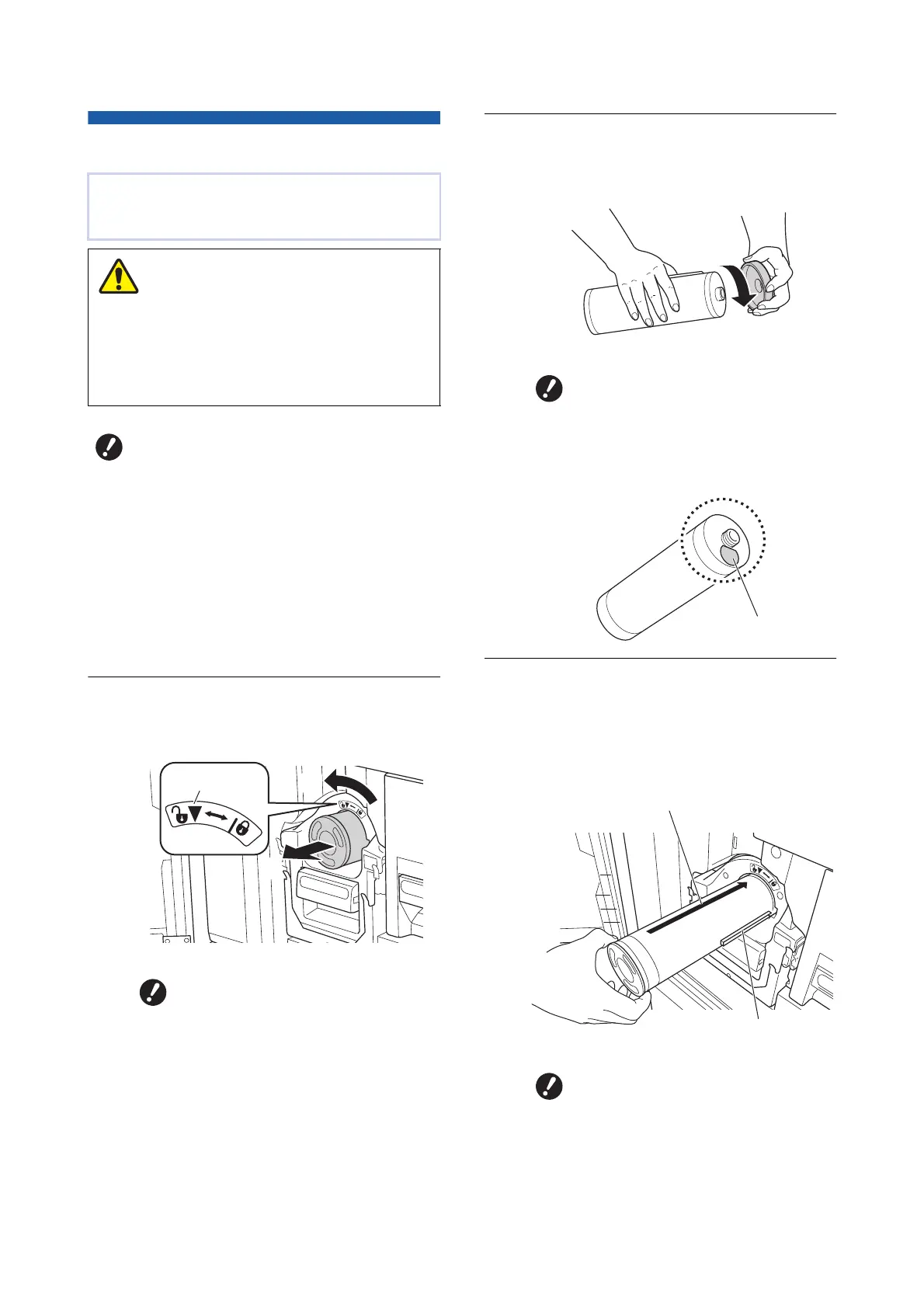
Open the front door.
2
Pull out the depleted ink cartridge.
1 Turn the ink cartridge counterclockwise.
2 Pull out the ink cartridge to the front.
3
Remove the cap of the new ink car-
tridge.
Turn the cap of the ink cartridge to remove it.
4
Set the new ink cartridge in place.
Align the arrow on the ink cartridge to the [V]
mark on the print drum (cylinder), and then
insert the ink cartridge as far as it will go.
(Locate the protrusion of the ink cartridge to the
right.)
When the ink is depleted, a message is displayed
and this machine stops.
Replace the ink cartridge with a new one.
Ink may be left on the area around the print drum
(cylinder). Take care not to smudge your hands or
clothes with the ink.
Wash immediately with soap if you get ink on your
hands, etc.
BIt is recommended to use products
specified by RISO when replacing the
ink cartridge.
BKeep the power on while replacing the
ink cartridge.
BReplace with an ink cartridge of the
same ink color. If you want to change
the ink color, replace the entire print
drum (cylinder). (A 151 “Replacing the
Print Drum (Cylinder)”)
BDispose of the depleted ink car-
tridge according to the disposal
regulations of your local commu-
nity.
(A 153 “Collecting and Disposing
of Depleted Consumables”)
Caution
1
2
Unlock
BDo not touch or knock the edge of
the ink cartridge.
BDo not peel off or scratch the
label that is attached to the edge
of the ink cartridge.
BCheck the orientation of the ink
cartridge carefully when setting it
in place. Forcibly pressing it may
result in damage.
Label
Arrow
Protrusion



 To Next Page