Chapter 8 RISO Console
139
8
[Monitoring] Menu
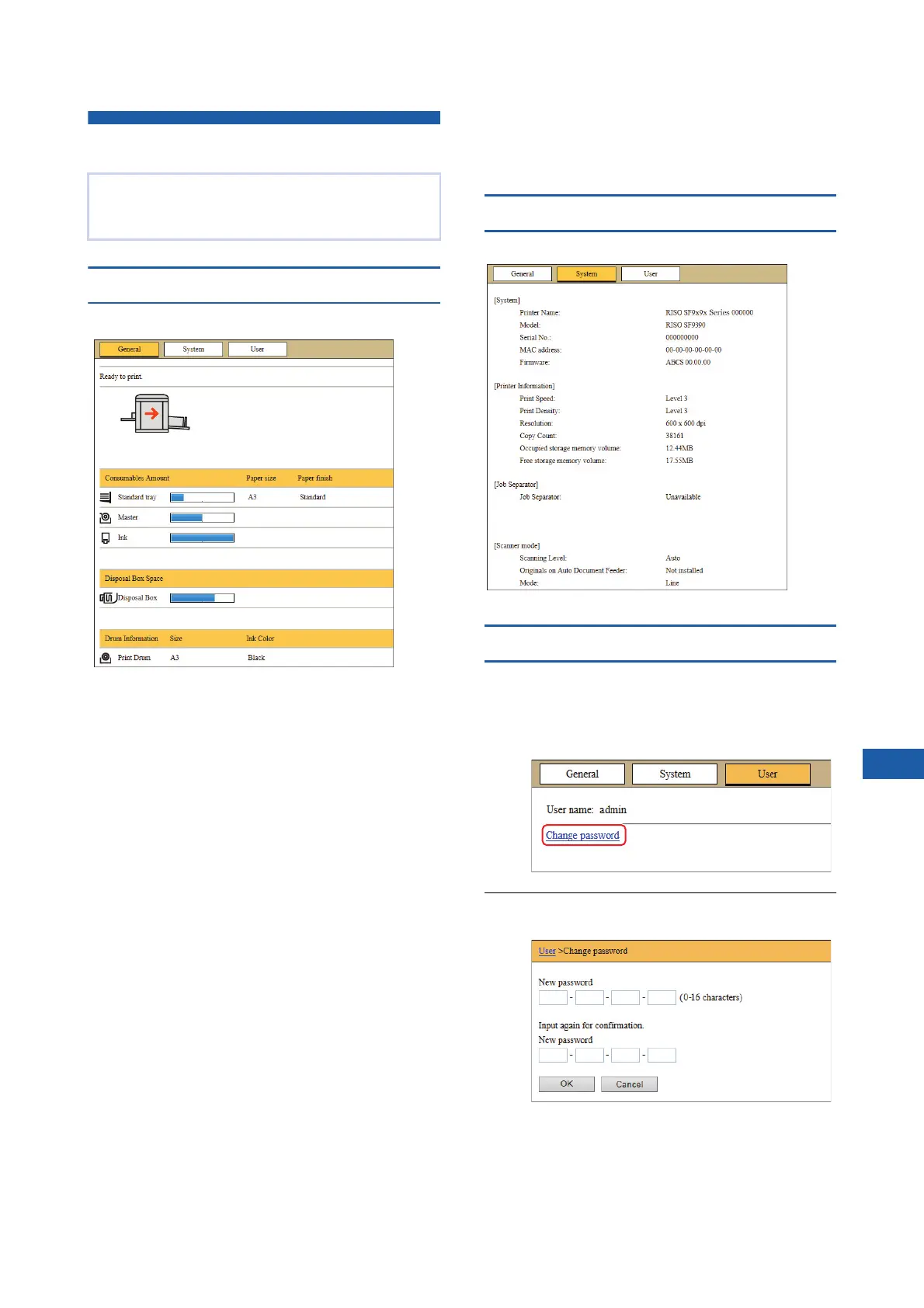
[General] tab screen
You can check the status of this machine.
■ Status of this machine
Shows a message such as [Ready to print.] or [Sleep-
ing.]. If an error occurs in this machine, an error mes-
sage is displayed.
■ Consumables Amount
[Standard tray]
Shows the remaining amount of papers that are set on
the paper feed tray, and also [Paper size] and [Paper
finish].
[Master]
Shows the remaining amount of the masters that are
set in this machine.
If the remaining amount is low, the remaining amount
indicator blinks.
[Ink]
Shows the remaining amount of ink that is set in this
machine.
If the remaining amount is low, the remaining amount
indicator blinks.
■ Disposal Box Space
Shows the remaining amount of space in the master
disposal box.
If the amount of space is low, the remaining amount
indicator blinks.
■ Drum Information
Shows the size and color of the print drum (cylinder)
that is set in this machine.
[System] tab screen
You can check the system information of this machine.
[User] tab screen
You can change the password for logging in to the
RISO Console.
1
Click [Change password].
2
Enter a new password.
You can check the status of this machine and sys-
tem information, and also change the login pass-
word.



 To Next Page